# 前言
本章介紹如何使用Pytorch實現簡單的聲紋識別模型,本項目參考了人臉識別項目的做法Pytorch-MobileFaceNet ,使用了ArcFace Loss,ArcFace loss:Additive Angular Margin Loss(加性角度間隔損失函數),對特徵向量和權重歸一化,對θ加上角度間隔m,角度間隔比餘弦間隔在對角度的影響更加直接。
源碼地址:VoiceprintRecognition-Pytorch (0.3.9)
使用環境:
- Python 3.7
- Pytorch 1.8.1
使用環境:
- Anaconda 3
- Python 3.8
- Pytorch 1.13.1
- Windows 10 or Ubuntu 18.04
項目特性
- 支持模型:EcapaTdnn、TDNN、Res2Net、ResNetSE
- 支持池化層:AttentiveStatsPool(ASP)、SelfAttentivePooling(SAP)、TemporalStatisticsPooling(TSP)、TemporalAveragePooling(TAP)
- 支持損失函數:AAMLoss、AMLoss、ARMLoss、CELoss
- 支持預處理方法:MelSpectrogram、Spectrogram、MFCC
模型下載
| 模型 | 預處理方法 | 數據集 | 類別數量 | tpr | fpr | eer | 模型下載地址 |
|---|---|---|---|---|---|---|---|
| EcapaTdnn | MelSpectrogram | zhvoice | 3242 | 0.98972 | 0.00730 | 0.01758 | 加載知識星球獲取 |
| EcapaTdnn | Spectrogram | zhvoice | 3242 | 0.99142 | 0.00817 | 0.01675 | |
| EcapaTdnn | MFCC | zhvoice | 3242 | 0.99431 | 0.00659 | 0.01227 | |
| EcapaTdnn | MelSpectrogram | 更大的數據集 | 6355 | 0.97881 | 0.00788 | 0.02907 | |
| EcapaTdnn | MelSpectrogram | 超大的數據集 | 13718 | 0.98342 | 0.00776 | 0.02434 |
安裝環境
- 首先安裝的是Pytorch的GPU版本,如果已經安裝過了,請跳過。
conda install pytorch==1.13.1 torchvision==0.14.1 torchaudio==0.13.1 pytorch-cuda=11.6 -c pytorch -c nvidia
- 安裝ppvector庫。
使用pip安裝,命令如下:
python -m pip install mvector -U -i https://pypi.tuna.tsinghua.edu.cn/simple
建議源碼安裝,源碼安裝能保證使用最新代碼。
git clone https://github.com/yeyupiaoling/VoiceprintRecognition_Pytorch.git
cd VoiceprintRecognition_Pytorch/
python setup.py install
創建數據
本教程筆者使用的是zhvoice ,這個數據集一共有3242個人的語音數據,有1130000+條語音數據,下載之前要全部解壓數據集。如果讀者有其他更好的數據集,可以混合在一起使用,但最好是要用python的工具模塊aukit處理音頻,降噪和去除靜音。
首先是創建一個數據列表,數據列表的格式爲<語音文件路徑\t語音分類標籤>,創建這個列表主要是方便之後的讀取,也是方便讀取使用其他的語音數據集,語音分類標籤是指說話人的唯一ID,不同的語音數據集,可以通過編寫對應的生成數據列表的函數,把這些數據集都寫在同一個數據列表中。
在create_data.py寫下以下代碼,因爲zhvoice 這個數據集是mp3格式的,作者發現這種格式讀取速度很慢,所以筆者把全部的mp3格式的音頻轉換爲wav格式,這個過程可能很久。當然也可以不轉換,項目也是支持的MP3格式的,只要設置參數to_wav=False。執行下面程序完成數據準備。
python create_data.py
執行上面的程序之後,會生成以下的數據格式,如果要自定義數據,參考如下數據列表,前面是音頻的相對路徑,後面的是該音頻對應的說話人的標籤,就跟分類一樣。自定義數據集的注意,測試數據列表的ID可以不用跟訓練的ID一樣,也就是說測試的數據的說話人可以不用出現在訓練集,只要保證測試數據列表中同一個人相同的ID即可。
dataset/zhvoice/zhmagicdata/5_895/5_895_20170614203758.wav  3238
dataset/zhvoice/zhmagicdata/5_895/5_895_20170614214007.wav  3238
dataset/zhvoice/zhmagicdata/5_941/5_941_20170613151344.wav  3239
dataset/zhvoice/zhmagicdata/5_941/5_941_20170614221329.wav  3239
dataset/zhvoice/zhmagicdata/5_941/5_941_20170616153308.wav  3239
dataset/zhvoice/zhmagicdata/5_968/5_968_20170614162657.wav  3240
dataset/zhvoice/zhmagicdata/5_968/5_968_20170622194003.wav  3240
dataset/zhvoice/zhmagicdata/5_968/5_968_20170707200554.wav  3240
dataset/zhvoice/zhmagicdata/5_970/5_970_20170616000122.wav  3241
修改預處理方法
配置文件中默認使用的是MelSpectrogram預處理方法,如果要使用其他預處理方法,可以修改配置文件中的安裝下面方式修改,具體的值可以根據自己情況修改。
MelSpectrogram預處理方法如下:
preprocess_conf:
  # 音頻預處理方法,支持:MelSpectrogram、Spectrogram、MFCC
  feature_method: 'MelSpectrogram'

# MelSpectrogram的參數,其他的預處理方法查看對應API設設置參數
feature_conf:
  sample_rate: 16000
  n_fft: 1024
  hop_length: 320
  win_length: 1024
  f_min: 50.0
  f_max: 14000.0
  n_mels: 64
pectrogram'預處理方法如下:
preprocess_conf:
  # 音頻預處理方法,支持:MelSpectrogram、Spectrogram、MFCC
  feature_method: 'Spectrogram'

# Spectrogram的參數,其他的預處理方法查看對應API設設置參數
feature_conf:
  n_fft: 1024
  hop_length: 320
  win_length: 1024
MFCC預處理方法如下:
preprocess_conf:
  # 音頻預處理方法,支持:MelSpectrogram、Spectrogram、MFCC
  feature_method: 'MFCC'

# MFCC的參數,其他的預處理方法查看對應API設設置參數
feature_conf:
  sample_rate: 16000
  n_fft: 1024
  hop_length: 320
  win_length: 1024
  f_min: 50.0
  f_max: 14000.0
  n_mels: 64
  n_mfcc: 40
訓練模型
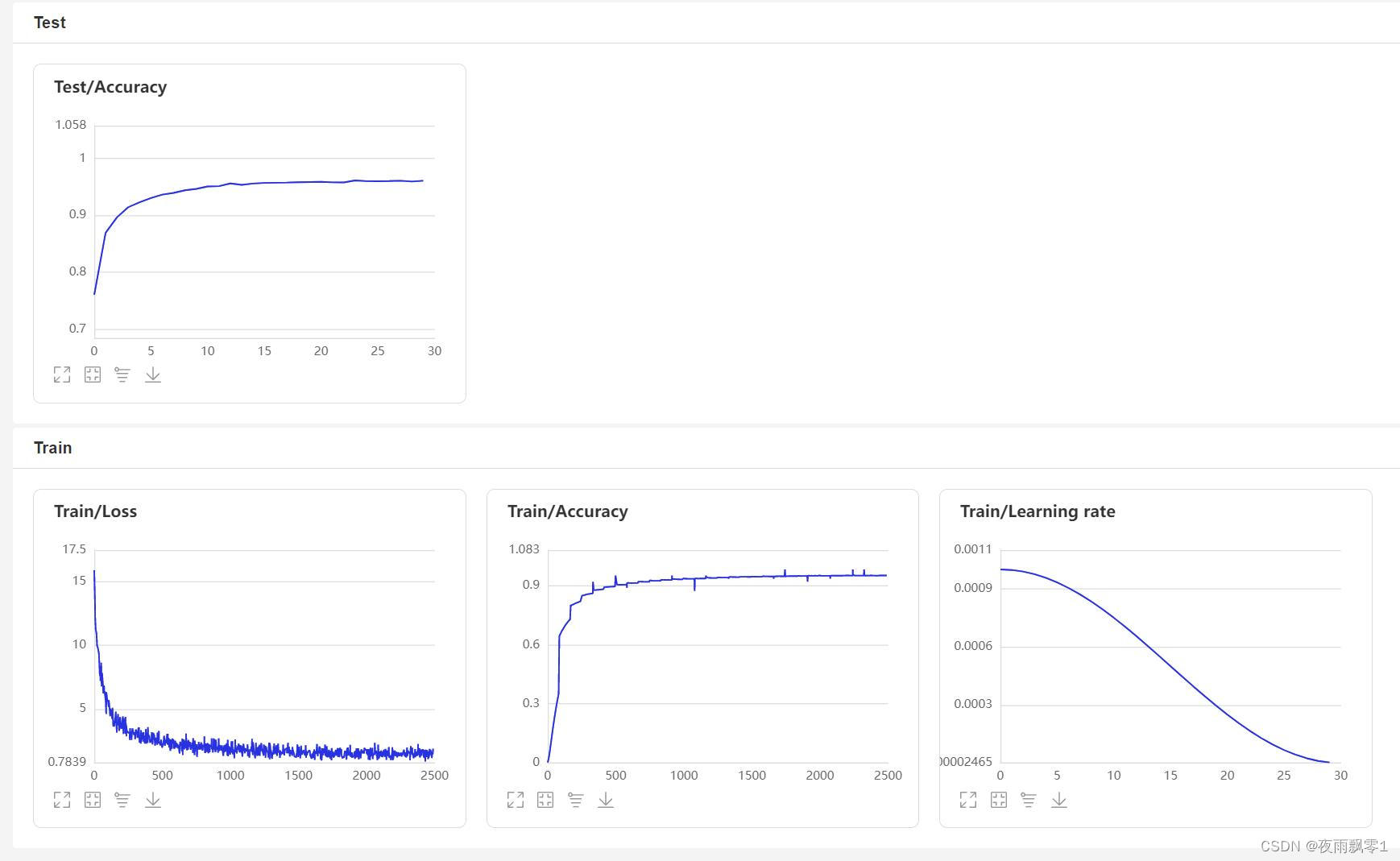
使用train.py訓練模型,本項目支持多個音頻預處理方式,通過configs/ecapa_tdnn.yml配置文件的參數preprocess_conf.feature_method可以指定,MelSpectrogram爲梅爾頻譜,Spectrogram爲語譜圖,MFCC梅爾頻譜倒譜系數。通過參數augment_conf_path可以指定數據增強方式。訓練過程中,會使用VisualDL保存訓練日誌,通過啓動VisualDL可以隨時查看訓練結果,啓動命令visualdl --logdir=log --host 0.0.0.0
# 單卡訓練
CUDA_VISIBLE_DEVICES=0 python train.py
# 多卡訓練
CUDA_VISIBLE_DEVICES=0,1 torchrun --standalone --nnodes=1 --nproc_per_node=2 train.py
訓練輸出日誌:
[2023-02-25 11:53:53.194706 INFO   ] utils:print_arguments:13 - ----------- 額外配置參數 -----------
[2023-02-25 11:53:53.194706 INFO   ] utils:print_arguments:15 - augment_conf_path: configs/augmentation.json
[2023-02-25 11:53:53.194706 INFO   ] utils:print_arguments:15 - configs: configs/ecapa_tdnn.yml
[2023-02-25 11:53:53.194706 INFO   ] utils:print_arguments:15 - pretrained_model: None
[2023-02-25 11:53:53.194706 INFO   ] utils:print_arguments:15 - resume_model: None
[2023-02-25 11:53:53.194706 INFO   ] utils:print_arguments:15 - save_model_path: models/
[2023-02-25 11:53:53.194706 INFO   ] utils:print_arguments:15 - use_gpu: True
[2023-02-25 11:53:53.194706 INFO   ] utils:print_arguments:16 - ------------------------------------------------
[2023-02-25 11:53:53.208669 INFO   ] utils:print_arguments:18 - ----------- 配置文件參數 -----------
[2023-02-25 11:53:53.208669 INFO   ] utils:print_arguments:21 - dataset_conf:
[2023-02-25 11:53:53.208669 INFO   ] utils:print_arguments:28 -     batch_size: 64
[2023-02-25 11:53:53.208669 INFO   ] utils:print_arguments:28 -     chunk_duration: 3
[2023-02-25 11:53:53.208669 INFO   ] utils:print_arguments:28 -     do_vad: False
[2023-02-25 11:53:53.209670 INFO   ] utils:print_arguments:28 -     min_duration: 0.5
[2023-02-25 11:53:53.209670 INFO   ] utils:print_arguments:28 -     num_speakers: 3242
[2023-02-25 11:53:53.209670 INFO   ] utils:print_arguments:28 -     num_workers: 4
[2023-02-25 11:53:53.209670 INFO   ] utils:print_arguments:28 -     sample_rate: 16000
[2023-02-25 11:53:53.209670 INFO   ] utils:print_arguments:28 -     target_dB: -20
[2023-02-25 11:53:53.209670 INFO   ] utils:print_arguments:28 -     test_list: dataset/test_list.txt
[2023-02-25 11:53:53.209670 INFO   ] utils:print_arguments:28 -     train_list: dataset/train_list.txt
[2023-02-25 11:53:53.209670 INFO   ] utils:print_arguments:28 -     use_dB_normalization: True
[2023-02-25 11:53:53.209670 INFO   ] utils:print_arguments:21 - feature_conf:
[2023-02-25 11:53:53.209670 INFO   ] utils:print_arguments:28 -     hop_length: 160
[2023-02-25 11:53:53.209670 INFO   ] utils:print_arguments:28 -     n_fft: 400
[2023-02-25 11:53:53.209670 INFO   ] utils:print_arguments:28 -     n_mels: 80
[2023-02-25 11:53:53.209670 INFO   ] utils:print_arguments:28 -     sr: 16000
[2023-02-25 11:53:53.209670 INFO   ] utils:print_arguments:28 -     win_length: 400
[2023-02-25 11:53:53.209670 INFO   ] utils:print_arguments:28 -     window: hann
[2023-02-25 11:53:53.209670 INFO   ] utils:print_arguments:21 - model_conf:
[2023-02-25 11:53:53.209670 INFO   ] utils:print_arguments:28 -     channels: [512, 512, 512, 512, 1536]
[2023-02-25 11:53:53.209670 INFO   ] utils:print_arguments:28 -     dilations: [1, 2, 3, 4, 1]
[2023-02-25 11:53:53.209670 INFO   ] utils:print_arguments:28 -     kernel_sizes: [5, 3, 3, 3, 1]
[2023-02-25 11:53:53.210667 INFO   ] utils:print_arguments:28 -     lin_neurons: 192
[2023-02-25 11:53:53.210667 INFO   ] utils:print_arguments:21 - optimizer_conf:
[2023-02-25 11:53:53.210667 INFO   ] utils:print_arguments:28 -     learning_rate: 0.001
[2023-02-25 11:53:53.210667 INFO   ] utils:print_arguments:28 -     weight_decay: 1e-6
[2023-02-25 11:53:53.220680 INFO   ] utils:print_arguments:21 - preprocess_conf:
[2023-02-25 11:53:53.220680 INFO   ] utils:print_arguments:28 -     feature_method: MelSpectrogram
[2023-02-25 11:53:53.220680 INFO   ] utils:print_arguments:21 - train_conf:
[2023-02-25 11:53:53.220680 INFO   ] utils:print_arguments:28 -     log_interval: 100
[2023-02-25 11:53:53.220680 INFO   ] utils:print_arguments:28 -     max_epoch: 30
[2023-02-25 11:53:53.220680 INFO   ] utils:print_arguments:30 - use_model: ecapa_tdnn
[2023-02-25 11:53:53.220680 INFO   ] utils:print_arguments:31 - ------------------------------------------------
[2022-11-05 19:58:31.589525 INFO   ] augmentation:_parse_pipeline_from:126 - 數據增強配置:{'type': 'noise', 'aug_type': 'audio', 'params': {'min_snr_dB': 10, 'max_snr_dB': 50, 'repetition': 2, 'noise_dir': 'dataset/noise/'}, 'prob': 0.0}
[2022-11-05 19:58:31.589525 INFO   ] augmentation:_parse_pipeline_from:126 - 數據增強配置:{'type': 'resample', 'aug_type': 'audio', 'params': {'new_sample_rate': [8000, 32000, 44100, 48000]}, 'prob': 0.0}
[2022-11-05 19:58:31.589525 INFO   ] augmentation:_parse_pipeline_from:126 - 數據增強配置:{'type': 'speed', 'aug_type': 'audio', 'params': {'min_speed_rate': 0.9, 'max_speed_rate': 1.1, 'num_rates': 3}, 'prob': 0.0}
[2022-11-05 19:58:31.589525 INFO   ] augmentation:_parse_pipeline_from:126 - 數據增強配置:{'type': 'shift', 'aug_type': 'audio', 'params': {'min_shift_ms': -5, 'max_shift_ms': 5}, 'prob': 0.0}
[2022-11-05 19:58:31.590535 INFO   ] augmentation:_parse_pipeline_from:126 - 數據增強配置:{'type': 'volume', 'aug_type': 'audio', 'params': {'min_gain_dBFS': -15, 'max_gain_dBFS': 15}, 'prob': 0.0}
[2022-11-05 19:58:31.590535 INFO   ] augmentation:_parse_pipeline_from:126 - 數據增強配置:{'type': 'specaug', 'aug_type': 'feature', 'params': {'inplace': True, 'max_time_warp': 5, 'max_t_ratio': 0.01, 'n_freq_masks': 2, 'max_f_ratio': 0.05, 'n_time_masks': 2, 'replace_with_zero': False}, 'prob': 0.0}
[2022-11-05 19:58:31.590535 INFO   ] augmentation:_parse_pipeline_from:126 - 數據增強配置:{'type': 'specsub', 'aug_type': 'feature', 'params': {'max_t': 10, 'num_t_sub': 2}, 'prob': 0.0}
I0424 08:57:03.707505  3377 nccl_context.cc:74] init nccl context nranks: 2 local rank: 0 gpu id: 0 ring id: 0
W0424 08:57:03.930370  3377 device_context.cc:447] Please NOTE: device: 0, GPU Compute Capability: 7.5, Driver API Version: 11.6, Runtime API Version: 10.2
W0424 08:57:03.932493  3377 device_context.cc:465] device: 0, cuDNN Version: 7.6.
I0424 08:57:05.431638  3377 nccl_context.cc:107] init nccl context nranks: 2 local rank: 0 gpu id: 0 ring id: 10
······
[2023-03-16 20:30:42.559858 INFO   ] trainer:__train_epoch:232 - Train epoch: [1/30], batch: [0/16579], loss: 16.48008, accuracy: 0.01562, learning rate: 0.00000000, speed: 21.27 data/sec, eta: 17 days, 7:38:55
[2023-03-16 20:31:15.045717 INFO   ] trainer:__train_epoch:232 - Train epoch: [1/30], batch: [100/16579], loss: 16.34529, accuracy: 0.00062, learning rate: 0.00000121, speed: 197.03 data/sec, eta: 1 day, 20:52:05
[2023-03-16 20:31:47.086451 INFO   ] trainer:__train_epoch:232 - Train epoch: [1/30], batch: [200/16579], loss: 16.31631, accuracy: 0.00054, learning rate: 0.00000241, speed: 199.77 data/sec, eta: 1 day, 20:14:40
[2023-03-16 20:32:19.711337 INFO   ] trainer:__train_epoch:232 - Train epoch: [1/30], batch: [300/16579], loss: 16.30544, accuracy: 0.00047, learning rate: 0.00000362, speed: 196.19 data/sec, eta: 1 day, 21:02:28
[2023-03-16 20:32:52.853642 INFO   ] trainer:__train_epoch:232 - Train epoch: [1/30], batch: [400/16579], loss: 16.29228, accuracy: 0.00043, learning rate: 0.00000483, speed: 193.14 data/sec, eta: 1 day, 21:44:42
[2023-03-16 20:33:25.116274 INFO   ] trainer:__train_epoch:232 - Train epoch: [1/30], batch: [500/16579], loss: 16.27346, accuracy: 0.00041, learning rate: 0.00000603, speed: 198.40 data/sec, eta: 1 day, 20:31:18
······
[2023-03-16 20:34:09.633572 INFO   ] trainer:train:304 - ======================================================================
100%|███████████████████████████████████| 84/84 [00:10<00:00,  7.79it/s]
開始兩兩對比音頻特徵...
100%|██████████████████████████████| 5332/5332 [00:07<00:00, 749.89it/s]
[2023-03-16 20:34:29.328638 INFO   ] trainer:train:306 - Test epoch: 1, time/epoch: 0:00:48.881889, threshold: 0.72, tpr: 0.62350, fpr: 0.04601, eer: 0.42250
[2023-03-16 20:34:29.328840 INFO   ] trainer:train:309 - ======================================================================
[2023-03-16 20:34:29.728986 INFO   ] trainer:__save_checkpoint:203 - 已保存模型:models/ecapa_tdnn_MelSpectrogram/best_model
[2023-03-16 20:34:30.724868 INFO   ] trainer:__save_checkpoint:203 - 已保存模型:models/ecapa_tdnn_MelSpectrogram/epoch_1
[2023-03-16 20:30:42.559858 INFO   ] trainer:__train_epoch:232 - Train epoch: [2/30], batch: [0/16579], loss: 16.48008, accuracy: 0.01562, learning rate: 0.00000000, speed: 21.27 data/sec, eta: 17 days, 7:38:55
[2023-03-16 20:31:15.045717 INFO   ] trainer:__train_epoch:232 - Train epoch: [2/30], batch: [100/16579], loss: 16.34529, accuracy: 0.00062, learning rate: 0.00000121, speed: 197.03 data/sec, eta: 1 day, 20:52:05
[2023-03-16 20:31:47.086451 INFO   ] trainer:__train_epoch:232 - Train epoch: [2/30], batch: [200/16579], loss: 16.31631, accuracy: 0.00054, learning rate: 0.00000241, speed: 199.77 data/sec, eta: 1 day, 20:14:40
[2023-03-16 20:32:19.711337 INFO   ] trainer:__train_epoch:232 - Train epoch: [2/30], batch: [300/16579], loss: 16.30544, accuracy: 0.00047, learning rate: 0.00000362, speed: 196.19 data/sec, eta: 1 day, 21:02:28
······
VisualDL頁面:
數據增強
本項目提供了幾種音頻增強操作,分佈是隨機裁剪,添加背景噪聲,調節語速,調節音量,和SpecAugment。其中後面4種增加的參數可以在configs/augmentation.json修改,參數prob是指定該增強操作的概率,如果不想使用該增強方式,可以設置爲0。要主要的是,添加背景噪聲需要把多個噪聲音頻文件存放在dataset/noise,否則會跳過噪聲增強
noise:
  min_snr_dB: 10
  max_snr_dB: 30
  noise_path: "dataset/noise"
  prob: 0.5
評估模型
訓練結束之後會保存預測模型,我們用預測模型來預測測試集中的音頻特徵,然後使用音頻特徵進行兩兩對比,計算tpr、fpr、eer。
python eval.py
輸出類似如下:
······
------------------------------------------------
W0425 08:27:32.057426 17654 device_context.cc:447] Please NOTE: device: 0, GPU Compute Capability: 7.5, Driver API Version: 11.6, Runtime API Version: 10.2
W0425 08:27:32.065165 17654 device_context.cc:465] device: 0, cuDNN Version: 7.6.
[2023-03-16 20:20:47.195908 INFO   ] trainer:evaluate:341 - 成功加載模型:models/ecapa_tdnn_MelSpectrogram/best_model/model.pth
100%|███████████████████████████| 84/84 [00:28<00:00,  2.95it/s]
開始兩兩對比音頻特徵...
100%|███████████████████████████| 5332/5332 [00:05<00:00, 1027.83it/s]
評估消耗時間:65s,threshold:0.26,tpr:0.99391, fpr: 0.00611, eer: 0.01220
聲紋對比
下面開始實現聲紋對比,創建infer_contrast.py程序,編寫infer()函數,在編寫模型的時候,模型是有兩個輸出的,第一個是模型的分類輸出,第二個是音頻特徵輸出。所以在這裏要輸出的是音頻的特徵值,有了音頻的特徵值就可以做聲紋識別了。我們輸入兩個語音,通過預測函數獲取他們的特徵數據,使用這個特徵數據可以求他們的對角餘弦值,得到的結果可以作爲他們相識度。對於這個相識度的閾值threshold,讀者可以根據自己項目的準確度要求進行修改。
python infer_contrast.py --audio_path1=audio/a_1.wav --audio_path2=audio/b_2.wav
輸出類似如下:
[2023-04-02 18:30:48.009149 INFO   ] utils:print_arguments:13 - ----------- 額外配置參數 -----------
[2023-04-02 18:30:48.009149 INFO   ] utils:print_arguments:15 - audio_path1: dataset/a_1.wav
[2023-04-02 18:30:48.009149 INFO   ] utils:print_arguments:15 - audio_path2: dataset/b_2.wav
[2023-04-02 18:30:48.009149 INFO   ] utils:print_arguments:15 - configs: configs/ecapa_tdnn.yml
[2023-04-02 18:30:48.009149 INFO   ] utils:print_arguments:15 - model_path: models/ecapa_tdnn_MelSpectrogram/best_model/
[2023-04-02 18:30:48.009149 INFO   ] utils:print_arguments:15 - threshold: 0.6
[2023-04-02 18:30:48.009149 INFO   ] utils:print_arguments:15 - use_gpu: True
[2023-04-02 18:30:48.009149 INFO   ] utils:print_arguments:16 - ------------------------------------------------
······································································
W0425 08:29:10.006249 21121 device_context.cc:447] Please NOTE: device: 0, GPU Compute Capability: 7.5, Driver API Version: 11.6, Runtime API Version: 10.2
W0425 08:29:10.008555 21121 device_context.cc:465] device: 0, cuDNN Version: 7.6.
成功加載模型參數和優化方法參數:models/ecapa_tdnn/model.pth
audio/a_1.wav 和 audio/b_2.wav 不是同一個人,相似度爲:-0.09565544128417969
聲紋識別
在上面的聲紋對比的基礎上,我們創建infer_recognition.py實現聲紋識別。同樣是使用上面聲紋對比的infer()預測函數,通過這兩個同樣獲取語音的特徵數據。 不同的是筆者增加了load_audio_db()和register(),以及recognition(),第一個函數是加載聲紋庫中的語音數據,這些音頻就是相當於已經註冊的用戶,他們註冊的語音數據會存放在這裏,如果有用戶需要通過聲紋登錄,就需要拿到用戶的語音和語音庫中的語音進行聲紋對比,如果對比成功,那就相當於登錄成功並且獲取用戶註冊時的信息數據。第二個函數register()其實就是把錄音保存在聲紋庫中,同時獲取該音頻的特徵添加到待對比的數據特徵中。最後recognition()函數中,這個函數就是將輸入的語音和語音庫中的語音一一對比。
有了上面的聲紋識別的函數,讀者可以根據自己項目的需求完成聲紋識別的方式,例如筆者下面提供的是通過錄音來完成聲紋識別。首先必須要加載語音庫中的語音,語音庫文件夾爲audio_db,然後用戶回車後錄音3秒鐘,然後程序會自動錄音,並使用錄音到的音頻進行聲紋識別,去匹配語音庫中的語音,獲取用戶的信息。通過這樣方式,讀者也可以修改成通過服務請求的方式完成聲紋識別,例如提供一個API供APP調用,用戶在APP上通過聲紋登錄時,把錄音到的語音發送到後端完成聲紋識別,再把結果返回給APP,前提是用戶已經使用語音註冊,併成功把語音數據存放在audio_db文件夾中。
python infer_recognition.py
輸出類似如下:
[2023-04-02 18:31:20.521040 INFO   ] utils:print_arguments:13 - ----------- 額外配置參數 -----------
[2023-04-02 18:31:20.521040 INFO   ] utils:print_arguments:15 - audio_db_path: audio_db/
[2023-04-02 18:31:20.521040 INFO   ] utils:print_arguments:15 - configs: configs/ecapa_tdnn.yml
[2023-04-02 18:31:20.521040 INFO   ] utils:print_arguments:15 - model_path: models/ecapa_tdnn_MelSpectrogram/best_model/
[2023-04-02 18:31:20.521040 INFO   ] utils:print_arguments:15 - record_seconds: 3
[2023-04-02 18:31:20.521040 INFO   ] utils:print_arguments:15 - threshold: 0.6
[2023-04-02 18:31:20.521040 INFO   ] utils:print_arguments:15 - use_gpu: True
[2023-04-02 18:31:20.521040 INFO   ] utils:print_arguments:16 - ------------------------------------------------
······································································
W0425 08:30:13.257884 23889 device_context.cc:447] Please NOTE: device: 0, GPU Compute Capability: 7.5, Driver API Version: 11.6, Runtime API Version: 10.2
W0425 08:30:13.260191 23889 device_context.cc:465] device: 0, cuDNN Version: 7.6.
成功加載模型參數和優化方法參數:models/ecapa_tdnn/model.pth
Loaded 沙瑞金 audio.
Loaded 李達康 audio.
請選擇功能,0爲註冊音頻到聲紋庫,1爲執行聲紋識別:0
按下回車鍵開機錄音,錄音3秒中:
開始錄音......
錄音已結束!
請輸入該音頻用戶的名稱:夜雨飄零
請選擇功能,0爲註冊音頻到聲紋庫,1爲執行聲紋識別:1
按下回車鍵開機錄音,錄音3秒中:
開始錄音......
錄音已結束!
識別說話的爲:夜雨飄零,相似度爲:0.920434
其他版本
- Tensorflow:VoiceprintRecognition-Tensorflow
- PaddlePaddle:VoiceprintRecognition-PaddlePaddle
- Keras:VoiceprintRecognition-Keras
參考資料
- https://github.com/PaddlePaddle/PaddleSpeech
- https://github.com/yeyupiaoling/PaddlePaddle-MobileFaceNets
- https://github.com/yeyupiaoling/PPASR