Introduction
In speech dialogue recognition, Voice Activity Detection (VAD) is typically used to detect when a user finishes speaking. However, determining the appropriate duration for this end time is challenging: if it’s too short, fast-speaking users may be interrupted; if too long, users will experience longer waiting times. Additionally, users often pause briefly to think during speech. If VAD alone is used, such pauses might be misinterpreted as the end of speech, resulting in incomplete sentences. To address this, text endpoint detection can be integrated with VAD to ensure the user’s expression is complete.
Principle
The principle of using a large language model to detect whether a sentence is complete is straightforward: leverage the model’s text generation capability to predict the next token or the probability that the next token is an end token.
Consider the following examples. When given a text missing the end token <|im_end|>, the model predicts the next character. If it’s the end token, the sentence is considered complete. The model can generate such outputs because during fine-tuning, the input format used was like <|im_start|><|user|>What's your name<|im_end|><|im_start|><|assistant|>My name is Yeyupiaoling<|im_end|>, allowing the model to reason based on this format.
Example of an incomplete sentence (model recognition):
# Example input text:
<|im_start|><|user|>What's your name
# Model output:
<|im_start|><|user|>What's your name
Example of a complete sentence (model recognition):
# Example input text:
<|im_start|><|user|>What's your name
# Model output:
<|im_start|><|user|>What's your name<|im_end|>
Data Preparation
A suitable dataset is alpaca_gpt4_zh, but it requires processing. The training data format should align with standard large language model fine-tuning formats, but with adjustments for faster training and better usability:
- Keep the
instructionfield concise (users generally don’t provide extremely long inputs). - Set the
outputfield to empty to significantly reduce input size and improve training speed.
Example data:
[
    {
        "instruction": "How can we reduce water usage in daily life",
        "input": "",
        "output": ""
    },
    {
        "instruction": "Edit the article to make it more reader-friendly",
        "input": "",
        "output": ""
    },
]
Model Fine-tuning
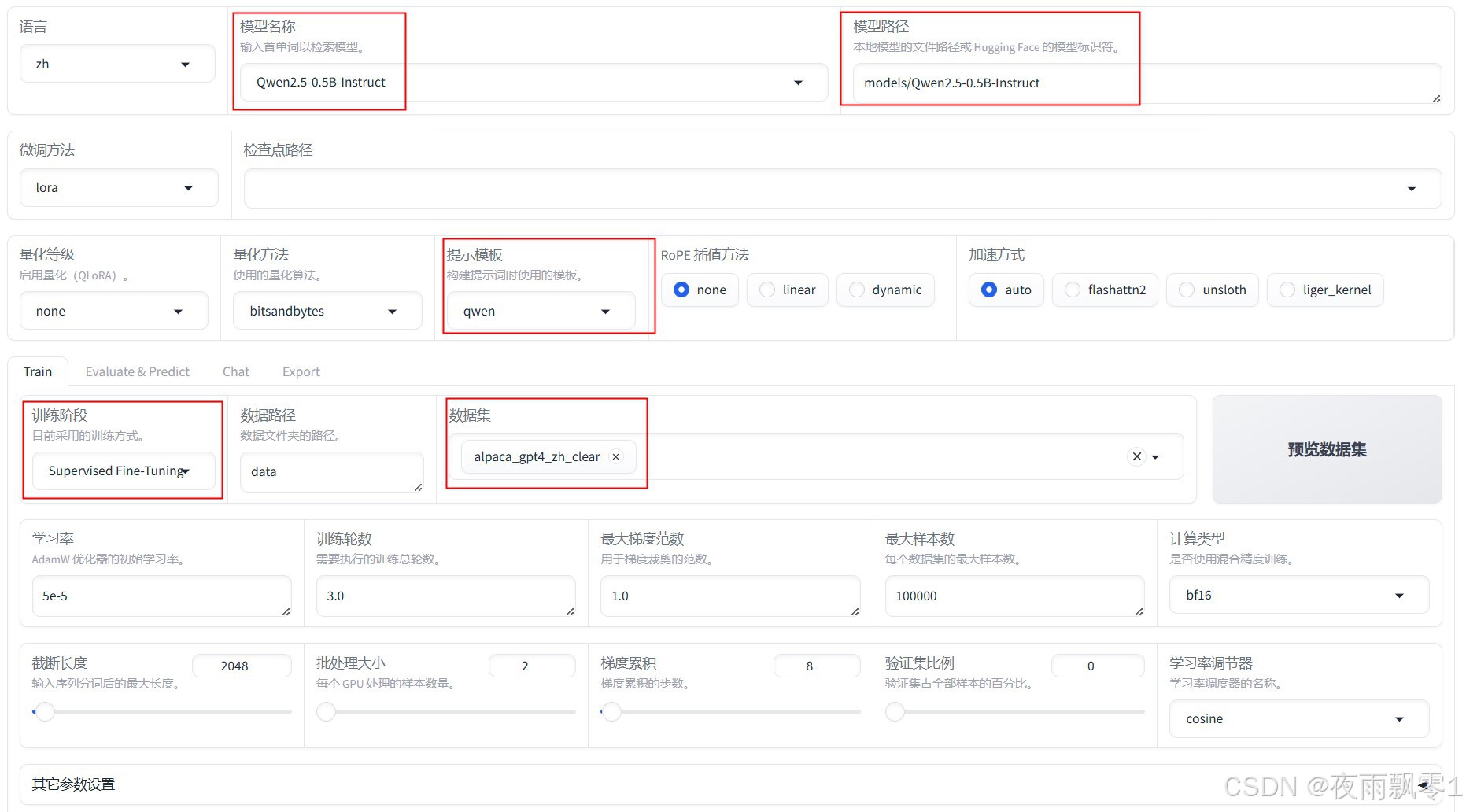
The author used LLaMA-Factory for model fine-tuning. For detailed usage, refer to the official documentation. Below are key points about data format and training considerations:
Select a small Qwen model for faster inference. Pay special attention to the prompt template (different models use different templates) and ensure the processed dataset is selected. After training, select the checkpoint path and export the model.
Quantization
To achieve faster inference on CPUs, export to ONNX format and quantize the model. Note: Quantized model inference results may be inaccurate on Windows.
Conversion code:
import argparse

from optimum.onnxruntime import ORTQuantizer, ORTModelForCausalLM
from optimum.onnxruntime.configuration import AutoQuantizationConfig
from transformers import AutoTokenizer

if __name__ == "__main__":
    parser = argparse.ArgumentParser()
    parser.add_argument("--model", type=str, default="models/Qwen2.5-0.5B-Instruct")
    parser.add_argument("--save_dir", type=str, default="models/Qwen2.5-0.5B-Instruct-onnx")
    args = parser.parse_args()

    # Load and export the model to ONNX
    ort_model = ORTModelForCausalLM.from_pretrained(args.model,
                                                    export=True,
                                                    task="text-generation-with-past")
    tokenizer = AutoTokenizer.from_pretrained(args.model)
    ort_model.save_pretrained(args.save_dir)
    tokenizer.save_pretrained(args.save_dir)

    dqconfig = AutoQuantizationConfig.avx2(is_static=False,
                                           per_channel=False,
                                           use_symmetric_activations=True)

    print("Quantizing model...")
    quantizer = ORTQuantizer.from_pretrained(ort_model)
    model_quantized_path = quantizer.quantize(save_dir=args.save_dir + "-quantize",
                                              quantization_config=dqconfig)
Text Endpoint Detection
The code below uses the model to predict the next token and get the probability of it being the end token <|im_end|>. A threshold of 0.15 is recommended, but other values can be used.
import numpy as np
import torch
from loguru import logger
from optimum.onnxruntime import ORTModelForCausalLM
from sklearn.utils.extmath import softmax
from transformers import AutoTokenizer


class TurnDetector:
    def __init__(self, model_path):
        self.model = ORTModelForCausalLM.from_pretrained(model_path)
        self.tokenizer = AutoTokenizer.from_pretrained(model_path)
        self.eou_index = self.tokenizer.encode("<|im_end|>")[-1]
        logger.info(f"End token ID: {self.eou_index}")

    def __call__(self, text):
        messages = [{"role": "user", "content": text}]
        text = self.tokenizer.apply_chat_template(messages,
                                                  add_generation_prompt=False,
                                                  add_special_tokens=False,
                                                  tokenize=False)
        ix = text.rfind("<|im_end|>")
        text = text[:ix]

        model_inputs = self.tokenizer(text, return_tensors="pt")
        position_ids = torch.arange(model_inputs['input_ids'].shape[1], dtype=torch.int64)[None, :]
        model_inputs['position_ids'] = position_ids

        outputs = self.model(**model_inputs).logits.numpy()

        logits = outputs[0, -1, :]
        probs = softmax(logits[np.newaxis, :])[0]
        eou_probability = probs[self.eou_index]

        return eou_probability


if __name__ == '__main__':
    turn_detector = TurnDetector("models/Qwen2.5-0.5B-Instruct-finetune-onnx")

    s = "What's your name"
    result = turn_detector(s)
    print(f'[{s}] Recognition result: {result:.3f}')

    s = "What's your name"
    result = turn_detector(s)
    print(f'[{s}] Recognition result: {result:.3f}')
Output:
2025-01-17 20:16:57.416 | INFO     | __main__:__init__:14 - End token ID: 151645
[What's your name] Recognition result: 0.000
[What's your name] Recognition result: 0.571