Foreword
VoiceprintRecognition_Pytorch is an open-source voiceprint recognition framework by the author. It supports multiple advanced voiceprint recognition models such as EcapaTdnn, ResNetSE, ERes2Net, and CAM++. It also offers various data preprocessing methods including MelSpectrogram, Spectrogram, MFCC, and Fbank, along with multiple loss functions like AAMLoss, AMLoss, ARMLoss, and CELoss. The framework supports various voiceprint recognition tasks, including voiceprint pairs, voiceprint retrieval, and the speaker diarization (speaker separation) feature introduced in this article.
Using Speaker Diarization
For model acquisition, developers can either train the model themselves or download the model provided by the author. For specific acquisition methods, please refer to the open-source address of VoiceprintRecognition_Pytorch. This section focuses on how to use the speaker diarization feature of this framework.
To perform speaker diarization, run the infer_speaker_diarization.py script with the audio path as input. This will separate the speakers and display the results. It is recommended that the audio length is not less than 10 seconds. For more features, check the program parameters.
python infer_speaker_diarization.py --audio_path=dataset/test_long.wav
The output will be similar to the following. From the log, you can see that it not only separates the speaking segments of each speaker in the audio but also identifies who said which parts (note: this requires prior registration):
2024-10-10 19:30:40.768 | INFO     | mvector.predict:__init__:61 - Successfully loaded model parameters: models/CAMPPlus_Fbank/best_model/model.pth
2024-10-10 19:30:40.795 | INFO     | mvector.predict:__create_index:127 - Voiceprint feature index created successfully. There are 3 users: ['沙瑞金', '夜雨飘零', '李达康']
2024-10-10 19:30:40.796 | INFO     | mvector.predict:__load_audio_db:142 - Loading voiceprint database data...
100%|██████████| 3/3 [00:00<?, ?it/s]
2024-10-10 19:30:40.798 | INFO     | mvector.predict:__create_index:127 - Voiceprint feature index created successfully. There are 3 users: ['沙瑞金', '夜雨飘零', '李达康']
2024-10-10 19:30:40.798 | INFO     | mvector.predict:__load_audio_db:172 - Voiceprint database data loaded successfully!
Recognition results:
{'speaker': '沙瑞金', 'start': 0.0, 'end': 2.0}
{'speaker': 'Stranger 1', 'start': 4.0, 'end': 7.0}
{'speaker': '李达康', 'start': 7.0, 'end': 8.0}
{'speaker': '沙瑞金', 'start': 9.0, 'end': 12.0}
{'speaker': '沙瑞金', 'start': 13.0, 'end': 14.0}
{'speaker': 'Stranger 1', 'start': 15.0, 'end': 19.0}
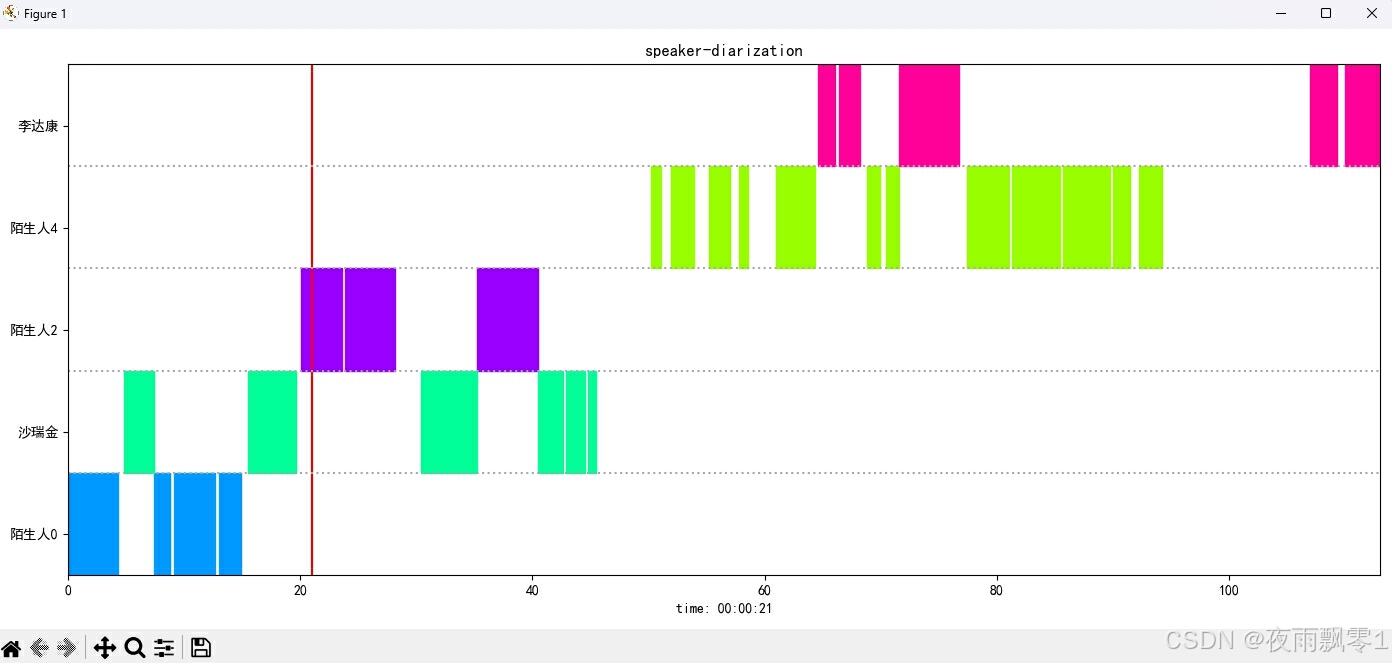
The display result image is as follows. You can control audio playback using the Space key, and clicking on the image will jump the audio to the specified position:
The project also provides a GUI program. Run infer_speaker_diarization_gui.py to use it. For more features, check the program parameters.
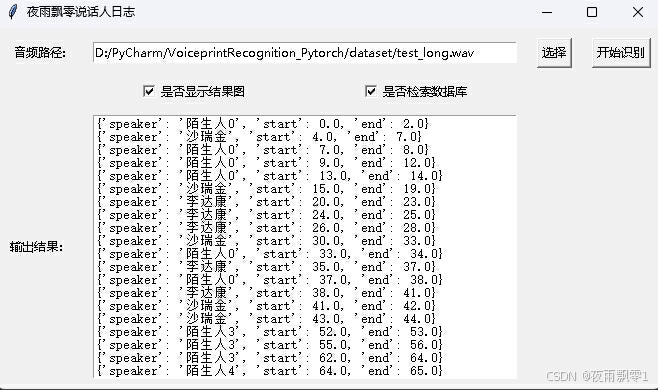
python infer_speaker_diarization_gui.py
You can open a page like this for speaker recognition:
Note: If the speaker names are in Chinese, a font installation is required for normal display. Generally, no installation is needed on Windows, but Ubuntu requires it. If Windows is missing fonts, download the .ttf file from Font Files and copy it to C:\Windows\Fonts. For Ubuntu, follow these steps:
- Install the font
git clone https://github.com/tracyone/program_font && cd program_font && ./install.sh
- Execute the following Python code
import matplotlib
import shutil
import os

path = matplotlib.matplotlib_fname()
path = path.replace('matplotlibrc', 'fonts/ttf/')
print(path)
shutil.copy('/usr/share/fonts/MyFonts/simhei.ttf', path)
user_dir = os.path.expanduser('~')
shutil.rmtree(f'{user_dir}/.cache/matplotlib', ignore_errors=True)
Other Versions
The author has also open-sourced a PaddlePaddle version with the same functionality. For more details, please refer to this address: VoiceprintRecognition-PaddlePaddle