Many applications have functions to save passwords and accounts, such as QQ. Next, I will explain how to use SharedPreferences to save passwords and accounts. Some people might consider using a database, but in my opinion, for saving simple data, a database is overkill. SharedPreferences is relatively lightweight.
First, design the layout with only two input fields and one button.
<EditText
        android:id="@+id/number"
        android:layout_width="match_parent"
        android:layout_height="wrap_content"
        android:inputType="number" />

<EditText
    android:id="@+id/password"
    android:layout_width="match_parent"
    android:layout_height="wrap_content"
    android:inputType="textPassword" />

<Button
    android:id="@+id/save"
    android:text="保存"
    android:layout_width="match_parent"
    android:layout_height="wrap_content" />
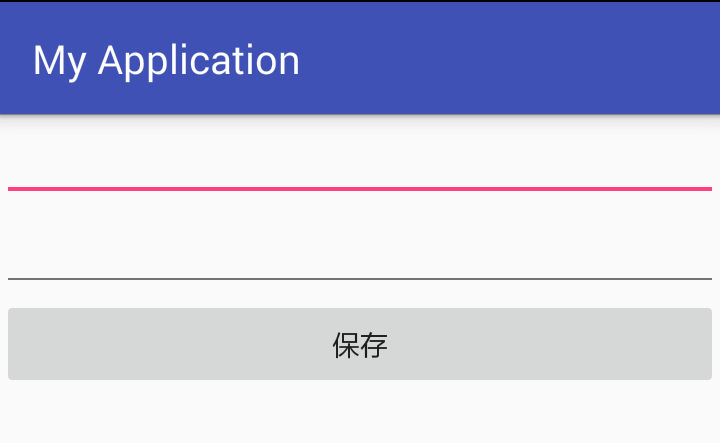
Next, obtain the controls.
private EditText number;
private EditText password;
private Button save;

number = (EditText) findViewById(R.id.number);
password = (EditText) findViewById(R.id.password);
save = (Button) findViewById(R.id.save);
After obtaining the controls, get the SharedPreferences. The first parameter is the filename for saving, and the second is the saving mode. If the file exists, it will be read; if not, it will be created.
private SharedPreferences sp;
// The first parameter is the filename for saving, and the second is the saving mode. If the file exists, it will be read; if not, it will be created.
sp = getSharedPreferences("info", MODE_PRIVATE);
Add a button click event to save the account and password when the button is clicked.
save.setOnClickListener(new View.OnClickListener() {
    @Override
    public void onClick(View v) {
        // Get the account and password from the input fields
        String numberStr = number.getText().toString().trim();
        String passwordStr = password.getText().toString().trim();
        // Check if they are empty
        if (numberStr.isEmpty() || passwordStr.isEmpty()) {
            Toast.makeText(getApplicationContext(), "Account or password cannot be empty", Toast.LENGTH_SHORT).show();
        } else {
            // Get the Editor
            SharedPreferences.Editor editor = sp.edit();
            // Input the content
            editor.putString("number", numberStr);
            editor.putString("password", passwordStr);
            // Must commit to take effect; apply() can also be used
            editor.commit();
            Toast.makeText(getApplicationContext(), "Save successful", Toast.LENGTH_SHORT).show();
        }
    }
});
After saving the account and password, if you want the password and account to be directly populated when the app is opened for the second time, retrieve the data when the page loads.
// Get the content of the "info" file. The first parameter is the key used for saving, and the second is the default value if the key is not found.
String numberStr1 = sp.getString("number", "");
String passwordStr2 = sp.getString("password", "");
number.setText(numberStr1);
password.setText(passwordStr2);
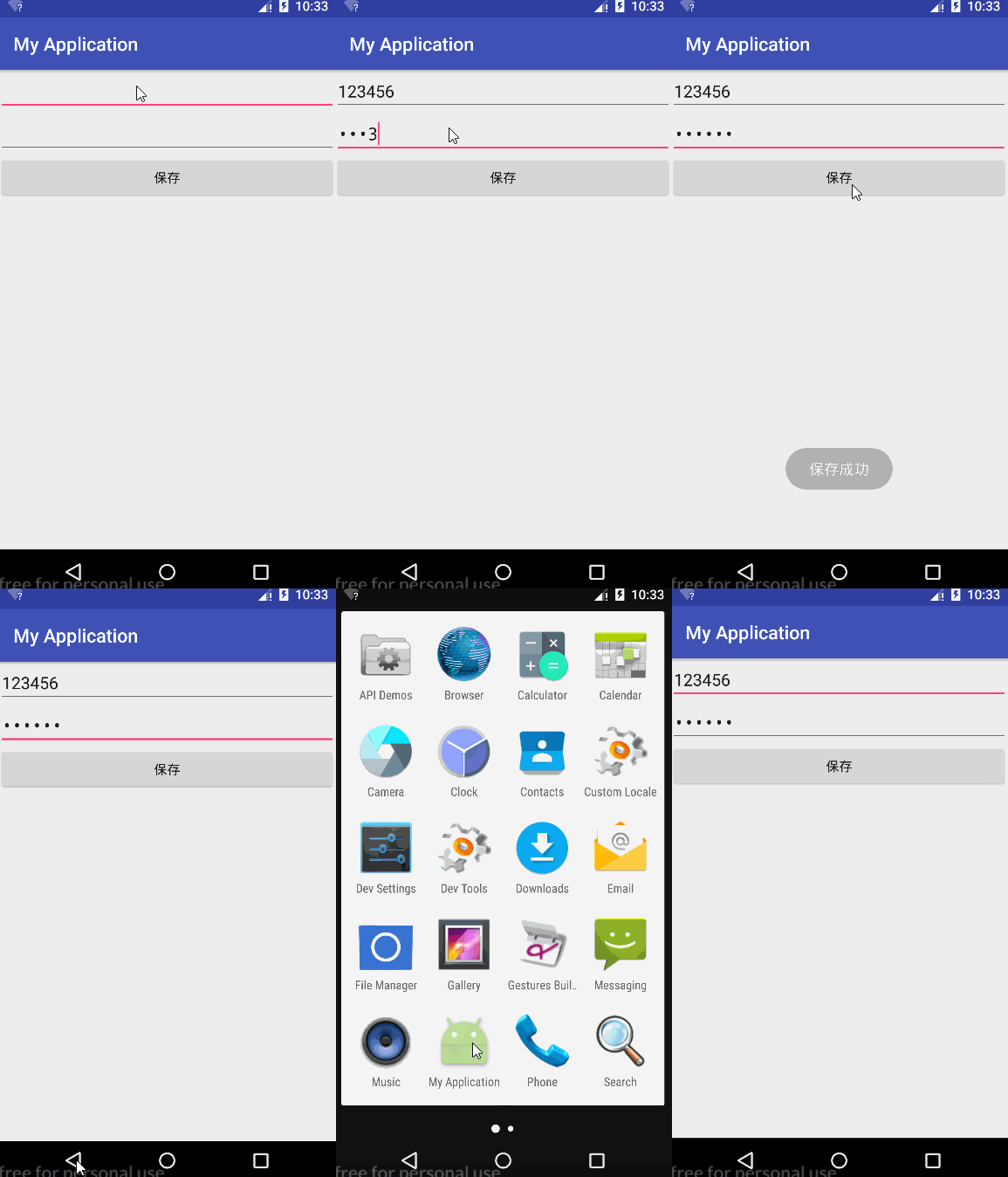
Effect diagram
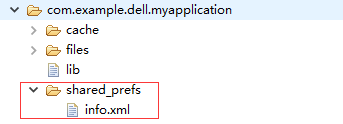
The info.xml file is saved in data/data/package name/shared_prefs/info.xml and is stored in XML format.
Finally, review the entire process.
Saving
① Obtain SharedPreferences using getSharedPreferences("filename", mode).
② Obtain the Editor using sp.edit().
③ Use editor.putXXX(key, value) to save data.
④ Use editor.commit() or apply() to make the changes take effect.
Reading
① Obtain SharedPreferences using getSharedPreferences("filename", mode).
② Use sp.getXXX(key, defValue) to directly retrieve the data.
Encryption
Storing passwords in plain text is insecure. Here are simple encryption and decryption methods:
    /**
     * Encryption method
     * @param str The string to be encrypted
     * @param key The encryption key
     * @return The encrypted string
     */
    public String encryptionString(String str, int key) {
        char[] chars = str.toCharArray();
        for (int i = 0; i < chars.length; i++) {
            chars[i] = (char) (chars[i] + key);
        }
        return String.valueOf(chars);
    }

    /**
     * Decryption method
     * @param str The string to be decrypted
     * @param key The decryption key (same as encryption)
     * @return The decrypted string
     */
    public String decodeString(String str, int key) {
        char[] chars = str.toCharArray();
        for (int i = 0; i < chars.length; i++) {
            chars[i] = (char) (chars[i] - key);
        }
        return String.valueOf(chars);
    }
Encrypt the password before saving it.
public static final int DECODE_ENCRYPTION_KEY = 64;

String passwordStr = password.getText().toString().trim();
// Encrypt the password
passwordStr = encryptionString(passwordStr, DECODE_ENCRYPTION_KEY);
editor.putString("password", passwordStr);
Decrypt the password before displaying it.
public static final int DECODE_ENCRYPTION_KEY = 64;

String passwordStr2 = sp.getString("password", "");
// Decrypt the password
passwordStr2 = decodeString(passwordStr2, DECODE_ENCRYPTION_KEY);
password.setText(passwordStr2);
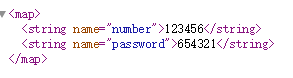
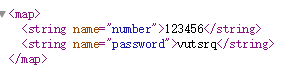
After saving, even if others see the encrypted data, they won’t know the real password. The following image shows the encrypted password (real password is 654321).
The complete code is as follows:
import android.content.SharedPreferences;
import android.os.Bundle;
import android.support.v7.app.AppCompatActivity;
import android.view.View;
import android.widget.Button;
import android.widget.EditText;
import android.widget.Toast;

public class MainActivity extends AppCompatActivity {

    private EditText number;
    private EditText password;
    private Button save;
    private SharedPreferences sp;
    public static final int DECODE_ENCRYPTION_KEY = 64;

    @Override
    protected void onCreate(Bundle savedInstanceState) {
        super.onCreate(savedInstanceState);
        setContentView(R.layout.activity_main);

        number = (EditText) findViewById(R.id.number);
        password = (EditText) findViewById(R.id.password);
        save = (Button) findViewById(R.id.save);

        // The first parameter is the filename for saving, and the second is the saving mode. If the file exists, it will be read; if not, it will be created.
        sp = getSharedPreferences("info", MODE_PRIVATE);

        // Get the content of the "info" file. The first parameter is the key used for saving, and the second is the default value if the key is not found.
        String numberStr1 = sp.getString("number", "");
        String passwordStr2 = sp.getString("password", "");
        // Decrypt the password
        passwordStr2 = decodeString(passwordStr2, DECODE_ENCRYPTION_KEY);
        password.setText(passwordStr2);
        number.setText(numberStr1);


        save.setOnClickListener(new View.OnClickListener() {
            @Override
            public void onClick(View v) {
                // Get the account and password from the input fields
                String numberStr = number.getText().toString().trim();
                String passwordStr = password.getText().toString().trim();
                // Encrypt the password
                passwordStr = encryptionString(passwordStr, DECODE_ENCRYPTION_KEY);
                // Check if they are empty
                if (numberStr.isEmpty() || passwordStr.isEmpty()) {
                    Toast.makeText(getApplicationContext(), "Account or password cannot be empty", Toast.LENGTH_SHORT).show();
                } else {
                    // Get the Editor
                    SharedPreferences.Editor editor = sp.edit();
                    // Input the content
                    editor.putString("number", numberStr);
                    editor.putString("password", passwordStr);
                    // Must commit to take effect; apply() can also be used
                    editor.commit();
                    Toast.makeText(getApplicationContext(), "Save successful", Toast.LENGTH_SHORT).show();
                }
            }
        });
    }

    /**
     * Encryption method
     * @param str The string to be encrypted
     * @param key The encryption key
     * @return The encrypted string
     */
    public String encryptionString(String str, int key) {
        char[] chars = str.toCharArray();
        for (int i = 0; i < chars.length; i++) {
            chars[i] = (char) (chars[i] + key);
        }
        return String.valueOf(chars);
    }

    /**
     * Decryption method
     * @param str The string to be decrypted
     * @param key The decryption key (same as encryption)
     * @return The decrypted string
     */
    public String decodeString(String str, int key) {
        char[] chars = str.toCharArray();
        for (int i = 0; i < chars.length; i++) {
            chars[i] = (char) (chars[i] - key);
        }
        return String.valueOf(chars);
    }
}