Reading SMS and contacts is commonly used, and it is important to understand that this involves the Content Provider (contentProvider) knowledge point. As we know, the database is located in the package directory under data–>data, and other applications cannot access it. If some data needs to be provided to other applications, such as the address book, how can other applications obtain this data? This is where Content Provider comes into play. It predefines methods for operating the database. Since these methods are provided by the developer of the application, they ensure secure database operations while enabling data sharing.
SMS
To start with the topic, let’s first discuss SMS. To retrieve data from the database, we need to understand its structure.
The SMS database is located at the following path under data–>data:
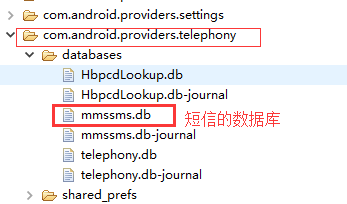
The table structure is as follows. There are 3 tables we need to focus on, which we will use later. The date column stores millisecond values.

Java Code:
// Get the ContentResolver
ContentResolver contentResolver = getContentResolver();
// Get the URI for the SMS table
Uri uri = Uri.parse("content://sms");
// Define the columns to query
String[] projection = {"address", "date", "body"};
// Query parameters: URI, columns, selection, selectionArgs, sortOrder
Cursor cursor = contentResolver.query(uri, projection, null, null, null);

// Process the query result
if (cursor != null) {
    while (cursor.moveToNext()) {
        String address = cursor.getString(cursor.getColumnIndex("address"));
        String date = cursor.getString(cursor.getColumnIndex("date"));
        String body = cursor.getString(cursor.getColumnIndex("body"));
        Log.e("SMS", "Address: " + address + "\nDate: " + date + "\nBody: " + body);
    }
    cursor.close();
}
Contacts
Retrieving contacts is more complex, and their table structure is also intricate. To get a contact’s name, phone number, and email, we need to extract data from 3 tables.
The database is located at the following path under data–>data:
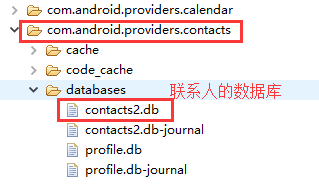
-
data table: The
data1column almost contains all the data we need. The fourth column’s code indicates the type of data indata1. These codes are explained in themimetypestable. To find this data, we use theraw_contact_idto query, which comes from theraw_contactstable. -
mimetypes table: Describes the data type corresponding to the code.
-
raw_contacts table: Contains the IDs of contacts to be displayed in the address book. When a contact is deleted, the
contact_idin thedatatable is set to null, but the data itself is not truly deleted.
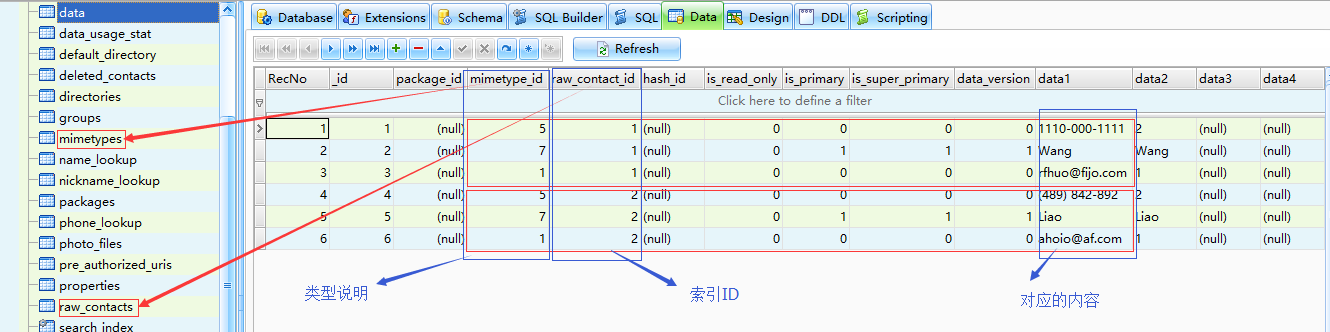
mimetypes table: Description of data type codes
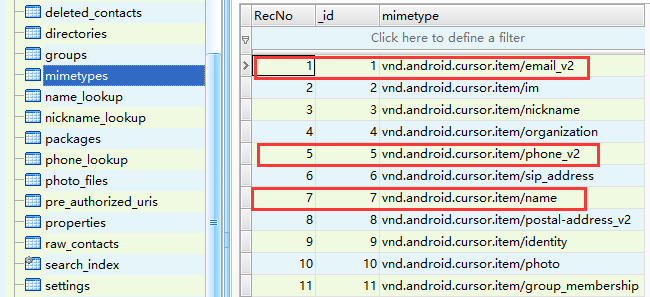
raw_contacts table: Contact ID storage
Java Code:
// Get the ContentResolver
ContentResolver contentResolver = getContentResolver();
// URI for raw_contacts table
Uri rawContactUri = Uri.parse("content://com.android.contacts/raw_contacts");
// Query raw_contact_id
Cursor contactIdCursor = contentResolver.query(rawContactUri, new String[]{"contact_id"}, null, null, null);

if (contactIdCursor != null) {
    while (contactIdCursor.moveToNext()) {
        String contactId = contactIdCursor.getString(contactIdCursor.getColumnIndex("contact_id"));

        // URI for data table
        Uri dataUri = Uri.parse("content://com.android.contacts/data");
        // Query data for the current contact_id
        Cursor dataCursor = contentResolver.query(dataUri, new String[]{"mimetype", "data1"},
                "raw_contact_id=?", new String[]{contactId}, null);

        if (dataCursor != null) {
            ContactsData contactsData = new ContactsData();
            while (dataCursor.moveToNext()) {
                String mimeType = dataCursor.getString(dataCursor.getColumnIndex("mimetype"));
                switch (mimeType) {
                    case "vnd.android.cursor.item/email_v2":
                        contactsData.setEmail(dataCursor.getString(dataCursor.getColumnIndex("data1")));
                        break;
                    case "vnd.android.cursor.item/phone_v2":
                        contactsData.setNumber(dataCursor.getString(dataCursor.getColumnIndex("data1")));
                        break;
                    case "vnd.android.cursor.item/name":
                        contactsData.setName(dataCursor.getString(dataCursor.getColumnIndex("data1")));
                        break;
                }
            }
            contactsDatas.add(contactsData);
            dataCursor.close();
        }
    }
    contactIdCursor.close();
}
Log.d("Test", "Starting to print contacts...");
ContactsData Class (Java Bean):
public class ContactsData {
    private String email;
    private String number;
    private String name;

    public String getEmail() { return email; }
    public void setEmail(String email) { this.email = email; }

    public String getNumber() { return number; }
    public void setNumber(String number) { this.number = number; }

    public String getName() { return name; }
    public void setName(String name) { this.name = name; }

    @Override
    public String toString() {
        return "ContactsData{" +
                "email='" + email + '\'' +
                ", number='" + number + '\'' +
                ", name='" + name + '\'' +
                '}';
    }
}
Permissions:
Add these permissions in AndroidManifest.xml:
<uses-permission android:name="android.permission.READ_SMS"/>
<uses-permission android:name="android.permission.READ_CONTACTS"/>
For Android 6.0+, you must request permissions dynamically.
Actual Application Usage
Directly using hardcoded paths may cause errors because different manufacturers modify contact paths. Instead, use Android’s official API:
Java Code (Using ContactsContract):
// Query contacts using ContactsContract
Cursor cursor = getContentResolver().query(ContactsContract.Contacts.CONTENT_URI, null, null, null, null);
if (cursor != null) {
    while (cursor.moveToNext()) {
        ContactsData contactsData = new ContactsData();
        String contactId = cursor.getString(cursor.getColumnIndex(ContactsContract.Contacts._ID));
        String name = cursor.getString(cursor.getColumnIndex(ContactsContract.Contacts.DISPLAY_NAME));
        contactsData.setName(name);

        // Query phone numbers for this contact
        Cursor phones = getContentResolver().query(ContactsContract.CommonDataKinds.Phone.CONTENT_URI,
                null, ContactsContract.CommonDataKinds.Phone.CONTACT_ID + "=?",
                new String[]{contactId}, null);
        if (phones != null && phones.moveToNext()) {
            String number = phones.getString(phones.getColumnIndex(ContactsContract.CommonDataKinds.Phone.NUMBER));
            contactsData.setNumber(number);
            phones.close();
        }

        // Query emails for this contact
        Cursor emails = getContentResolver().query(ContactsContract.CommonDataKinds.Email.CONTENT_URI,
                null, ContactsContract.CommonDataKinds.Email.CONTACT_ID + "=?",
                new String[]{contactId}, null);
        if (emails != null && emails.moveToNext()) {
            String email = emails.getString(emails.getColumnIndex(ContactsContract.CommonDataKinds.Email.DATA));
            contactsData.setEmail(email);
            emails.close();
        }

        contactsDatas.add(contactsData);
    }
    cursor.close();
}
Log.d("Test", "Starting to print contacts...");
for (ContactsData c : contactsDatas) {
    Log.e("Contact", c.toString());
}
Contact Retrieval Screenshot:

Summary
- Use
ContentProviderto access system data securely. - For SMS, directly query the
content://smsURI. - For contacts, use
ContactsContractAPIs to avoid hardcoded paths. - Always request permissions (especially dynamically for Android 6.0+).
This approach ensures compatibility across devices and follows Android best practices.