OkHttp3 is a very powerful Android networking framework developed and open-sourced by Square. It is widely used by many Android developers, so I need to learn it as well.
Server
To facilitate testing, we need a backend server application. Below is a Java Web Servlet that receives login data from the client, verifies the password, and returns the result in JSON format:
import javax.servlet.ServletException;
import javax.servlet.annotation.WebServlet;
import javax.servlet.http.HttpServlet;
import javax.servlet.http.HttpServletRequest;
import javax.servlet.http.HttpServletResponse;
import java.io.IOException;
import java.io.PrintWriter;

@WebServlet(name = "MyServlet", urlPatterns = {"/MyServlet"})
public class MyServlet extends HttpServlet {
    protected void doPost(HttpServletRequest request, HttpServletResponse response) throws ServletException, IOException {
        // Retrieve form data
        String number = request.getParameter("number");
        String pwd = request.getParameter("pwd");
        String body;

        // Verify password and account
        if (number.equals("12345") && pwd.equals("12345")) {
            body = "{\"result\":\"success\",\"file\":\"/file/123.jpg\"}";
        } else {
            body = "{\"result\":\"fail\"}";
        }

        // Output result
        PrintWriter writer = response.getWriter();
        writer.write(body);
    }

    protected void doGet(HttpServletRequest request, HttpServletResponse response) throws ServletException, IOException {
        this.doPost(request, response);
    }
}
Client
To use OkHttp3, add the dependency library. The following statement includes two libraries: the base package Okio and OkHttp itself:
compile 'com.squareup.okhttp3:okhttp:3.8.1'
We need to create two Activities: one for the login interface and another for the login result interface.
Login Interface (activity_main.xml)
Modify activity_main.xml to create a login interface:
<LinearLayout xmlns:android="http://schemas.android.com/apk/res/android"
    xmlns:tools="http://schemas.android.com/tools"
    android:id="@+id/activity_main"
    android:layout_width="match_parent"
    android:layout_height="match_parent"
    android:orientation="vertical"
    tools:context="com.example.dell.testokhttp3.MainActivity">

    <EditText
        android:id="@+id/edit_number"
        android:layout_width="match_parent"
        android:layout_height="wrap_content"
        android:hint="Please enter account" />

    <EditText
        android:id="@+id/edit_pwd"
        android:layout_width="match_parent"
        android:layout_height="wrap_content"
        android:hint="Please enter password" />

    <LinearLayout
        android:orientation="horizontal"
        android:layout_width="match_parent"
        android:layout_height="wrap_content">

        <Button
            android:layout_weight="1"
            android:layout_width="0dp"
            android:layout_height="wrap_content"
            android:onClick="getRequest"
            android:text="GET Login" />

        <Button
            android:layout_weight="1"
            android:layout_width="0dp"
            android:layout_height="wrap_content"
            android:onClick="postRequest"
            android:text="POST Login" />
    </LinearLayout>

</LinearLayout>
Login Interface Screenshot
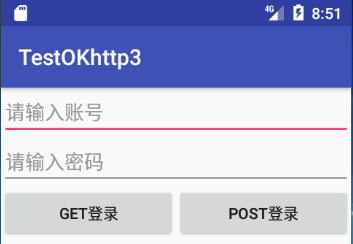
Login Result Interface (activity_main2.xml)
Modify activity_main2.xml to create the interface after successful login:
<LinearLayout xmlns:android="http://schemas.android.com/apk/res/android"
    xmlns:tools="http://schemas.android.com/tools"
    android:id="@+id/activity_main2"
    android:layout_width="match_parent"
    android:layout_height="match_parent"
    android:orientation="vertical"
    tools:context="com.example.dell.testokhttp3.Main2Activity">

    <Button
        android:text="Show Image"
        android:layout_width="match_parent"
        android:layout_height="wrap_content"
        android:id="@+id/showImage"
        android:onClick="showImage" />

    <Button
        android:text="Save Image"
        android:layout_width="match_parent"
        android:layout_height="wrap_content"
        android:id="@+id/saveImage"
        android:onClick="saveImage" />

    <ImageView
        android:id="@+id/imageview"
        android:layout_width="match_parent"
        android:layout_height="wrap_content" />
</LinearLayout>
Login Result Interface Screenshot
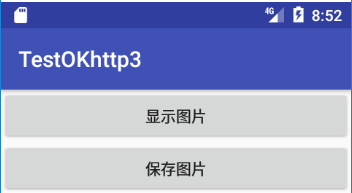
MainActivity Code
Initialization
// Base URL
private String url = "http://10.0.2.2:8080";
private EditText number;
private EditText pwd;

// Initialize views
number = (EditText) findViewById(R.id.edit_number);
pwd = (EditText) findViewById(R.id.edit_pwd);
GET and POST Methods
I use two login methods: GET and POST. GET is generally not used for login as it exposes data in the URL, but it’s used here for testing.
// GET method
public void get() {
    final String numberStr = number.getText().toString().trim();
    final String pwdStr = pwd.getText().toString().trim();

    new Thread(new Runnable() {
        @Override
        public void run() {
            Request request = new Request.Builder()
                    .url(url + "/MyServlet?number=" + numberStr + "&pwd=" + pwdStr)
                    .build();

            OkHttpClient client = new OkHttpClient.Builder()
                    .connectTimeout(10, TimeUnit.SECONDS)
                    .writeTimeout(20, TimeUnit.SECONDS)
                    .readTimeout(20, TimeUnit.SECONDS)
                    .build();

            Call call = client.newCall(request);
            call.enqueue(new Callback() {
                @Override
                public void onFailure(Call call, IOException e) {
                    // Handle failure
                }

                @Override
                public void onResponse(Call call, Response response) throws IOException {
                    String res = response.body().string();
                    Log.d("MainActivity", "GET Response: " + res);
                    parseJSON(res);
                }
            });
        }
    }).start();
}

// POST method
public void post() {
    final String numberStr = number.getText().toString().trim();
    final String pwdStr = pwd.getText().toString().trim();

    new Thread(new Runnable() {
        @Override
        public void run() {
            OkHttpClient client = new OkHttpClient.Builder()
                    .connectTimeout(10, TimeUnit.SECONDS)
                    .writeTimeout(20, TimeUnit.SECONDS)
                    .readTimeout(20, TimeUnit.SECONDS)
                    .build();

            FormBody.Builder formBody = new FormBody.Builder();
            formBody.add("number", numberStr);
            formBody.add("pwd", pwdStr);

            Request request = new Request.Builder()
                    .url(url + "/MyServlet")
                    .post(formBody.build())
                    .build();

            Call call = client.newCall(request);
            call.enqueue(new Callback() {
                @Override
                public void onFailure(Call call, IOException e) {
                    // Handle failure
                }

                @Override
                public void onResponse(Call call, Response response) throws IOException {
                    String res = response.body().string();
                    Log.d("MainActivity", "POST Response: " + res);
                    parseJSON(res);
                }
            });
        }
    }).start();
}
JSON Parsing
// Parse JSON response
public void parseJSON(String jsonStr) {
    try {
        JSONObject jsonObject = new JSONObject(jsonStr);
        String result = jsonObject.getString("result");

        if (result.equals("success")) {
            String fileUrl = jsonObject.getString("file");
            final String imageUrl = url + fileUrl;

            // Update UI on main thread
            runOnUiThread(new Runnable() {
                @Override
                public void run() {
                    Intent intent = new Intent(MainActivity.this, Main2Activity.class);
                    intent.putExtra("imageUrl", imageUrl);
                    startActivity(intent);
                    Toast.makeText(getApplicationContext(), "Login successful", Toast.LENGTH_SHORT).show();
                }
            });
        } else {
            runOnUiThread(new Runnable() {
                @Override
                public void run() {
                    Toast.makeText(getApplicationContext(), "Account or password incorrect", Toast.LENGTH_SHORT).show();
                }
            });
        }
    } catch (JSONException e) {
        e.printStackTrace();
    }
}
Button Click Handlers
public void getRequest(View view) {
    get();
}

public void postRequest(View view) {
    post();
}
Permissions
Add network and storage permissions to AndroidManifest.xml:
<uses-permission android:name="android.permission.INTERNET" />
<uses-permission android:name="android.permission.WRITE_EXTERNAL_STORAGE" />
Main2Activity Code
Receive Image URL
private String url;
private ImageView imageView;

// Get image URL from previous Activity
Intent intent = getIntent();
url = intent.getStringExtra("imageUrl");

// Initialize views
imageView = (ImageView) findViewById(R.id.imageview);
Show Image
private void showImage(final String imageUrl) {
    new Thread(new Runnable() {
        @Override
        public void run() {
            try {
                OkHttpClient client = new OkHttpClient.Builder()
                        .cache(new Cache(getExternalCacheDir().getAbsoluteFile(), 1024 * 1024 * 2))
                        .build();

                Request request = new Request.Builder()
                        .url(imageUrl)
                        .build();

                Response response = client.newCall(request).execute();
                InputStream inputStream = response.body().byteStream();
                Bitmap bitmap = BitmapFactory.decodeStream(inputStream);

                // Update UI via Handler
                Message msg = new Message();
                msg.what = 1;
                msg.obj = bitmap;
                handler.sendMessage(msg);

                inputStream.close();
            } catch (IOException e) {
                e.printStackTrace();
            }
        }
    }).start();
}
Save Image to SD Card
public void saveImage(final String imageUrl) {
    new Thread(new Runnable() {
        @Override
        public void run() {
            try {
                OkHttpClient client = new OkHttpClient.Builder()
                        .cache(new Cache(getExternalCacheDir().getAbsoluteFile(), 1024 * 1024 * 2))
                        .build();

                Request request = new Request.Builder()
                        .url(imageUrl)
                        .build();

                Response response = client.newCall(request).execute();
                byte[] bytes = response.body().bytes();

                // Extract filename
                String[] urls = imageUrl.split("/");
                String filename = urls[urls.length - 1];

                // Save to SD card
                File file = new File(Environment.getExternalStorageDirectory(), filename);
                FileOutputStream fos = new FileOutputStream(file);
                fos.write(bytes);
                fos.flush();
                fos.close();

                // Notify success
                Message msg = new Message();
                msg.what = 2;
                msg.obj = "Image saved successfully";
                handler.sendMessage(msg);
            } catch (IOException e) {
                e.printStackTrace();
                Message msg = new Message();
                msg.what = 2;
                msg.obj = "Image save failed";
                handler.sendMessage(msg);
            }
        }
    }).start();
}
Handler for UI Updates
private Handler handler = new Handler() {
    @Override
    public void handleMessage(Message msg) {
        switch (msg.what) {
            case 1:
                imageView.setImageBitmap((Bitmap) msg.obj);
                break;
            case 2:
                Toast.makeText(getApplicationContext(), (String) msg.obj, Toast.LENGTH_SHORT).show();
                break;
        }
    }
};
Button Click Handlers
public void showImage(View view) {
    String imageUrl = getIntent().getStringExtra("imageUrl");
    showImage(imageUrl);
}

public void saveImage(View view) {
    String imageUrl = getIntent().getStringExtra("imageUrl");
    saveImage(imageUrl);
}
Final Screenshot
Final Result
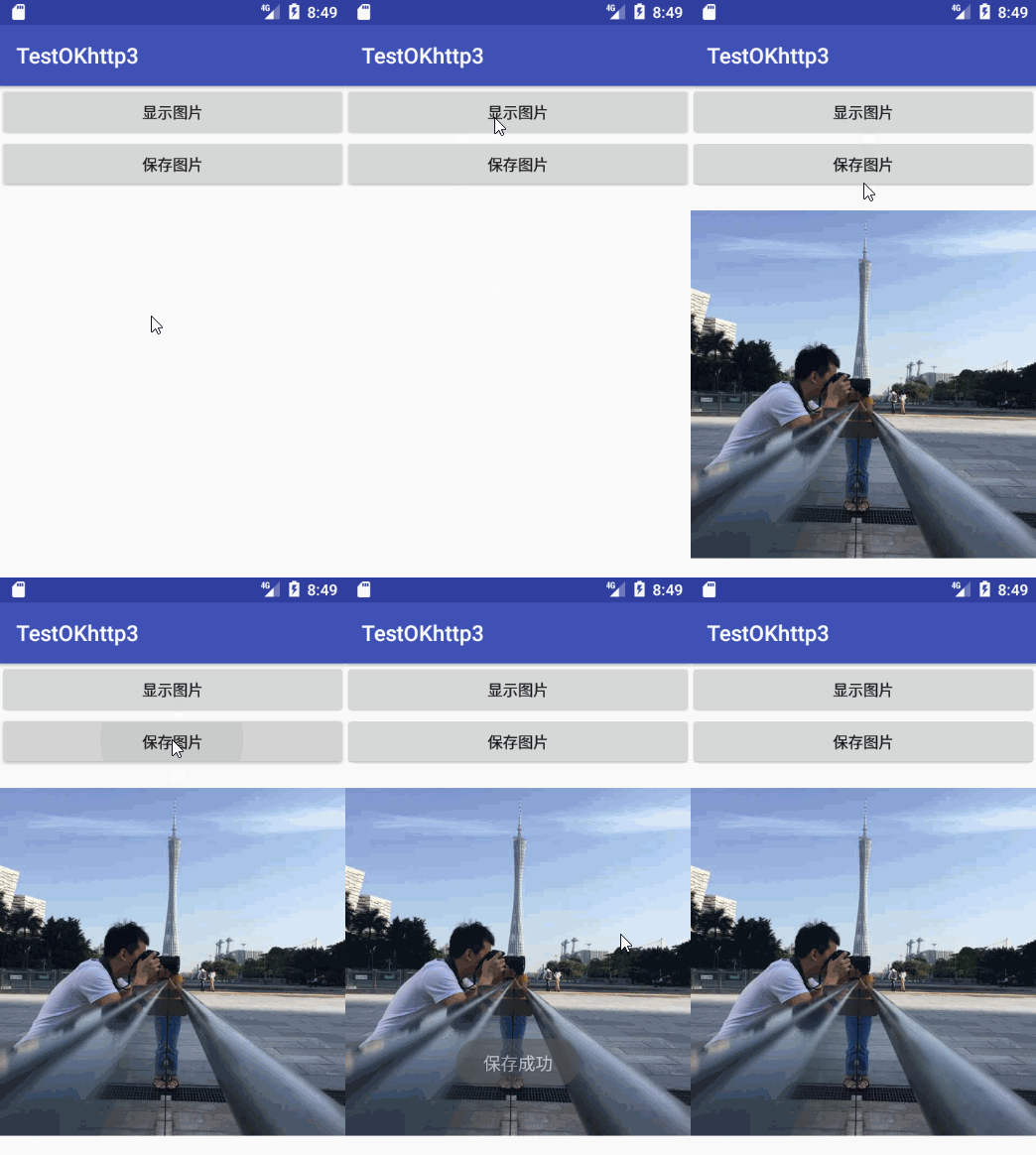
This completes the implementation of a basic Android application using OkHttp3 for network requests, JSON parsing, image loading, and image saving.