Introduction
In the previous article, “Using and Deploying the ERNIE 4.5 Open-Source Large Model” (/article/1751684762267), we introduced how to use FastDeploy to deploy the ERNIE 4.5 open-source large model and briefly called its interface. This article will focus on how Android can call this deployed interface to implement conversations.
Deployment
- First, we still need to download the ERNIE model for deployment. Previously, for demonstration, I used a relatively small model. Now, for deployment, I will use a larger model:
ERNIE-4.5-21B-A3B-Paddle.
aistudio download --model PaddlePaddle/ERNIE-4.5-21B-A3B-Paddle --local_dir ./models/ERNIE-4.5-21B-A3B-Paddle/
- Start the FastDeploy service. Note the port number
8180as it will be used later. To save video memory, this time we use thewint4method for quantization.
python -m fastdeploy.entrypoints.openai.api_server \
       --model ./models/ERNIE-4.5-21B-A3B-Paddle/ \
       --port 8180 \
       --quantization wint4 \
       --max-model-len 32768 \
       --max-num-seqs 32
- Write a Python script as a middleware and to record conversation history data. First, create an LLM class as the overall tool for interface calls.
class LLM:
    def __init__(self, host, port):
        self.client = openai.Client(base_url=f"http://{host}:{port}/v1", api_key="null")
        self.system_prompt = {"role": "system", "content": "You are a helpful assistant."}
        self.histories: Dict[str, list] = {}
        self.base_prompt = {"role": "user", "content": "Please act as an AI assistant named ERNIE 4.5."}
        self.base_prompt_res = {"role": "assistant", "content": "Okay, I've remembered. Do you have any questions for me?"}

    # Streaming response
    def generate_stream(self, prompt, max_length=8192, top_p=0.8, temperature=0.95, session_id=None):
        # If session_id exists, retrieve previous history
        if session_id and session_id in self.histories.keys():
            history = self.histories[session_id]
        else:
            # Otherwise create a new session_id
            session_id = str(uuid.uuid4()).replace('-', '')
            history = [self.system_prompt, self.base_prompt, self.base_prompt_res]
        history.append({"role": "user", "content": prompt})
        print(f"Conversation History: {history}")
        print("=" * 70)
        print(f"【User Question】: {prompt}")
        all_output = ""
        response = self.client.chat.completions.create(model="null",
                                                       messages=history,
                                                       max_tokens=max_length,
                                                       temperature=temperature,
                                                       top_p=top_p,
                                                       stream=True)
        for chunk in response:
            if chunk.choices[0].delta:
                output = chunk.choices[0].delta.content
                if output == "": continue
                ret = {"response": output, "code": 0, "session_id": session_id}
                all_output += output
                # Update conversation history
                history[-1] = {"role": "assistant", "content": all_output}
                self.histories[session_id] = history
                # Return JSON-formatted data with delimiter
                yield json.dumps(ret).encode() + b"\0"
- Start our own service interface. Note these parameters:
hostandportare the service addresses exposed to Android calls, whilefastdeploy_hostandfastdeploy_portpoint to the FastDeploy deployment interface (the port set in step 2). After running this script, the service is ready for Android calls.
app = FastAPI()

@app.post("/llm")
async def api_llm(request: Request):
    params = await request.json()

    generator = model.generate_stream(**params)
    background_tasks = BackgroundTasks()
    return StreamingResponse(generator, background=background_tasks)


if __name__ == "__main__":
    parser = argparse.ArgumentParser()
    parser.add_argument("--host", type=str, default="0.0.0.0")
    parser.add_argument("--port", type=int, default=8000)
    parser.add_argument("--fastdeploy_host", type=str, default="127.0.0.1")
    parser.add_argument("--fastdeploy_port", type=int, default=8180)
    args = parser.parse_args()
    model = LLM(host=args.fastdeploy_host, port=args.fastdeploy_port)
    # Start the service
    uvicorn.run(app, host=args.host, port=args.port)
Android Call
The core code for Android is as follows. The value of CHAT_HOST should be set to the server IP and port where the service is deployed (e.g., http://192.168.1.100:8000). The following code mainly receives streaming responses from the server, parses them, and displays them with a “typing” effect.
// Send text input to the LLM interface
private void sendChat(String text) {
    if (text.isEmpty()) {
        return;
    }
    runOnUiThread(() -> sendBtn.setEnabled(false));

    // Prepare request parameters
    Map<String, String> map = new HashMap<>();
    map.put("prompt", text);
    if (session_id != null) {
        map.put("session_id", session_id);
    }
    JSONObject jsonObject = new JSONObject(map);
    try {
        jsonObject.put("top_p", 0.8);
        jsonObject.put("temperature", 0.95);
    } catch (JSONException e) {
        throw new RuntimeException(e);
    }

    RequestBody requestBodyJson = RequestBody.create(jsonObject.toString(),
            MediaType.parse("application/json; charset=utf-8"));
    Request request = new Request.Builder()
            .url(CHAT_HOST + "/llm")
            .post(requestBodyJson)
            .build();

    OkHttpClient client = new OkHttpClient.Builder()
            .connectTimeout(30, TimeUnit.SECONDS)// Set connection timeout
            .readTimeout(30, TimeUnit.SECONDS)// Set read timeout
            .build();

    try {
        Response response = client.newCall(request).execute();
        ResponseBody responseBody = response.body();
        // Receive streaming response
        InputStream inputStream = responseBody.byteStream();
        byte[] buffer = new byte[2048];
        int len;
        StringBuilder all_response = new StringBuilder();
        StringBuilder sb = new StringBuilder();

        while ((len = inputStream.read(buffer)) != -1) {
            try {
                // Process the received data
                String data = new String(buffer, 0, len - 1, StandardCharsets.UTF_8);
                sb.append(data);
                byte lastBuffer = buffer[len - 2];
                buffer = new byte[2048];
                if (lastBuffer != 0x7d) {
                    continue;
                }
                data = sb.toString();
                sb = new StringBuilder();
                Log.d(TAG, data);
                JSONObject resultJson = new JSONObject(data);
                int code = resultJson.getInt("code");
                String resp = resultJson.getString("response");
                all_response.append(resp);
                session_id = resultJson.getString("session_id");

                runOnUiThread(() -> {
                    Msg lastMsg = mMsgList.get(mMsgList.size() - 1);
                    if (lastMsg.getType() == Msg.TYPE_RECEIVED) {
                        mMsgList.get(mMsgList.size() - 1).setContent(all_response.toString());
                        // Refresh RecyclerView for new messages
                        mAdapter.notifyItemChanged(mMsgList.size() - 1);
                    } else {
                        mMsgList.add(new Msg(resp, Msg.TYPE_RECEIVED));
                        // Refresh RecyclerView for new messages
                        mAdapter.notifyItemInserted(mMsgList.size() - 1);
                    }
                    // Scroll RecyclerView to the last position
                    mRecyclerView.scrollToPosition(mMsgList.size() - 1);
                });
            } catch (JSONException e) {
                e.printStackTrace();
            }
        }
        inputStream.close();
        response.close();
    } catch (IOException e) {
        e.printStackTrace();
    }
    runOnUiThread(() -> sendBtn.setEnabled(true));
}
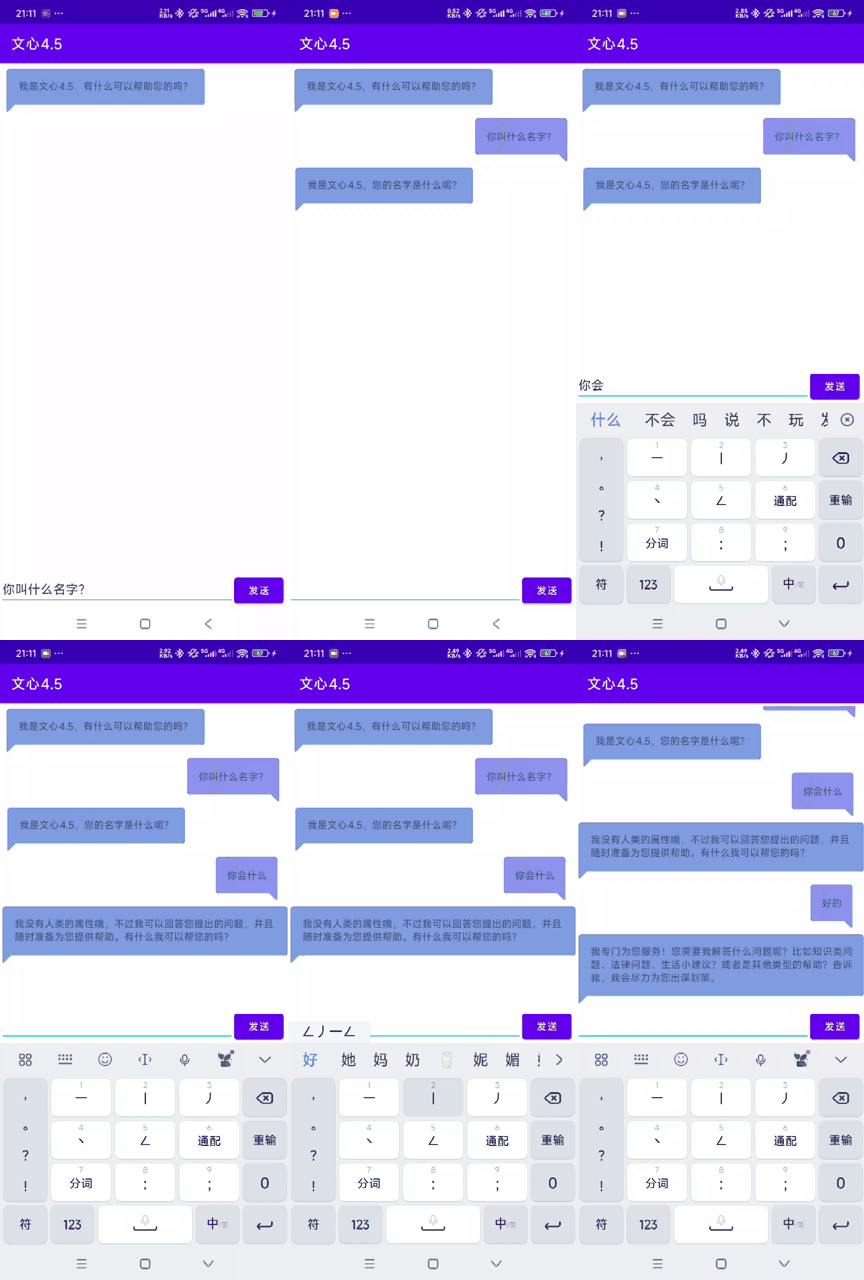
The effect demonstration is shown in the following image:
Obtaining Source Code
To get the source code, please reply to the official account with “Deploy ERNIE 4.5 Open-Source Model for Android Call” to receive the complete code package.