功能介紹:
錄音並保存爲m4a格式的音頻,然後播放該音頻,參考文檔使用AVRecorder開發音頻錄製功能(ArkTS),更詳細接口信息請查看接口文檔:@ohos.multimedia.media (媒體服務)。
知識點:
- 熟悉使用AVRecorder錄音並保存在本地。
- 熟悉使用AVPlayer播放本地音頻文件。
- 熟悉對敏感權限的動態申請方式,本項目的敏感權限爲
MICROPHONE。
使用環境:
- API 9
- DevEco Studio 4.0 Release
- Windows 11
- Stage模型
- ArkTS語言
所需權限:
- ohos.permission.MICROPHONE
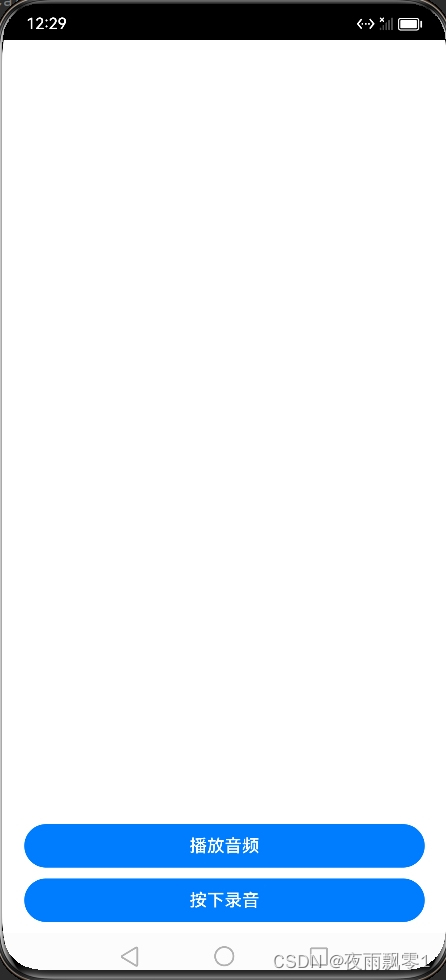
效果圖:
核心代碼:
src/main/ets/utils/Permission.ets是動態申請權限的工具:
import bundleManager from '@ohos.bundle.bundleManager';
import abilityAccessCtrl, { Permissions } from '@ohos.abilityAccessCtrl';

async function checkAccessToken(permission: Permissions): Promise<abilityAccessCtrl.GrantStatus> {
  let atManager = abilityAccessCtrl.createAtManager();
  let grantStatus: abilityAccessCtrl.GrantStatus;

  // 獲取應用程序的accessTokenID
  let tokenId: number;
  try {
    let bundleInfo: bundleManager.BundleInfo = await bundleManager.getBundleInfoForSelf(bundleManager.BundleFlag.GET_BUNDLE_INFO_WITH_APPLICATION);
    let appInfo: bundleManager.ApplicationInfo = bundleInfo.appInfo;
    tokenId = appInfo.accessTokenId;
  } catch (err) {
    console.error(`getBundleInfoForSelf failed, code is ${err.code}, message is ${err.message}`);
  }

  // 校驗應用是否被授予權限
  try {
    grantStatus = await atManager.checkAccessToken(tokenId, permission);
  } catch (err) {
    console.error(`checkAccessToken failed, code is ${err.code}, message is ${err.message}`);
  }

  return grantStatus;
}

export async function checkPermissions(permission: Permissions): Promise<boolean> {
  let grantStatus: abilityAccessCtrl.GrantStatus = await checkAccessToken(permission);

  if (grantStatus === abilityAccessCtrl.GrantStatus.PERMISSION_GRANTED) {
    return true
  } else {
    return false
  }
}
src/main/ets/utils/Recorder.ets是錄音工具類,進行錄音和獲取錄音數據。
import media from '@ohos.multimedia.media';
import fs from '@ohos.file.fs';
import promptAction from '@ohos.promptAction';
import audio from '@ohos.multimedia.audio';

export default class AudioRecorder {
  private audioFile = null
  private avRecorder: media.AVRecorder | undefined = undefined;
  private avProfile: media.AVRecorderProfile = {
    audioBitrate: 48000, // 音頻比特率
    audioChannels: audio.AudioChannel.CHANNEL_1, // 音頻聲道數
    audioCodec: media.CodecMimeType.AUDIO_AAC, // 音頻編碼格式,當前只支持aac
    audioSampleRate: audio.AudioSamplingRate.SAMPLE_RATE_16000, // 音頻採樣率
    fileFormat: media.ContainerFormatType.CFT_MPEG_4A, // 封裝格式,當前只支持m4a
  };
  private avConfig: media.AVRecorderConfig = {
    audioSourceType: media.AudioSourceType.AUDIO_SOURCE_TYPE_MIC, // 音頻輸入源,這裏設置爲麥克風
    profile: this.avProfile,
    url: '', // 錄音文件的url
  };

  // 註冊audioRecorder回調函數
  setAudioRecorderCallback() {
    if (this.avRecorder != undefined) {
      // 錯誤上報回調函數
      this.avRecorder.on('error', (err) => {
        console.error(`錄音器發生錯誤,錯誤碼爲:${err.code}, 錯誤信息爲:${err.message}`);
      })
    }
  }

  // 開始錄製
  async startRecord(audioPath: string) {
    // 1.創建錄製實例
    this.avRecorder = await media.createAVRecorder();
    this.setAudioRecorderCallback();
    // 創建並打開錄音文件
    this.audioFile = fs.openSync(audioPath, fs.OpenMode.READ_WRITE | fs.OpenMode.CREATE);
    // 2.獲取錄製文件fd賦予avConfig裏的url
    this.avConfig.url = `fd://${this.audioFile.fd}`
    // 3.配置錄製參數完成準備工作
    await this.avRecorder.prepare(this.avConfig);
    // 4.開始錄製
    await this.avRecorder.start();
    console.info('正在錄音...')
  }

  // 暫停錄製
  async pauseRecord() {
    // 僅在started狀態下調用pause爲合理狀態切換
    if (this.avRecorder != undefined && this.avRecorder.state === 'started') {
      await this.avRecorder.pause();
    }
  }

  // 恢復錄製
  async resumeRecord() {
    // 僅在paused狀態下調用resume爲合理狀態切換
    if (this.avRecorder != undefined && this.avRecorder.state === 'paused') {
      await this.avRecorder.resume();
    }
  }

  // 停止錄製
  async stopRecord() {
    if (this.avRecorder != undefined) {
      // 1. 停止錄製
      // 僅在started或者paused狀態下調用stop爲合理狀態切換
      if (this.avRecorder.state === 'started'
        || this.avRecorder.state === 'paused') {
        await this.avRecorder.stop();
      }
      // 2.重置
      await this.avRecorder.reset();
      // 3.釋放錄製實例
      await this.avRecorder.release();
      // 4.關閉錄製文件fd
      fs.closeSync(this.audioFile);

      promptAction.showToast({ message: "錄音成功!" })
    }
  }
}
還需要在src/main/module.json5添加所需要的權限,注意是在module中添加,關於字段說明,也需要在各個的string.json添加:
    "requestPermissions": [
      {
        "name": "ohos.permission.MICROPHONE",
        "reason": "$string:record_reason",
        "usedScene": {
          "abilities": [
            "EntryAbility"
          ],
          "when": "always"
        }
      }
    ]
頁面代碼如下:
import { checkPermissions } from '../utils/Permission';
import abilityAccessCtrl, { Permissions } from '@ohos.abilityAccessCtrl';
import common from '@ohos.app.ability.common';
import AudioCapturer from '../utils/Recorder';
import AudioRecorder from '../utils/Recorder';
import promptAction from '@ohos.promptAction';
import media from '@ohos.multimedia.media';
import fs from '@ohos.file.fs';


// 需要動態申請的權限
const permissions: Array<Permissions> = ['ohos.permission.MICROPHONE'];
// 獲取程序的上下文
const context = getContext(this) as common.UIAbilityContext;
// 獲取項目的files目錄
const filesDir = context.filesDir;
// 如果文件夾不存在就創建
fs.access(filesDir, (err, res: boolean) => {
  if (!res) {
    fs.mkdirSync(filesDir)
  }
});

// 錄音文件路徑
let audioPath = filesDir + "/audio.m4a";

@Entry
@Component
struct Index {
  @State recordBtnText: string = '按下錄音'
  @State playBtnText: string = '播放音頻'
  // 錄音器
  private audioRecorder?: AudioRecorder;
  // 播放器
  private avPlayer
  private playIng: boolean = false

  // 頁面顯示時
  async onPageShow() {
    // 判斷是否已經授權
    let promise = checkPermissions(permissions[0])
    promise.then((result) => {
      if (result) {
        // 初始化錄音器
        if (this.audioRecorder == null) {
          this.audioRecorder = new AudioRecorder()
        }
      } else {
        this.reqPermissionsAndRecord(permissions)
      }
    })
    // 創建avPlayer實例對象
    this.avPlayer = await media.createAVPlayer();
    // 創建狀態機變化回調函數
    this.setAVPlayerCallback();
    console.info('播放器準備完成')
  }

  build() {
    Row() {
      RelativeContainer() {
        // 錄音按鈕
        Button(this.recordBtnText)
          .id('btn1')
          .width('90%')
          .margin({ bottom: 10 })
          .alignRules({
            bottom: { anchor: '__container__', align: VerticalAlign.Bottom },
            middle: { anchor: '__container__', align: HorizontalAlign.Center }
          })
          .onTouch((event) => {
            switch (event.type) {
              case TouchType.Down:
                console.info('按下按鈕')
              // 判斷是否有權限
                let promise = checkPermissions(permissions[0])
                promise.then((result) => {
                  if (result) {
                    // 開始錄音
                    this.audioRecorder.startRecord(audioPath)
                    this.recordBtnText = '錄音中...'
                  } else {
                    // 申請權限
                    this.reqPermissionsAndRecord(permissions)
                  }
                })
                break
              case TouchType.Up:
                console.info('鬆開按鈕')
                if (this.audioRecorder != null) {
                  // 停止錄音
                  this.audioRecorder.stopRecord()
                }
                this.recordBtnText = '按下錄音'
                break
            }
          })

        // 錄音按鈕
        Button(this.playBtnText)
          .id('btn2')
          .width('90%')
          .margin({ bottom: 10 })
          .alignRules({
            bottom: { anchor: 'btn1', align: VerticalAlign.Top },
            middle: { anchor: '__container__', align: HorizontalAlign.Center }
          })
          .onClick(() => {
            if (!this.playIng) {
              this.playBtnText = '播放中...'
              // 播放音頻
              this.playAudio(audioPath)
            }else {
              // 停止播放
              this.stopPlay()
            }
          })
      }
      .width('100%')
      .height('100%')
    }
    .width('100%')
    .height('100%')
  }

  // 播放音頻
  async playAudio(path: string) {
    this.playIng = true
    let fdPath = 'fd://';
    let res = fs.accessSync(path);
    if (!res) {
      console.error(`音頻文件不存在:${path}`);
      this.playIng = false
      return
    }
    console.info(`播放音頻文件:${path}`)
    // 打開相應的資源文件地址獲取fd
    let file = await fs.open(path);
    fdPath = fdPath + '' + file.fd;
    // url賦值觸發initialized狀態機上報
    this.avPlayer.url = fdPath;
  }

  // 停止播放
  stopPlay() {
    this.avPlayer.reset();
  }

  // 註冊avplayer回調函數
  setAVPlayerCallback() {
    this.avPlayer.on('error', (err) => {
      this.playIng = false
      this.playBtnText = '播放音頻'
      console.error(`播放器發生錯誤,錯誤碼:${err.code}, 錯誤信息:${err.message}`);
      // 調用reset重置資源,觸發idle狀態
      this.avPlayer.reset();
    })
    // 狀態機變化回調函數
    this.avPlayer.on('stateChange', async (state) => {
      switch (state) {
        case 'initialized':
        // 資源初始化完成,開始準備文件
          this.avPlayer.prepare();
          break;
        case 'prepared':
        // 資源準備完成,開始準備文件
          this.avPlayer.play();
          break;
        case 'completed':
        // 調用reset()重置資源,AVPlayer重新進入idle狀態,允許更換資源url
          this.avPlayer.reset();
          break;
        case 'idle':
          this.playIng = false
          this.playBtnText = '播放音頻'
          break;
      }
    })
  }

  // 申請權限
  reqPermissionsAndRecord(permissions: Array<Permissions>): void {
    let atManager = abilityAccessCtrl.createAtManager();
    // requestPermissionsFromUser會判斷權限的授權狀態來決定是否喚起彈窗
    atManager.requestPermissionsFromUser(context, permissions).then((data) => {
      let grantStatus: Array<number> = data.authResults;
      let length: number = grantStatus.length;
      for (let i = 0; i < length; i++) {
        if (grantStatus[i] === 0) {
          // 用戶授權,可以繼續訪問目標操作
          console.info('授權成功')
          if (this.audioRecorder == null) {
            this.audioRecorder = new AudioCapturer()
          }
        } else {
          promptAction.showToast({ message: '授權失敗,需要授權才能錄音' })
          return;
        }
      }
    }).catch((err) => {
      console.error(`requestPermissionsFromUser failed, code is ${err.code}, message is ${err.message}`);
    })
  }
}