Function Introduction:
A WeChat-like chat message list, displaying sent and received text messages. Reference the document Create a List.
Key Knowledge Points:
- Familiarity with the use of the List component.
- Familiarity with Text component customization (e.g., border modification).
- Manually controlling list scrolling.
- Dynamically adding list data.
- Initializing data via the constructor.
Usage Environment:
- API 9
- DevEco Studio 4.0 Release
- Windows 11
- Stage model
- ArkTS language
Required Permissions:
- No permissions required
Effect Diagram:
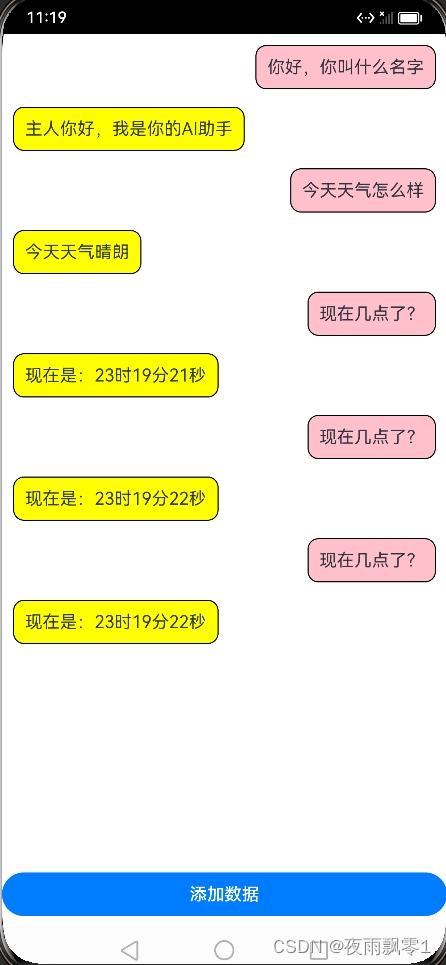
In src/main/ets/model/Msg.ets, define the message structure:
// Message types: received (0) and sent (1)
export const TYPE_RECEIVED = 0;
export const TYPE_SENT = 1;

export class Msg {
  content: string;
  type: number;

  constructor(content: string, type: number) {
    this.content = content;
    this.type = type;
  }
}
In src/main/ets/model/MsgDataSource.ets, operations for the list are implemented, such as adding data and getting list size. Controlling list display is done by manipulating this object:
import { Msg } from './Msg';


export class MsgDataSource implements IDataSource {
  private listeners: DataChangeListener[] = [];
  private listData = new Array<Msg>();

  constructor() {
    this.addData(new Msg('Hello, what is your name?', 0))
    this.addData(new Msg('Hello master, I am your AI assistant', 1))
    this.addData(new Msg('How is the weather today?', 0))
    this.addData(new Msg('Today is sunny', 1))
  }

  public totalCount(): number {
    return this.listData.length;
  }

  public getData(index: number): Msg {
    return this.listData[index];
  }

  public addData(msg: Msg): void {
    this.listData = this.listData.concat(msg);
    this.notifyDataAdd(this.listData.length - 1);
  }

  registerDataChangeListener(listener: DataChangeListener): void {
    if (this.listeners.indexOf(listener) < 0) {
      this.listeners.push(listener);
    }
  }

  unregisterDataChangeListener(listener: DataChangeListener): void {
    const position = this.listeners.indexOf(listener);
    if (position >= 0) {
      this.listeners.splice(position, 1);
    }
  }

  notifyDataAdd(index: number): void {
    this.listeners.forEach((listener: DataChangeListener) => {
      listener.onDataAdd(index);
    })
  }

  notifyDataChange(index: number): void {
    this.listeners.forEach((listener: DataChangeListener) => {
      listener.onDataChange(index);
    })
  }
}
Page code:
import { Msg, TYPE_SENT } from '../model/Msg';
import { MsgDataSource } from '../model/MsgDataSource';

@Entry
@Component
struct Index {
  @Provide msgListData: MsgDataSource = new MsgDataSource();
  private listScroller: Scroller = new Scroller();

  build() {
    Column() {
      Scroll() {
        Column() {
          Row() {
            List({ space: 16, scroller: this.listScroller }) {
              LazyForEach(this.msgListData, (item: Msg) => {
                ListItem() {
                  Column() {
                    if (item?.type == TYPE_SENT) {
                      Column() {
                        Text(item?.content)
                          .border({ width: 1, color: Color.Black, radius: 10 })
                          .padding(10)
                          .backgroundColor(Color.Yellow)
                      }
                      .width('100%')
                      .alignItems(HorizontalAlign.Start)
                    } else {
                      Column() {
                        Text(item?.content)
                          .border({ width: 1, color: Color.Black, radius: 10 })
                          .padding(10)
                          .backgroundColor(Color.Pink)
                      }
                      .width('100%')
                      .alignItems(HorizontalAlign.End)
                    }
                  }
                  .width('100%')
                }
              })
            }
            .width('95%')
            .height('100%')
          }
          .justifyContent(FlexAlign.Center)
          .alignItems(VerticalAlign.Top)
          .padding({ top: 10, bottom: 10 })
          .width('100%')
          .height('100%')
        }
        .width('100%')
      }
      .scrollBar(BarState.Off)
      .width('100%')
      .height('90%')

      Row() {
        Button('Add Data')
          .width('100%')
          .margin({ bottom: 10 })
          .onClick(() => {
            let myDate: Date = new Date()
            let content = `Current time: ${myDate.getHours()}h ${myDate.getMinutes()}m ${myDate.getSeconds()}s`
            this.msgListData.addData(new Msg('What time is it?', 0))
            this.msgListData.addData(new Msg(content, 1))
            this.listScroller.scrollToIndex(this.msgListData.totalCount() - 1)
          })
      }
      .height('10%')
      .width('100%')
      .alignItems(VerticalAlign.Bottom)
    }
    .width('100%')
    .height('100%')
  }
}