Introduction
OpenAI has open-sourced Whisper, a speech recognition project that claims its English speech recognition capability is on par with humans, and it also supports automatic speech recognition in 98 other languages. Whisper provides automatic speech recognition and translation tasks, which can convert speech in various languages into text and translate those texts into English. The main goal of this project is to fine-tune the Whisper model using LoRA. Several models are currently available for open-source, which can be viewed at openai. The commonly used models are listed below. Additionally, the project finally uses CTranslate2 for accelerated inference of speech recognition, and it’s worth noting that accelerated inference supports direct conversion of the original Whisper model without necessarily requiring fine-tuning.
- openai/whisper-tiny
- openai/whisper-base
- openai/whisper-small
- openai/whisper-medium
- openai/whisper-large
- openai/whisper-large-v2
Source Code Address: Whisper-Finetune
Environment Used:
- Anaconda 3
- Python 3.8
- PyTorch 1.13.1
- Ubuntu 18.04
- GPU A100-PCIE-40GB*1
Introduction to Main Program Files
aishell.py: Prepares AIShell training data.finetune.py: Fine-tunes the model.merge_lora.py: Merges the Whisper and LoRA models.evaluation.py: Evaluates the fine-tuned model or the original Whisper model.infer_tfs.py: Uses transformers to directly call the fine-tuned or original Whisper model for prediction, suitable only for short audio inference.infer_ct2.py: Uses the model converted to CTranslate2 for prediction, mainly referring to this program’s usage.infer_gui.py: Provides a GUI interface for prediction using the CTranslate2-converted model.infer_server.py: Deploys the CTranslate2-converted model to the server for client-side calls.
Welcome to join the knowledge planet for discussions. The knowledge planet provides project model files, model files of other related projects by the blogger, and other resources.
Model Test Table
- Word Error Rate (WER) Test Table for Original Models
| Model Used | Specified Language | aishell_test | test_net | test_meeting | Model Acquisition |
|---|---|---|---|---|---|
| whisper-tiny | Chinese | 0.31898 | 0.40482 | 0.75332 | Available by joining the knowledge planet |
| whisper-base | Chinese | 0.22196 | 0.30404 | 0.50378 | Available by joining the knowledge planet |
| whisper-small | Chinese | 0.13897 | 0.18417 | 0.31154 | Available by joining the knowledge planet |
| whisper-medium | Chinese | 0.09538 | 0.13591 | 0.26669 | Available by joining the knowledge planet |
| whisper-large | Chinese | 0.08969 | 0.12933 | 0.23439 | Available by joining the knowledge planet |
| whisper-large-v2 | Chinese | 0.08817 | 0.12332 | 0.26547 | Available by joining the knowledge planet |
- Word Error Rate (WER) Test Table after Fine-Tuning Dataset
| Model Used | Specified Language | Dataset | aishell_test | test_net | test_meeting | Model Acquisition |
|---|---|---|---|---|---|---|
| whisper-tiny | Chinese | AIShell | 0.13043 | 0.4463 | 0.57728 | Available by joining the knowledge planet |
| whisper-base | Chinese | AIShell | 0.08999 | 0.33089 | 0.40713 | Available by joining the knowledge planet |
| whisper-small | Chinese | AIShell | 0.05452 | 0.19831 | 0.24229 | Available by joining the knowledge planet |
| whisper-medium | Chinese | AIShell | 0.03681 | 0.13073 | 0.16939 | Available by joining the knowledge planet |
| whisper-large-v2 | Chinese | AIShell | 0.03139 | 0.12201 | 0.15776 | Available by joining the knowledge planet |
| whisper-tiny | Chinese | WenetSpeech | 0.17711 | 0.24783 | 0.39226 | Available by joining the knowledge planet |
| whisper-large-v2 | Chinese | WenetSpeech | 0.05443 | 0.10087 | 0.19087 | Available by joining the knowledge planet |
- Inference Speed Test Table (Non-accelerated vs Accelerated), GPU: GTX3090 (24G)
| Model Used | Original Model Real-time Rate (float16) | Real-time Rate with CTranslate2 Acceleration (float16) | Real-time Rate with CTranslate2 Acceleration (int8_float16) |
|---|---|---|---|
| whisper-tiny | 0.03 | 0.06 | 0.06 |
| whisper-base | 0.04 | 0.06 | 0.06 |
| whisper-small | 0.08 | 0.08 | 0.08 |
| whisper-medium | 0.13 | 0.10 | 0.10 |
| whisper-large-v2 | 0.19 | 0.12 | 0.12 |
- Processed Data List
| Data Processing Method | AiShell | WenetSpeech |
|---|---|---|
| Add Punctuation Marks | Available by joining the knowledge planet | Available by joining the knowledge planet |
| Add Punctuation Marks and Timestamps | Available by joining the knowledge planet | Available by joining the knowledge planet |
Important Notes:
- During evaluation, the punctuation marks output by the model are removed, and traditional Chinese is converted to simplified Chinese.
aishell_testis the test set of AIShell, whiletest_netandtest_meetingare the test sets of WenetSpeech.- RTF = Total audio time (seconds) / Total ASR processing time (seconds).
- The audio used for speed testing is
dataset/test.wav, with a duration of 8 seconds. - The training data uses data with punctuation marks, which may result in a higher word error rate.
- Fine-tuning the AiShell data does not include timestamps, while fine-tuning the WenetSpeech data includes timestamps.
Installation Environment
- First, install the GPU version of PyTorch. If already installed, skip this step.
conda install pytorch==1.13.1 torchvision==0.14.1 torchaudio==0.13.1 pytorch-cuda=11.6 -c pytorch -c nvidia
- Install required dependency libraries.
python -m pip install -r requirements.txt -i https://pypi.tuna.tsinghua.edu.cn/simple
Data Preparation
The training dataset is a JSONL file, where each line is a JSON data entry. The data format is as follows: Whisper supports punctuation marks, so the training dataset can include them. This project provides a program aishell.py to generate training and test sets. Note: This program can skip downloading by specifying the AIShell compressed file path. If direct download is slow, use download managers like Thunder to get the dataset and specify the path via the --filepath parameter, e.g., /home/test/data_aishell.tgz. If training without timestamps, the sentences part can be omitted.
{
   "audio": {
      "path": "dataset/0.wav"
   },
   "sentence": "近几年,不但我用书给女儿压岁,也劝说亲朋不要给女儿压岁钱,而改送压岁书。",
   "sentences": [
      {
         "start": 0,
         "end": 1.4,
         "text": "近几年,"
      },
      {
         "start": 1.42,
         "end": 8.4,
         "text": "不但我用书给女儿压岁,也劝说亲朋不要给女儿压岁钱,而改送压岁书。"
      }
   ],
   "duration": 7.37
}
Model Fine-Tuning
After preparing the data, you can start fine-tuning the model. The two most critical parameters are:
- --base_model: Specifies the base Whisper model to fine-tune. This model must exist on HuggingFace and can be downloaded automatically during training, or you can specify a local path with --local_files_only=True.
- --output_path: Specifies the save path for the LoRA checkpoint after training.
Single GPU Training
CUDA_VISIBLE_DEVICES=0 python finetune.py --base_model=openai/whisper-tiny --output_dir=output/
Multi-GPU Training
There are two methods for multi-GPU training: torchrun and accelerate.
- Using
torchrunto start multi-GPU training:
torchrun --nproc_per_node=2 finetune.py --base_model=openai/whisper-tiny --output_dir=output/
- Using
accelerateto start multi-GPU training:
First, configure training parameters (answer the prompts, mostly default):
accelerate config
Then start training:
accelerate launch finetune.py --base_model=openai/whisper-tiny --output_dir=output/
Sample Training Log:
{'loss': 0.9098, 'learning_rate': 0.000999046843662503, 'epoch': 0.01}
{'loss': 0.5898, 'learning_rate': 0.0009970611012927184, 'epoch': 0.01}
{'loss': 0.5583, 'learning_rate': 0.0009950753589229333, 'epoch': 0.02}
{'loss': 0.5469, 'learning_rate': 0.0009930896165531485, 'epoch': 0.02}
{'loss': 0.5959, 'learning_rate': 0.0009911038741833634, 'epoch': 0.03}
Model Merging
After fine-tuning, two models exist: the base Whisper model and the LoRA model. They need to be merged for subsequent operations. The program requires two parameters:
- --lora_model: Path to the LoRA model saved after training (note the correct directory structure, e.g., output/checkpoint-final).
- --output_dir: Directory to save the merged model.
python merge_lora.py --lora_model=output/checkpoint-final --output_dir=models/
Model Evaluation
Run the following program to evaluate the model. Key parameters:
- --model_path: Path to the merged model (or directly use the original Whisper model, e.g., openai/whisper-large-v2).
- --metric: Evaluation method, e.g., cer (character error rate) or wer (word error rate).
python evaluation.py --model_path=models/whisper-tiny-finetune --metric=cer
Inference
Run the following program for speech recognition. This program uses transformers to call the fine-tuned or original Whisper model, suitable only for short audio inference. For long audio, refer to infer_ct2.py.
python infer_tfs.py --audio_path=dataset/test.wav --model_path=models/whisper-tiny-finetune
Accelerated Inference
To accelerate inference (original Whisper is slow), use CTranslate2. First, convert the merged model to CTranslate2 format:
ct2-transformers-converter --model models/whisper-tiny-finetune --output_dir models/whisper-tiny-ct2 --copy_files tokenizer.json --quantization float16
Then run the inference with the converted model:
python infer_ct2.py --audio_path=dataset/test.wav --model_path=models/whisper-tiny-ct2
Sample Output:
{
    "language": "zh",
    "duration": 8.39,
    "results": [
        {
            "start": 0.0,
            "end": 8.39,
            "text": "近几年不但我用书给女儿压岁也劝说亲朋友不要给女儿压岁钱而改送压岁书"
        }
    ],
    "text": "近几年不但我用书给女儿压岁也劝说亲朋友不要给女儿压岁钱而改送压岁书"
}
GUI Inference
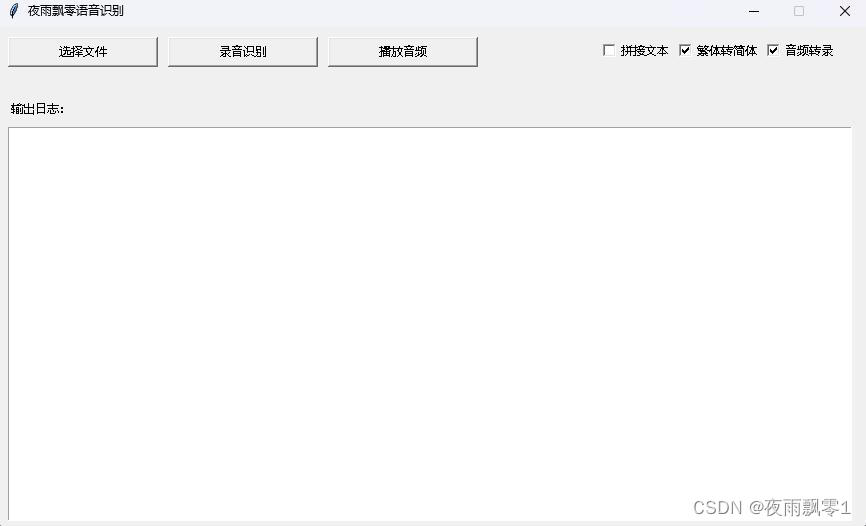
Run the following program to use the GUI interface for inference (CTranslate2 is used for acceleration):
python infer_gui.py --model_path=models/whisper-tiny-ct2
Sample GUI Interface:
Web Deployment
Deploy the model to the server using CTranslate2 for multi-client access:
python infer_server.py --host=0.0.0.0 --port=5000 --model_path=models/whisper-tiny-ct2 --num_workers=2
API Documentation
Two interfaces are provided:
- /recognition: Standard recognition (non-streaming).
- /recognition_stream: Streaming result return (suitable for long audio).
Request Parameters:
| Field | Required | Type | Default | Description |
|---|---|---|---|---|
| audio | Yes | File | Audio file to be recognized | |
| to_simple | No | int | 1 | Simplify traditional Chinese (0: No, 1: Yes) |
| remove_pun | No | int | 0 | Remove punctuation marks (0: No, 1: Yes) |
| task | No | String | transcribe | Task type: transcribe or translate |
Sample Python Call for /recognition:
import requests

response = requests.post(url="http://127.0.0.1:5000/recognition",
                         files=[("audio", ("test.wav", open("dataset/test.wav", 'rb'), 'audio/wav'))],
                         json={"to_simple": 1, "remove_pun": 0, "task": "transcribe"}, timeout=20)
print(response.text)
Sample Python Call for /recognition_stream:
import json
import requests

response = requests.post(url="http://127.0.0.1:5000/recognition_stream",
                         files=[("audio", ("test.wav", open("dataset/test_long.wav", 'rb'), 'audio/wav'))],
                         json={"to_simple": 1, "remove_pun": 0, "task": "transcribe"}, stream=True, timeout=20)
for chunk in response.iter_lines(decode_unicode=False, delimiter=b"\0"):
    if chunk:
        result = json.loads(chunk.decode())
        text = result["result"]
        start = result["start"]
        end = result["end"]
        print(f"[{start} - {end}]:{text}")
Android Deployment
The Android deployment code is in the AndroidDemo directory.
Model Conversion
- Clone the Whisper source code: