Introduction
MTCNN, Multi-task convolutional neural network, combines face detection with facial landmark detection. It is divided into three network structures: P-Net, R-Net, and O-Net. Proposed by the Shenzhen Institute of Advanced Technology, Chinese Academy of Sciences in 2016, this multi-task neural network model is used for face detection tasks. It mainly employs three cascaded networks with a candidate box plus classifier approach for fast and efficient face detection. These three cascaded networks are: P-Net (quickly generates candidate windows), R-Net (performs high-precision candidate window filtering), and O-Net (generates final bounding boxes and facial landmarks). Similar to many convolutional neural network models for image problems, MTCNN also uses techniques such as image pyramids, bounding box regression, and non-maximum suppression.
Source Code: https://github.com/yeyupiaoling/Pytorch-MTCNN
Environment
- PyTorch 1.8.1
- Python 3.7
File Introduction
models/Loss.pyLoss functions used by MTCNN, including classification loss, bounding box loss, and landmark lossmodels/PNet.pyPNet network structuremodels/RNet.pyRNet network structuremodels/ONet.pyONet network structureutils/data_format_converter.pyMerges multiple images into a single fileutils/data.pyTraining data readerutils/utils.pyVarious utility functionstrain_PNet/generate_PNet_data.pyGenerates training data for PNettrain_PNet/train_PNet.pyTrains the PNet modeltrain_RNet/generate_RNet_data.pyGenerates training data for RNettrain_RNet/train_RNet.pyTrains the RNet modeltrain_ONet/generate_ONet_data.pyGenerates training data for ONettrain_ONet/train_ONet.pyTrains the ONet modelinfer_path.pyPredicts images using paths, detects face positions and key points in images, and displays resultsinfer_camera.pyPredicts images, detects face positions and key points in real-time
Dataset Download
- WIDER Face Download the Training Images, extract the
WIDER_trainfolder and place it underdataset. Also download Face annotations, extract it, and place thewider_face_train_bbx_gt.txtfile in thedatasetdirectory. - Deep Convolutional Network Cascade for Facial Point Detection Download the Training set, extract it, and place the
lfw_5590andnet_7876folders underdataset.
After extracting the datasets, the dataset directory should contain folders: lfw_5590, net_7876, WIDER_train, and annotation files: testImageList.txt, trainImageList.txt, wider_face_train.txt.
Training Models
Training the model involves three steps: training PNet, training RNet, and training ONet. Each step depends on the previous one.
Step 1: Train PNet Model
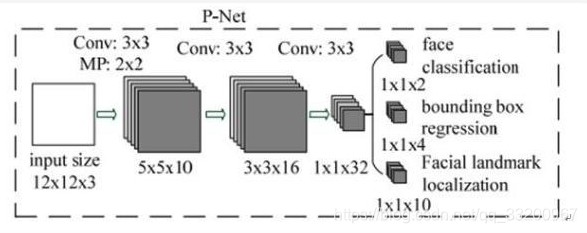
PNet (Proposal Network) is a fully convolutional network. It serves as a region proposal network for face detection. After three convolutional layers, the network uses a face classifier to determine if a region is a face and performs bounding box regression.
- cd train_PNet Switch to the train_PNet folder
- python3 generate_PNet_data.py First generate training data for PNet
- python3 train_PNet.py Start training the PNet model
Step 2: Train RNet Model
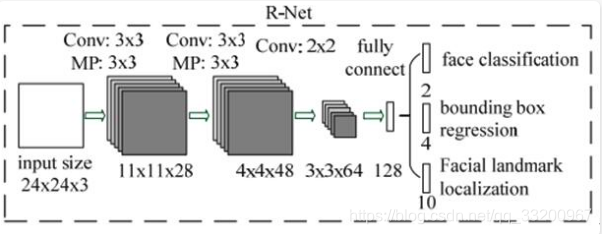
RNet (Refine Network) is a convolutional neural network with an additional fully connected layer compared to PNet, enabling stricter filtering of input data. After PNet, many prediction windows are generated; these are fed into RNet, which filters out low-quality candidates and optimizes predictions using Bounding-Box Regression and NMS.
- cd train_RNet Switch to the train_RNet folder
- python3 generate_RNet_data.py Generate training data for RNet using the trained PNet model
- python3 train_RNet.py Start training the RNet model
Step 3: Train ONet Model
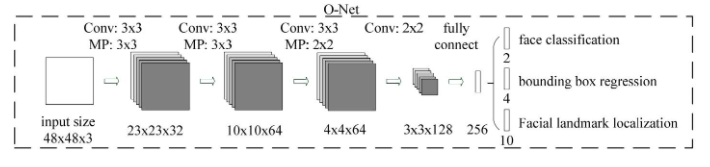
ONet (Output Network) is a more complex convolutional neural network with an additional convolutional layer compared to RNet. It uses more supervision to identify facial regions and performs regression on facial landmarks, ultimately outputting five facial feature points.
- cd train_ONet Switch to the train_ONet folder
- python3 generate_ONet_data.py Generate training data for ONet using the trained PNet and RNet models
- python3 train_ONet.py Start training the ONet model
Inference
-
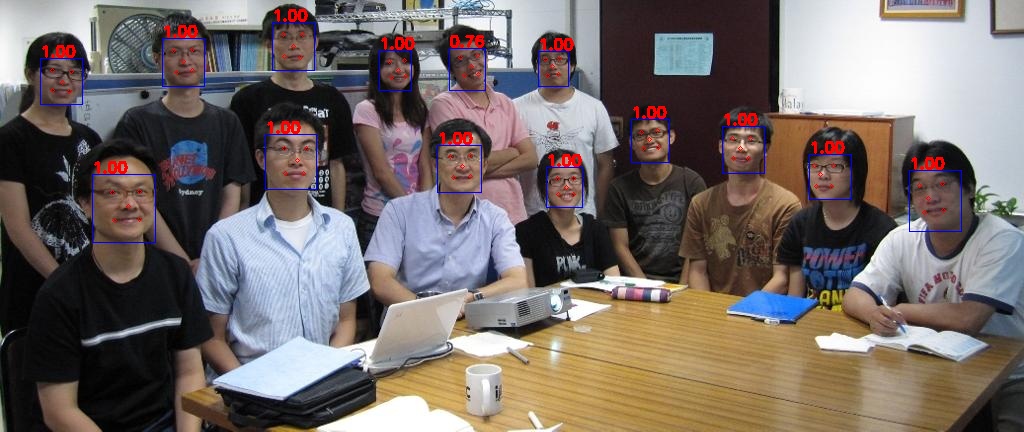
python3 infer_path.pyIdentify face boxes and key points in images using image paths and display results
-
python3 infer_camera.pyCapture images from the camera, detect face boxes and key points, and display results in real-time
References
- https://github.com/AITTSMD/MTCNN-Tensorflow
- https://blog.csdn.net/qq_36782182/article/details/83624357