CRNN
This project is a CRNN (Convolutional Recurrent Neural Network) text recognition model implemented with PaddlePaddle 2.0 dynamic graph, which supports image inputs of varying lengths. CRNN is an end-to-end recognition model that can complete the recognition of all text in an image without segmenting the image. The structure of CRNN mainly consists of CNN + RNN + CTC. Their respective functions are: using a deep CNN to extract features from the input image and obtain feature maps; using a bidirectional RNN (BLSTM) to predict the feature sequence, learning each feature vector in the sequence, and outputting the predicted label (true value) distribution; using CTC Loss to convert the series of label distributions obtained from the recurrent layer into the final label sequence.
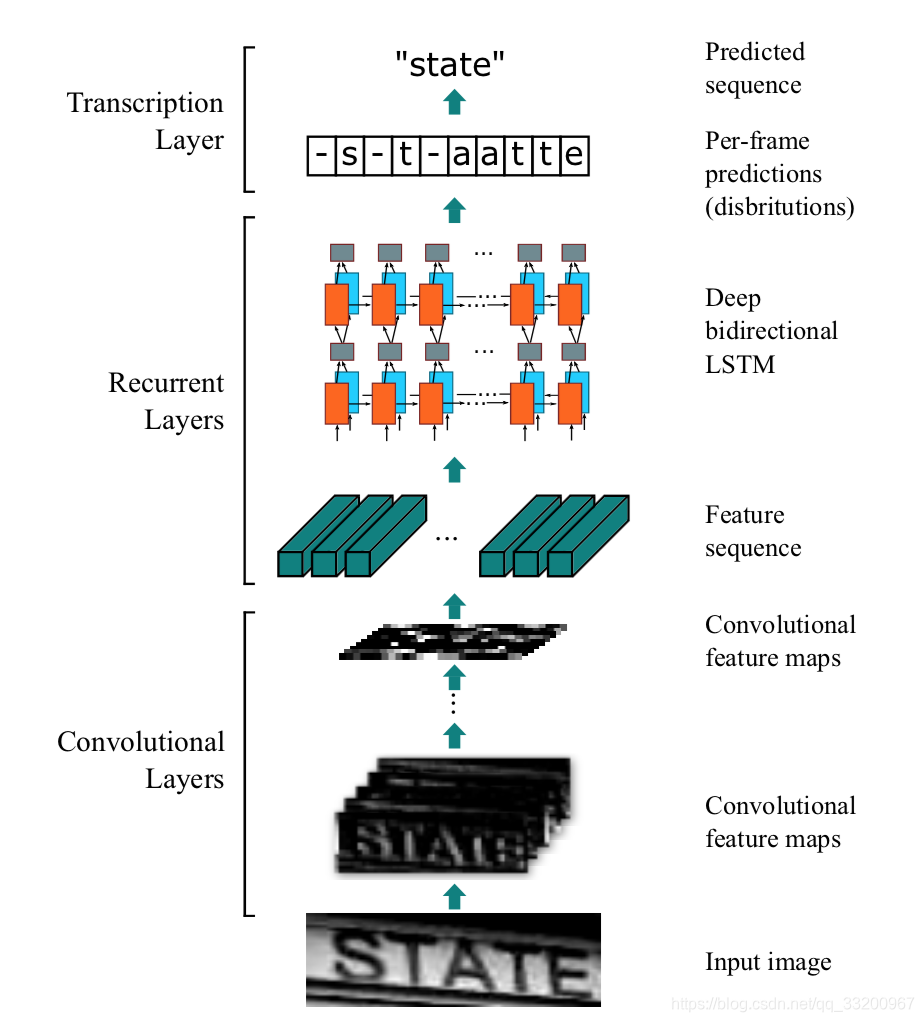
The structure of CRNN is as follows: An image with a height of 32 and arbitrary width. After passing through multiple convolutional layers, the height becomes 1. After paddle.squeeze(), the height is removed. That is, the input image BCHW becomes BCW after convolution. Then the feature order is changed from BCW to WBC and input into the RNN. After two RNN layers, the final input of the model is (W, B, Class_num), which is exactly the input of the CTCLoss function.
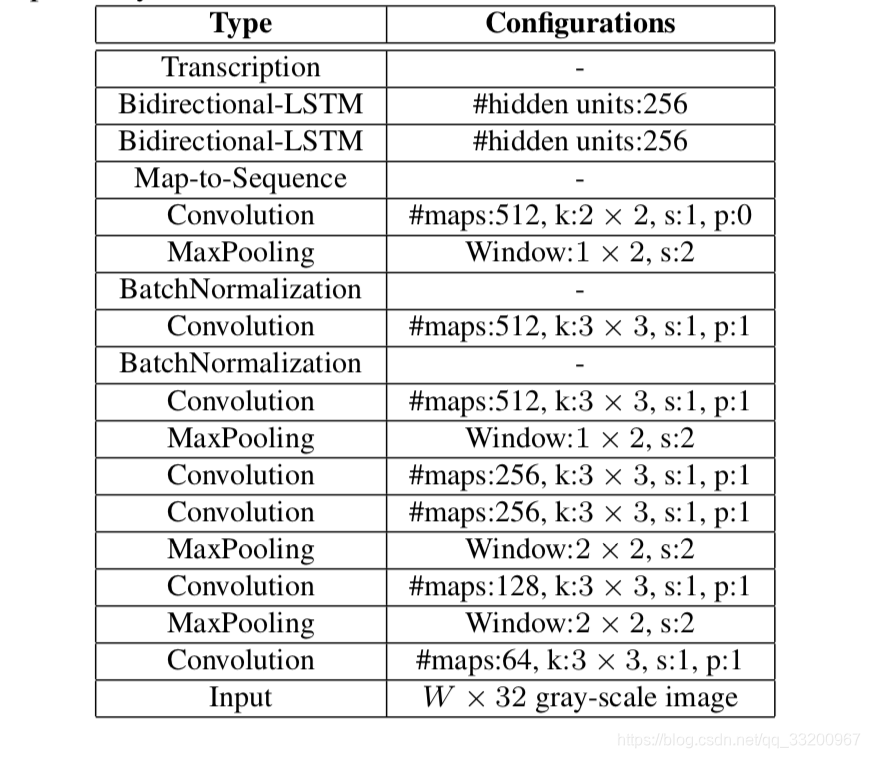
Environment Requirements:
- PaddlePaddle 2.0.1
- Python 3.7
Source Code Address: https://github.com/yeyupiaoling/PaddlePaddle-CRNN
Run Online: https://aistudio.baidu.com/aistudio/projectdetail/1751953
Dataset Preparation
- The author has prepared a dataset of captcha images with varying lengths. This program can automatically generate images, data lists, and vocabulary. Readers need to modify the path of their own font file
font_path. A large number of font files can be downloaded online. The author used this font Download Here.
```shell script
python create_image.py
The images generated by running the above program will be placed in the `dataset/images` directory. The generated training and test data lists are placed in `dataset/train_list.txt` and `dataset/test_list.txt` respectively. There is also a data vocabulary file `dataset/vocabulary.txt`.

The format of the data list is as follows: the left side is the image path, and the right side is the text label.
```shell script
dataset/images/1617420021182_c1dw.jpg   c1dw
dataset/images/1617420021204_uvht.jpg   uvht
dataset/images/1617420021227_hb30.jpg   hb30
dataset/images/1617420021266_4nkx.jpg   4nkx
dataset/images/1617420021296_80nv.jpg   80nv
The format of the dataset vocabulary is one character per line. The first line is a space, which does not represent any character.
```shell script
f
s
2
7
3
n
d
w
**To train with custom data, refer to the above format.**


# Training

Whether you use the custom dataset or the data generated above, as long as the file path is correct, you can start training. This training supports images of varying lengths, but the data length of each batch must still be the same. In this case, the author uses the `collate_fn()` function, which can find the longest data, pad other data with zeros to the same length, and output the actual length of each data label because the loss function needs the actual length of the label as input.
```shell script
python train.py
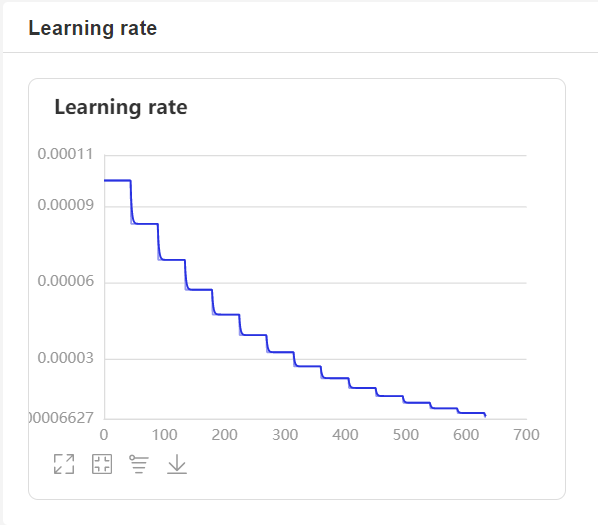
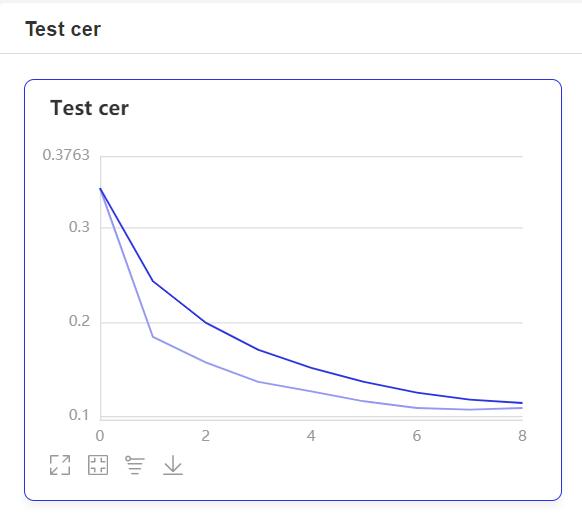
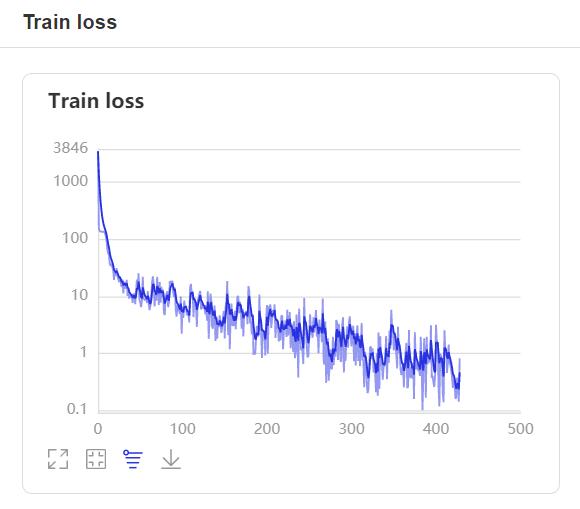
- During training, the program will use VisualDL to record training results. You can start VisualDL with the following command:
visualdl --logdir=log --host=0.0.0.0
- Then visit
http://localhost:8040in your browser to view the results. The display is as follows:
Inference
After training, use the saved model for inference. Modify the image_path to specify the path of the image to be predicted. For the decoding method, the author uses the simplest greedy strategy.
```shell script
python infer.py
The output is as follows:
Prediction result: 2gmnt93e
```