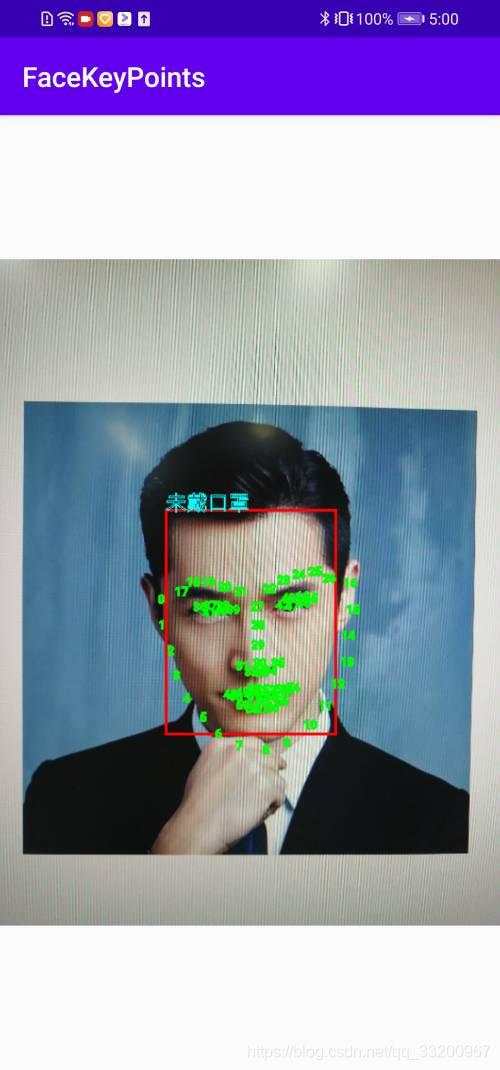
Implement Face Detection, Key Point Detection, and Mask Detection with One Line of Code.
Face[] result = FaceDetectionUtil.getInstance(MainActivity.this).predictImage(bitmap);
This project uses C++ implementation with Paddle Lite for face detection, face key point detection, and mask detection. The compiled dynamic and static libraries are deployed on Android applications to enable these detection functions on Android devices. Therefore, you don’t need to use C++ development; you can simply use the JNI interface provided by the author. The ai module was used during development and can be completely deleted by readers. If you want to view the C++ implementation, you can refer to the source code in this module.
Source Code Address: https://github.com/yeyupiaoling/FaceKeyPointsMask
Android Development
The assets directory stores model files. The pyramidbox.nb model is for face detection. The first step is to detect faces before proceeding with further recognition. The facekeypoints.nb model is for face key point detection. After detecting a face, this model is used to detect key points. The maskclassifier.nb model is the mask classification model, which identifies whether a mask is worn after detecting a face. Initially, a gender and age classification model was trained to enable five functions simultaneously: face detection, face key point detection, mask detection, gender recognition, and age recognition.
The jniLibs directory stores the compiled C++ code and Paddle Lite dynamic libraries. Although this file is large, the resulting APK will be very small after packaging.
The com.yeyupiaoling.ai package contains code for recognition functions and cannot be modified, as it includes JNI interfaces consistent with the C++ code. PaddleNative.java is the JNI interface for recognition. Face.java is a structure for returning results from C++, parsed by this Java bean. FaceDetectionUtil.java is the recognition utility class, and Utils.java provides other general utility methods.
Using the Recognition Function
With the above utility classes, recognition becomes straightforward. Just use the following one-line code: this method supports both Bitmap format and direct image path prediction.
Face[] result = FaceDetectionUtil.getInstance(MainActivity.this).predictImage(bitmap);
To display the recognition results, use the following one-line code. Since the image size during prediction is proportionally reduced, you cannot directly use the original Bitmap to draw recognition information. You must use getBitmap() to obtain the scaled-down image for correct drawing of prediction results.
Bitmap b = Utils.drawBitmap(FaceDetectionUtil.getInstance(MainActivity.this).getBitmap(), result);
This completes the implementation of face detection, key point detection, and mask detection on Android.
Effect Diagram: