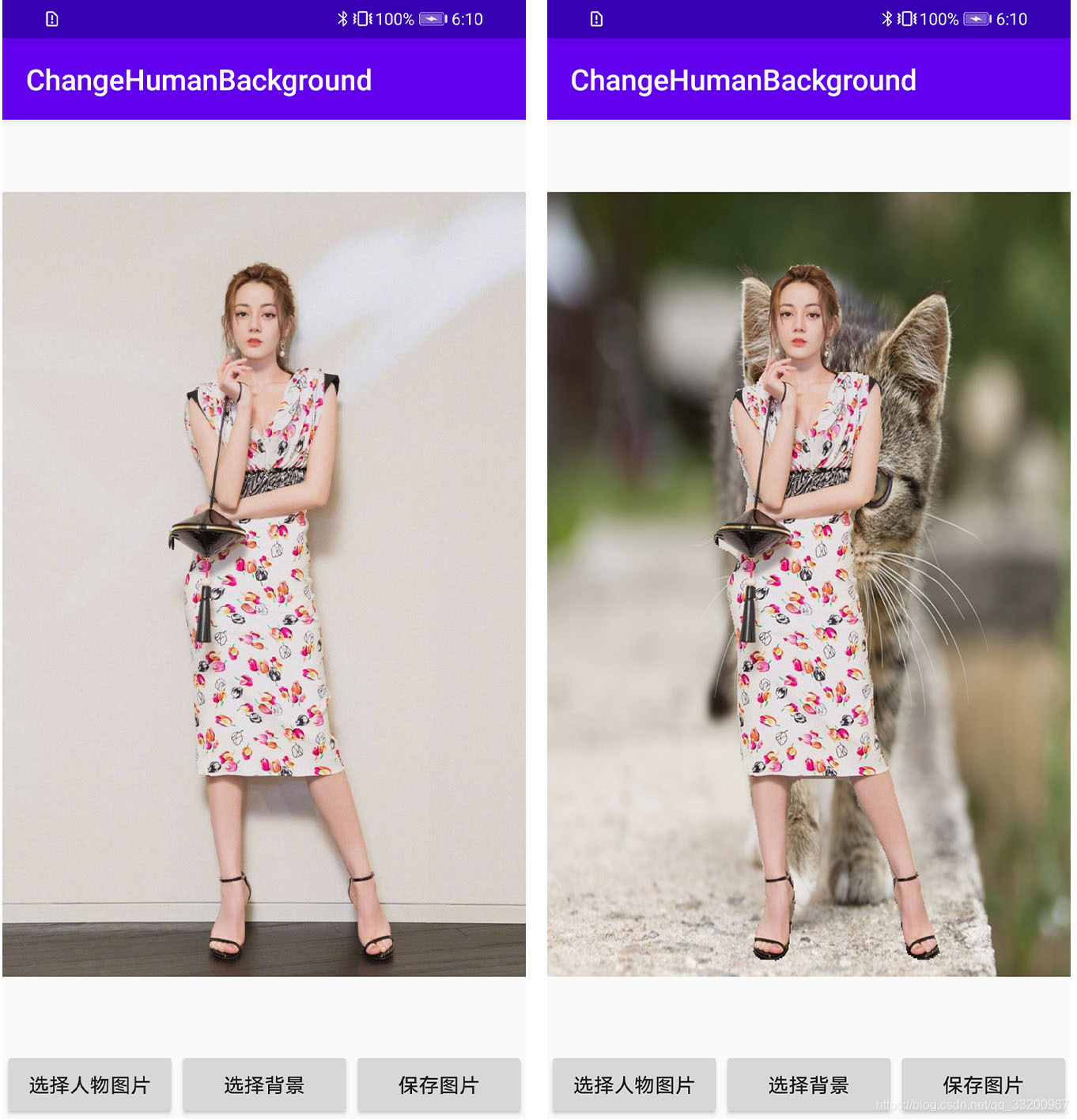
This tutorial is implemented using PaddlePaddle’s PaddleSeg, an open-source library available at http://github.com/PaddlePaddle/PaddleSeg. It utilizes pre-trained models provided by the open-source library to achieve human image semantic segmentation, and finally deploys the model to an Android application. For how to use PaddlePaddle models in Android applications, please refer to the author’s article “Implementing Image Classification on Android Phones Using Paddle Lite”.
Open-source code address of this tutorial: https://github.com/yeyupiaoling/ChangeHumanBackground
Image Semantic Segmentation Tool
First, we create a utility class to use PaddlePaddle’s image semantic segmentation model in an Android application. The PaddleLiteSegmentation Java utility class is used to load the model and predict images.
First, load the model to obtain a predictor. Here, inputShape specifies the input size of the image, and NUM_THREADS sets the number of threads for prediction (up to 4 threads are supported).
    private PaddlePredictor paddlePredictor;
    private Tensor inputTensor;
    public static long[] inputShape = new long[]{1, 3, 513, 513};
    private static final int NUM_THREADS = 4;

    /**
     * @param modelPath Path to the model file
     */
    public PaddleLiteSegmentation(String modelPath) throws Exception {
        File file = new File(modelPath);
        if (!file.exists()) {
            throw new Exception("Model file does not exist!");
        }
        try {
            MobileConfig config = new MobileConfig();
            config.setModelFromFile(modelPath);
            config.setThreads(NUM_THREADS);
            config.setPowerMode(PowerMode.LITE_POWER_HIGH);
            paddlePredictor = PaddlePredictor.createPaddlePredictor(config);

            inputTensor = paddlePredictor.getInput(0);
            inputTensor.resize(inputShape);
        } catch (Exception e) {
            e.printStackTrace();
            throw new Exception("Failed to load model!");
        }
    }
Before prediction, we add two overloaded methods to support both image paths and Bitmaps for semantic segmentation.
    public long[] predictImage(String image_path) throws Exception {
        if (!new File(image_path).exists()) {
            throw new Exception("Image file does not exist!");
        }
        FileInputStream fis = new FileInputStream(image_path);
        Bitmap bitmap = BitmapFactory.decodeStream(fis);
        long[] result = predictImage(bitmap);
        if (!bitmap.isRecycled()) {
            bitmap.recycle();
        }
        return result;
    }

    public long[] predictImage(Bitmap bitmap) throws Exception {
        return predict(bitmap);
    }
Next, a preprocessing method is needed to convert the Bitmap to a float array required by the predictor. This method handles channel order conversion and normalization (no normalization is needed here).
    private float[] getScaledMatrix(Bitmap bitmap) {
        int channels = (int) inputShape[1];
        int width = (int) inputShape[2];
        int height = (int) inputShape[3];
        float[] inputData = new float[channels * width * height];
        Bitmap rgbaImage = bitmap.copy(Bitmap.Config.ARGB_8888, true);
        Bitmap scaleImage = Bitmap.createScaledBitmap(rgbaImage, width, height, true);
        Log.d(TAG, scaleImage.getWidth() + ", " + scaleImage.getHeight());

        if (channels == 3) {
            // RGB = {0, 1, 2}, BGR = {2, 1, 0}
            int[] channelIdx = new int[]{0, 1, 2};
            int[] channelStride = new int[]{width * height, width * height * 2};
            for (int y = 0; y < height; y++) {
                for (int x = 0; x < width; x++) {
                    int color = scaleImage.getPixel(x, y);
                    float[] rgb = new float[]{(float) red(color), (float) green(color), (float) blue(color)};
                    inputData[y * width + x] = rgb[channelIdx[0]];
                    inputData[y * width + x + channelStride[0]] = rgb[channelIdx[1]];
                    inputData[y * width + x + channelStride[1]] = rgb[channelIdx[2]];
                }
            }
        } else if (channels == 1) {
            for (int y = 0; y < height; y++) {
                for (int x = 0; x < width; x++) {
                    int color = scaleImage.getPixel(x, y);
                    float gray = (float) (red(color) + green(color) + blue(color));
                    inputData[y * width + x] = gray;
                }
            }
        } else {
            Log.e(TAG, "Image must have 1 or 3 channels");
        }
        return inputData;
    }
Finally, the prediction method is implemented. The output is an array representing the semantic segmentation results, where 0 represents the background and 1 represents the human.
    private long[] predict(Bitmap bmp) throws Exception {
        float[] inputData = getScaledMatrix(bmp);
        inputTensor.setData(inputData);

        try {
            paddlePredictor.run();
        } catch (Exception e) {
            throw new Exception("Failed to predict image! Log: " + e);
        }
        Tensor outputTensor = paddlePredictor.getOutput(0);
        long[] output = outputTensor.getLongData();
        long[] outputShape = outputTensor.shape();
        Log.d(TAG, "Result shape: " + Arrays.toString(outputShape));
        return output;
    }
Implementing Human Background Replacement
In MainActivity, the model is copied from the assets to the cache directory when the application starts, and then the human image semantic segmentation model is loaded.
String segmentationModelPath = getCacheDir().getAbsolutePath() + File.separator + "model.nb";
Utils.copyFileFromAsset(MainActivity.this, "model.nb", segmentationModelPath);
try {
    paddleLiteSegmentation = new PaddleLiteSegmentation(segmentationModelPath);
    Toast.makeText(MainActivity.this, "Model loaded successfully!", Toast.LENGTH_SHORT).show();
    Log.d(TAG, "Model loaded successfully");
} catch (Exception e) {
    Toast.makeText(MainActivity.this, "Model loading failed!", Toast.LENGTH_SHORT).show();
    Log.d(TAG, "Model loading failed");
    e.printStackTrace();
    finish();
}
Create buttons to control background replacement:
// Get UI elements
Button selectPicture = findViewById(R.id.select_picture);
Button selectBackground = findViewById(R.id.select_background);
Button savePicture = findViewById(R.id.save_picture);
imageView = findViewById(R.id.imageView);

selectPicture.setOnClickListener(new View.OnClickListener() {
    @Override
    public void onClick(View v) {
        // Open gallery
        Intent intent = new Intent(Intent.ACTION_PICK);
        intent.setType("image/*");
        startActivityForResult(intent, 0);
    }
});

selectBackground.setOnClickListener(new View.OnClickListener() {
    @Override
    public void onClick(View v) {
        if (resultPicture != null) {
            // Open gallery for background selection
            Intent intent = new Intent(Intent.ACTION_PICK);
            intent.setType("image/*");
            startActivityForResult(intent, 1);
        } else {
            Toast.makeText(MainActivity.this, "Please select a human image first!", Toast.LENGTH_SHORT).show();
        }
    }
});

savePicture.setOnClickListener(new View.OnClickListener() {
    @Override
    public void onClick(View v) {
        // Save the processed image
        String savePath = Utils.saveBitmap(mergeBitmap1);
        if (savePath != null) {
            Toast.makeText(MainActivity.this, "Image saved to: " + savePath, Toast.LENGTH_SHORT).show();
            Log.d(TAG, "Image saved successfully: " + savePath);
        } else {
            Toast.makeText(MainActivity.this, "Image save failed", Toast.LENGTH_SHORT).show();
            Log.d(TAG, "Image save failed");
        }
    }
});
When selecting an image with a human, the image is predicted to get segmentation results. The image is then resized to match the original image size and used to create a temporary canvas.
Uri imageUri = data.getData();
imagePath = Utils.getPathFromURI(MainActivity.this, imageUri);
try {
    // Predict the image
    FileInputStream fis = new FileInputStream(imagePath);
    Bitmap bitmap = BitmapFactory.decodeStream(fis);
    long start = System.currentTimeMillis();
    long[] result = paddleLiteSegmentation.predictImage(imagePath);
    long end = System.currentTimeMillis();

    // Create a black image with fully transparent background
    humanPicture = bitmap.copy(Bitmap.Config.ARGB_8888, true);
    final int[] colorsMap = {0x00000000, 0xFF000000};
    int[] objectColor = new int[result.length];

    for (int i = 0; i < result.length; i++) {
        objectColor[i] = colorsMap[(int) result[i]];
    }
    Bitmap.Config config = humanPicture.getConfig();
    Bitmap outputImage = Bitmap.createBitmap(objectColor, (int) PaddleLiteSegmentation.inputShape[2], (int) PaddleLiteSegmentation.inputShape[3], config);
    resultPicture = Bitmap.createScaledBitmap(outputImage, humanPicture.getWidth(), humanPicture.getHeight(), true);

    imageView.setImageBitmap(bitmap);
    Log.d(TAG, "Prediction time: " + (end - start) + "ms");
} catch (Exception e) {
    e.printStackTrace();
}
Finally, implement background replacement by combining the human image and the background image:
Uri imageUri = data.getData();
imagePath = Utils.getPathFromURI(MainActivity.this, imageUri);
try {
    FileInputStream fis = new FileInputStream(imagePath);
    changeBackgroundPicture = BitmapFactory.decodeStream(fis);
    mergeBitmap1 = draw();
    imageView.setImageBitmap(mergeBitmap1);
} catch (Exception e) {
    e.printStackTrace();
}

// Background replacement implementation
public Bitmap draw() {
    // Resize background image to match human image size
    Bitmap bgBitmap = Bitmap.createScaledBitmap(changeBackgroundPicture, resultPicture.getWidth(), resultPicture.getHeight(), true);
    for (int y = 0; y < resultPicture.getHeight(); y++) {
        for (int x = 0; x < resultPicture.getWidth(); x++) {
            int color = resultPicture.getPixel(x, y);
            int alpha = Color.alpha(color);
            if (alpha == 255) {
                bgBitmap.setPixel(x, y, Color.TRANSPARENT);
            }
        }
    }

    // Create a new transparent canvas for background
    Bitmap bgBitmap2 = Bitmap.createBitmap(bgBitmap.getWidth(), bgBitmap.getHeight(), Bitmap.Config.ARGB_8888);
    Canvas canvas1 = new Canvas(bgBitmap2);
    canvas1.drawBitmap(bgBitmap, 0, 0, null);

    return mergeBitmap(humanPicture, bgBitmap2);
}

// Merge two Bitmaps
public static Bitmap mergeBitmap(Bitmap backBitmap, Bitmap frontBitmap) {
    Bitmap bitmap = backBitmap.copy(Bitmap.Config.ARGB_8888, true);
    Canvas canvas = new Canvas(bitmap);
    Rect baseRect = new Rect(0, 0, backBitmap.getWidth(), backBitmap.getHeight());
    Rect frontRect = new Rect(0, 0, frontBitmap.getWidth(), frontBitmap.getHeight());
    canvas.drawBitmap(frontBitmap, frontRect, baseRect, null);
    return bitmap;
}
The implementation effect is as follows: