Foreword
When doing voice recognition in Android applications, users typically start speaking after being awakened. When the user hasn’t spoken for a certain period, recording stops, and the recorded audio is sent to the voice recognition server to obtain the recognition result. This tutorial addresses how to detect if the user has stopped speaking, using the VAD (Voice Activity Detection) code from the WebRTC framework.
VAD stands for Voice Activity Detection, which detects human speech and is widely used in noise reduction and speech recognition. WebRTC’s VAD works by dividing the input spectrum into six sub-bands based on the frequency range of human voices: 80Hz–250Hz, 250Hz–500Hz, 500Hz–1KHz, 1KHz–2KHz, 2KHz–3KHz, and 3KHz–4KHz. It calculates the energy of these six sub-bands and uses the probability density function of the Gaussian model to compute a log-likelihood ratio function. The log-likelihood ratio has both global and local components: the global is the weighted sum of the six sub-bands, while the local is each individual sub-band. Speech is determined by first checking the sub-bands; if any sub-band is active, the global check is skipped, and speech is considered present if any sub-band passes the test.
Creating an Android Project
Now we’ll use WebRTC’s VAD source code to develop an Android project for detecting voice presence.
First, create an Android project and modify the local.properties configuration to add the NDK path (e.g., for the author):
ndk.dir=D\:\\Android\\android-ndk-r15c
sdk.dir=D\:\\Android\\sdk
Next, create a CMakeLists.txt file in the app directory with the following content:
cmake_minimum_required(VERSION 3.4.1)

set(CMAKE_C_FLAGS "${CMAKE_C_FLAGS} -Wall -pedantic")

aux_source_directory(src/main/cpp/vad_src/ DIR_LIB_SRCS)

add_definitions(-DWEBRTC_POSIX)
add_definitions(-DWEBRTC_ANDROID)

add_library( native-lib
             SHARED
             src/main/cpp/native-lib.cpp
             ${DIR_LIB_SRCS})

include_directories(src/main/cpp/vad_src/)

find_library( log-lib
              log )

target_link_libraries( native-lib
                       ${log-lib} )
Modify the app/build.gradle file in the app directory as follows:
# Add inside defaultConfig
externalNativeBuild {
    cmake {
        arguments = ['-DANDROID_STL=c++_static']
        cppFlags ""
    }
}

# Add inside android block
buildTypes {
    release {
        minifyEnabled false
        proguardFiles getDefaultProguardFile('proguard-android.txt'), 'proguard-rules.pro'
    }
}

externalNativeBuild {
    cmake {
        path "CMakeLists.txt"
    }
}
Using WebRTC
Clone the WebRTC source code first:
git clone https://android.googlesource.com/platform/external/webrtc
The required source code is in webrtc/webrtc/common_audio/vad. Copy all files from this directory to the main/cpp/vad_src folder in your Android project. Note: Many dependent files exist outside this directory, so ensure all dependencies are copied (you may need to download pre-extracted files as provided).
In the main/cpp directory, create native-lib.cpp to provide JNI interfaces for Java:
#include <jni.h>
#include <string>
#include <malloc.h>
#include "vad_src/webrtc_vad.h"
#include "vad_src/vad_core.h"

extern "C"
JNIEXPORT jboolean JNICALL
Java_com_yeyupiaoling_testvad_MainActivity_webRtcVad_1Process(JNIEnv *env, jobject instance,
                                                               jshortArray audioData_,
                                                               jint offsetInshort,
                                                               jint readSize) {

    VadInst *handle = WebRtcVad_Create();
    WebRtcVad_Init(handle);
    WebRtcVad_set_mode(handle, 2);
    int index = readSize / 160;
    jshort *pcm_data = env->GetShortArrayElements(audioData_, JNI_FALSE);
    bool b = JNI_FALSE;
    for (int i = 0; i < index; ++i) {
        int vad = WebRtcVad_Process(handle, 16000, pcm_data + offsetInshort + i * 160, 160);
        if (vad == 1) {
            b = JNI_TRUE;
        } else {
            b = JNI_FALSE;
        }
    }
    env->ReleaseShortArrayElements(audioData_, pcm_data, JNI_ABORT);
    WebRtcVad_Free(handle);
    return static_cast<jboolean>(b);
}
Corresponding Java method:
public native boolean webRtcVad_Process(short[] audioData, int offsetInshort, int readSize);
In Android, use the VAD to detect voice presence:
int mMinBufferSize = AudioRecord.getMinBufferSize(16000, AudioFormat.CHANNEL_IN_MONO, AudioFormat.ENCODING_PCM_16BIT);
AudioRecord mRecorder = new AudioRecord(MediaRecorder.AudioSource.MIC, 16000, AudioFormat.CHANNEL_IN_MONO, AudioFormat.ENCODING_PCM_16BIT, mMinBufferSize * 2);

mMinBufferSize = 320;
short[] audioData = new short[mMinBufferSize];
if (mRecorder.getState() != AudioRecord.STATE_INITIALIZED) {
    stopRecord();
    return;
}
mRecorder.startRecording();

while (mIsRecording) {
    if (null != mRecorder) {
        readSize = mRecorder.read(audioData, 0, mMinBufferSize);

        if (readSize == AudioRecord.ERROR_INVALID_OPERATION || readSize == AudioRecord.ERROR_BAD_VALUE) {
            continue;
        }
        if (readSize != 0 && readSize != -1) {
            mSpeaking = webRtcVad_Process(audioData, 0, readSize);
            if (mSpeaking) {
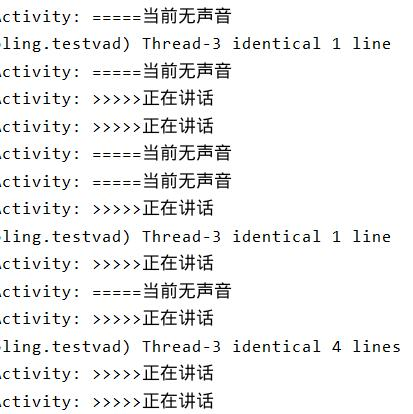
                Log.d(TAG, ">>>>>Speaking now");
            } else {
                Log.d(TAG, "=====No voice detected");
            }
        } else {
            break;
        }
    }
}
Add the microphone permission and handle runtime requests for Android 6.0+:
if (!hasPermission()) {
    requestPermission();
}

private boolean hasPermission() {
    if (Build.VERSION.SDK_INT >= Build.VERSION_CODES.M) {
        return checkSelfPermission(Manifest.permission.RECORD_AUDIO) == PackageManager.PERMISSION_GRANTED;
    } else {
        return true;
    }
}

private void requestPermission() {
    if (Build.VERSION.SDK_INT >= Build.VERSION_CODES.M) {
        requestPermissions(new String[]{Manifest.permission.RECORD_AUDIO}, 1);
    }
}