Table of Contents
@[toc]
Introduction
Sometimes we need network data for work or study, such as when working on deep learning tasks. For a classification task, a large amount of image data is required. Downloading images manually is clearly impractical, so we use crawler programs to help us download the needed data. Let’s start learning about crawlers.
Crawler Framework
Overall Framework
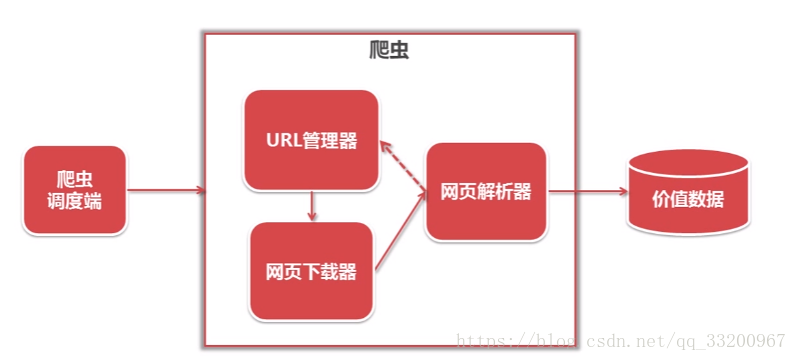
The following diagram illustrates the overall framework of a crawler, which includes a scheduler, URL manager, web downloader, web parser, and valuable data. Their roles are as follows:
- Scheduler: Primarily calls the URL manager, web downloader, and web parser; also sets the crawler’s entry point.
- URL Manager: Manages URLs of web pages to be crawled, adds new URLs, marks crawled URLs, and retrieves URLs to be crawled.
- Web Downloader: Downloads web page data via URLs and saves it as a string.
- Web Parser: Parses the string data obtained by the web downloader to extract the required data.
- Valuable Data: All useful data is stored here.
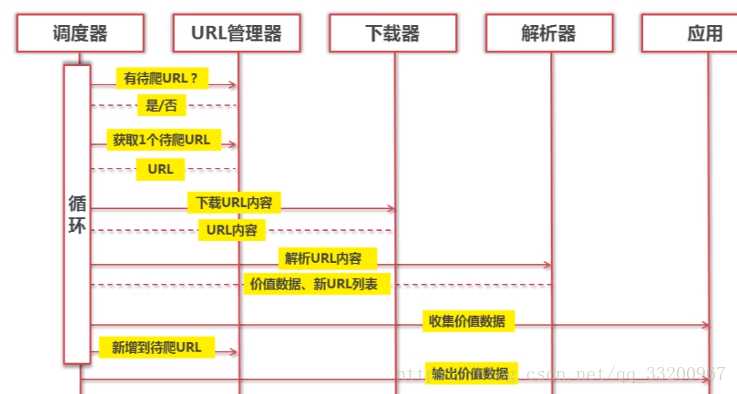
The following diagram shows a sequence diagram of a crawler. From the sequence diagram, you can see that the scheduler continuously fetches network data by invoking the URL manager, web downloader, and web parser.
URL Manager
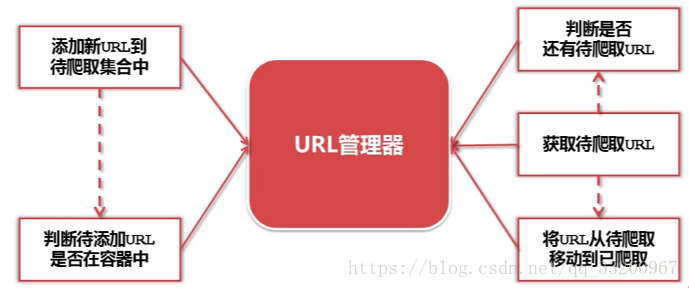
As shown in the diagram, the URL manager is responsible for managing the URLs of web pages to be crawled. When a new URL is encountered, it is added to the manager only after checking if it already exists. When fetching URLs, it first checks if there are remaining URLs. If so, it retrieves the URL and moves it to the crawled list to ensure no duplicate URLs are added.
Web Downloader
The web downloader is used to download web page data from URLs obtained by the URL manager. The downloaded data can be a local file or a string. For example, when crawling images, the downloaded data is a file; when crawling content from web pages, it is a string.

Code Snippet for Web Downloader:
# coding=utf-8
import urllib2

url = "https://www.baidu.com"
response = urllib2.urlopen(url)
code = response.getcode()
content = response.read()

print "Status code:", code
print "Web content:", content
You can also add request headers to mimic other browsers:
# coding=utf-8
import urllib2

url = "https://www.baidu.com"
request = urllib2.Request(url)
# Mimic Firefox browser
request.add_header("user-agent", "Mozilla/5.0")
response = urllib2.urlopen(request)
code = response.getcode()
content = response.read()

print "Status code:", code
print "Web content:", content
Output:
Status code: 200
Web content <html>
<head>
    <script>
        location.replace(location.href.replace("https://","http://"));
    </script>
</head>
<body>
    <noscript><meta http-equiv="refresh" content="0;url=http://www.baidu.com/"></noscript>
</body>
</html>
Web Parser
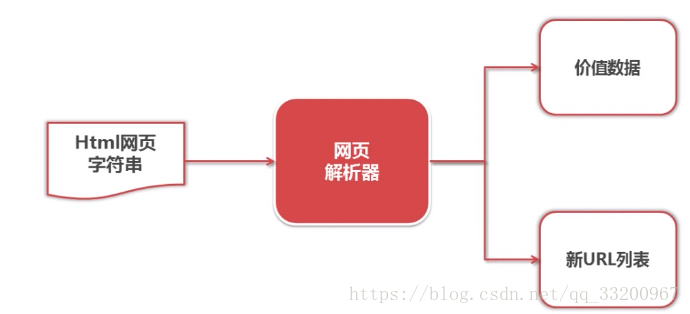
Among the strings downloaded by the web downloader, we need to extract the required data, such as new URLs to crawl and the desired web page content. The web parser parses this data: new URLs are added to the URL manager, and useful data is saved.
Code Snippet for Web Parser:
# coding=utf-8
from bs4 import BeautifulSoup

html_doc = """
<html><head><title>The Dormouse's story</title></head>
<body>
<p class="title"><b>The Dormouse's story</b></p>
"""

soup = BeautifulSoup(html_doc, 'html.parser', from_encoding='utf-8')
# Find p tag with class "title"
title_all = soup.find('p', class_="title")
print(title_all)
# Get the text content of this tag
title = title_all.get_text()
print(title)
Output:
<p class="title"><b>The Dormouse's story</b></p>
The Dormouse's story
Crawler Program
This program crawls articles from CSDN blogs and related articles. The crawler’s entry point is an article titled “Uploading Projects to Gitee” (https://blog.csdn.net/qq_33200967/article/details/70186759). At the end of each article, there are related article recommendations, which serve as additional URL sources.
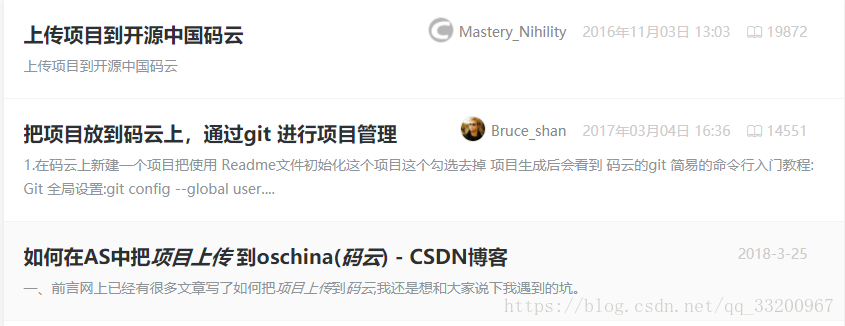
By examining the web source code of the article, we identify the following key code snippets for data extraction:
- Article Title: Located in
<h1 class="csdn_top">.
  <article>
      <h1 class="csdn_top">Uploading Projects to Gitee</h1>
      <div class="article_bar clearfix">
          <div class="artical_tag">
              <span class="original">
              Original                </span>
              <span class="time">April 15, 2017 20:39:02</span>
          </div>
- Article Content: Located in
<div class="article_content csdn-tracking-statistics tracking-click">.
  <div id="article_content" class="article_content csdn-tracking-statistics tracking-click" data-mod="popu_519" data-dsm="post">
      <div class="markdown_views">
          <p>Why use Gitee instead of GitHub? Many friends ask this. Here are the reasons: <br>
- Related Articles: Located in
<a href="..." strategy="BlogCommendFromBaidu_0">.
  <div class="recommend_list clearfix" id="rasss">
      <dl class="clearfix csdn-tracking-statistics recommend_article" data-mod="popu_387" data-poputype="feed" data-feed-show="false" data-dsm="post">
          <a href="https://blog.csdn.net/Mastery_Nihility/article/details/53020481" target="_blank" strategy="BlogCommendFromBaidu_0">
              <dd>
                  <h2>Uploading Projects to Open Source China's Gitee</h2>
                  <div class="summary">
                      Uploading projects to Gitee
                  </div>
With these location details, we can begin data crawling.
Scheduler
Create a spider_main.py file to implement the scheduler code, which acts as the central control for the entire crawler:
# coding=utf-8
import html_downloader
import html_outputer
import html_parser
import url_manager

class SpiderMain(object):
    def __init__(self):
        self.urls = url_manager.UrlManager()
        self.downloader = html_downloader.HtmlDownloader()
        self.parser = html_parser.HtmlParser()
        self.output = html_outputer.HtmlOutput()

    def craw(self, root_url, max_count):
        count = 1
        self.urls.add_new_url(root_url)
        while self.urls.has_new_url():
            try:
                new_url = self.urls.get_new_url()
                print 'craw %d : %s ' % (count, new_url)
                html_cont = self.downloader.downloader(new_url)
                new_urls, new_data = self.parser.parser(new_url, html_cont)
                self.urls.add_new_urls(new_urls)
                self.output.collect_data(new_data)
                if count == max_count:
                    break
                count += 1
            except Exception as e:
                print 'Crawling failed:', e
        self.output.output_html()

if __name__ == '__main__':
    root_url = "https://blog.csdn.net/qq_33200967/article/details/70186759"
    max_count = 100
    obj_spider = SpiderMain()
    obj_spider.craw(root_url, max_count)
URL Manager
Create url_manager.py to manage URLs:
# coding=utf-8

class UrlManager(object):
    def __init__(self):
        self.new_urls = set()
        self.old_urls = set()

    def add_new_url(self, url):
        if url is None:
            return
        if url not in self.new_urls and url not in self.old_urls:
            self.new_urls.add(url)

    def add_new_urls(self, urls):
        if urls is None or len(urls) == 0:
            return
        for url in urls:
            self.add_new_url(url)

    def has_new_url(self):
        return len(self.new_urls) != 0

    def get_new_url(self):
        new_url = self.new_urls.pop()
        self.old_urls.add(new_url)
        return new_url
Web Downloader
Create html_downloader.py to download web pages:
# coding=utf-8
import urllib2

class HtmlDownloader(object):
    def downloader(self, url):
        if url is None:
            return None
        response = urllib2.urlopen(url)
        if response.getcode() != 200:
            return None
        return response.read()
Web Parser
Create html_parser.py to parse web data:
# coding=utf-8
import re
from bs4 import BeautifulSoup

class HtmlParser(object):
    def parser(self, page_url, html_cont):
        if page_url is None or html_cont is None:
            return
        soup = BeautifulSoup(html_cont, 'html.parser', from_encoding='utf-8')
        new_urls = self._get_new_urls(soup)
        new_data = self._get_new_data(page_url, soup)
        return new_urls, new_data

    def _get_new_urls(self, soup):
        new_urls = set()
        links = soup.find_all('a', strategy=re.compile(r"BlogCommendFromBaidu_\d+"))
        for link in links:
            new_url = link['href']
            new_urls.add(new_url)
        return new_urls

    def _get_new_data(self, page_url, soup):
        res_data = {}
        res_data['url'] = page_url

        essay_title = soup.find('h1', class_="csdn_top")
        res_data['title'] = essay_title.get_text()

        essay_content = soup.find('div', class_="article_content csdn-tracking-statistics tracking-click")
        res_data['content'] = essay_content.get_text()
        return res_data
Data Outputter
Create html_outputer.py to save crawled data:
# coding=utf-8

class HtmlOutput(object):
    def __init__(self):
        self.datas = []

    def collect_data(self, data):
        if data is None:
            return
        self.datas.append(data)

    def output_html(self):
        fout = open('output.html', 'w')
        fout.write("<html>")
        fout.write("<body>")
        fout.write("<table>")
        if not self.datas:
            print "No data collected!"
        for data in self.datas:
            fout.write("<tr>")
            fout.write("<td>%s</td>" % data['url'])
            fout.write("<td>%s</td>" % data['title'].encode('utf-8'))
            fout.write("<td>%s</td>" % data['content'].encode('utf-8'))
            fout.write("</tr>")
        fout.write("</table>")
        fout.write("</body>")
        fout.write("</html>")
        fout.close()
Running the Code
Execute spider_main.py to see the crawling logs. Successful runs will output logs like:
craw 1 : https://blog.csdn.net/qq_33200967/article/details/70186759
craw 2 : https://blog.csdn.net/qq_18601953/article/details/78395878
craw 3 : https://blog.csdn.net/wust_lh/article/details/68068176
After crawling, all data is saved in output.html, which can be opened in a browser.
For your convenience, the complete code is available for download here.
References
- http://www.imooc.com/learn/563