在原生的ImageView中,沒有一個方法是可以直接顯示網絡的圖片的,當我們經常需要顯示網絡圖片時,每次都有一大堆的操作,這會很麻煩,今天就教大家在ImageView上輕鬆顯示網絡圖片。
自定義ImageView方法
寫一個類讓它繼承ImageView,並增加一個setImageURL(path)方法
import android.content.Context;
import android.graphics.Bitmap;
import android.graphics.BitmapFactory;
import android.os.Handler;
import android.os.Message;
import android.util.AttributeSet;
import android.widget.ImageView;
import android.widget.Toast;

import java.io.IOException;
import java.io.InputStream;
import java.net.HttpURLConnection;
import java.net.URL;

public class MyImageView extends ImageView {
    public static final int GET_DATA_SUCCESS = 1;
    public static final int NETWORK_ERROR = 2;
    public static final int SERVER_ERROR = 3;
    //子線程不能操作UI,通過Handler設置圖片
    private Handler handler = new Handler() {
        @Override
        public void handleMessage(Message msg) {
           switch (msg.what){
               case GET_DATA_SUCCESS:
                   Bitmap bitmap = (Bitmap) msg.obj;
                   setImageBitmap(bitmap);
                   break;
               case NETWORK_ERROR:
                   Toast.makeText(getContext(),"網絡連接失敗",Toast.LENGTH_SHORT).show();
                   break;
               case SERVER_ERROR:
                   Toast.makeText(getContext(),"服務器發生錯誤",Toast.LENGTH_SHORT).show();
                   break;
           }
        }
    };

    public MyImageView(Context context, AttributeSet attrs, int defStyleAttr) {
        super(context, attrs, defStyleAttr);
    }

    public MyImageView(Context context) {
        super(context);
    }

    public MyImageView(Context context, AttributeSet attrs) {
        super(context, attrs);
    }

    //設置網絡圖片
    public void setImageURL(final String path) {
        //開啓一個線程用於聯網
        new Thread() {
            @Override
            public void run() {
                try {
                    //把傳過來的路徑轉成URL
                    URL url = new URL(path);
                    //獲取連接
                    HttpURLConnection connection = (HttpURLConnection) url.openConnection();
                    //使用GET方法訪問網絡
                    connection.setRequestMethod("GET");
                    //超時時間爲10秒
                    connection.setConnectTimeout(10000);
                    //獲取返回碼
                    int code = connection.getResponseCode();
                    if (code == 200) {
                        InputStream inputStream = connection.getInputStream();
                        //使用工廠把網絡的輸入流生產Bitmap
                        Bitmap bitmap = BitmapFactory.decodeStream(inputStream);
                        //利用Message把圖片發給Handler
                        Message msg = Message.obtain();
                        msg.obj = bitmap;
                        msg.what = GET_DATA_SUCCESS;
                        handler.sendMessage(msg);
               inputStream.close();
                    }else {
                        //服務啓發生錯誤
                        handler.sendEmptyMessage(SERVER_ERROR);
                    }
                } catch (IOException e) {
                    e.printStackTrace();
                    //網絡連接錯誤
                    handler.sendEmptyMessage(NETWORK_ERROR);
                }
            }
        }.start();
    }

}
在佈局上不能使用ImageView,要使用MyImageView,要把剛纔重寫的一個MyImageView的全路徑寫上
<Button
    android:text="加載網絡圖片"
    android:layout_width="match_parent"
    android:layout_height="wrap_content"
    android:id="@+id/button" />

<com.example.dell.myapplication.MyImageView
    android:id="@+id/image_view"
    android:layout_width="match_parent"
    android:layout_height="match_parent" />
在MainActivity上,只要調用setImageURL(),直接把網絡的圖片路徑寫上就可以顯示網絡的圖片了
final MyImageView myImageView = (MyImageView) findViewById(R.id.image_view);
Button button = (Button) findViewById(R.id.button);
button.setOnClickListener(new View.OnClickListener() {
    @Override
    public void onClick(View v) {
          //直接把網絡的圖片路徑寫上就可以顯示網絡的圖片了
        myImageView.setImageURL("https://pic.cnblogs.com/avatar/1142647/20170416093225.png");
    }
});
最後別忘了添加訪問網絡的權限
<uses-permission android:name="android.permission.INTERNET"/>
效果圖

壓縮
這是比較簡單的從網絡獲取照片,直接在ImageView上顯示,但是你有沒有考慮過如果網絡的圖片很大,已經超出了手機屏幕的大小,如果還是加載原圖的話無疑是浪費內存,還有可能造成內存溢出,所以我們有必要對網絡的圖片進行壓縮,下面就開始講網絡圖片的壓縮。
首先獲取ImageView要顯示的寬度和高度
    /**
     * 獲取ImageView實際的寬度
     * @return 返回ImageView實際的寬度
     */
    public int realImageViewWith() {
        DisplayMetrics displayMetrics = getContext().getResources().getDisplayMetrics();
        ViewGroup.LayoutParams layoutParams = getLayoutParams();

        //如果ImageView設置了寬度就可以獲取實在寬帶
        int width = getWidth();
        if (width <= 0) {
            //如果ImageView沒有設置寬度,就獲取父級容器的寬度
            width = layoutParams.width;
        }
        if (width <= 0) {
            //獲取ImageView寬度的最大值
            width = getMaxWidth();
        }
        if (width <= 0) {
            //獲取屏幕的寬度
            width = displayMetrics.widthPixels;
        }
        Log.e("ImageView實際的寬度", String.valueOf(width));
        return width;
    }

    /**
     * 獲取ImageView實際的高度
     * @return 返回ImageView實際的高度
     */
    public int realImageViewHeight() {
        DisplayMetrics displayMetrics = getContext().getResources().getDisplayMetrics();
        ViewGroup.LayoutParams layoutParams = getLayoutParams();

        //如果ImageView設置了高度就可以獲取實在寬度
        int height = getHeight();
        if (height <= 0) {
            //如果ImageView沒有設置高度,就獲取父級容器的高度
            height = layoutParams.height;
        }
        if (height <= 0) {
            //獲取ImageView高度的最大值
            height = getMaxHeight();
        }
        if (height <= 0) {
            //獲取ImageView高度的最大值
            height = displayMetrics.heightPixels;
        }
        Log.e("ImageView實際的高度", String.valueOf(height));
        return height;
    }
然後是通過網絡圖片的大小計算要壓縮的比率
    /**
     * 獲得需要壓縮的比率
     *
     * @param options 需要傳入已經BitmapFactory.decodeStream(is, null, options);
     * @return 返回壓縮的比率,最小爲1
     */
    public int getInSampleSize(BitmapFactory.Options options) {
        int inSampleSize = 1;
        int realWith = realImageViewWith();
        int realHeight = realImageViewHeight();

        int outWidth = options.outWidth;
        Log.e("網絡圖片實際的寬度", String.valueOf(outWidth));
        int outHeight = options.outHeight;
        Log.e("網絡圖片實際的高度", String.valueOf(outHeight));

        //獲取比率最大的那個
        if (outWidth > realWith || outHeight > realHeight) {
            int withRadio = Math.round(outWidth / realWith);
            int heightRadio = Math.round(outHeight / realHeight);
            inSampleSize = withRadio > heightRadio ? withRadio : heightRadio;
        }
        Log.e("壓縮比率", String.valueOf(inSampleSize));
        return inSampleSize;
    }
獲得壓縮比率後,就可以進行壓縮了
    /**
     * 根據輸入流返回一個壓縮的圖片
     * @param input 圖片的輸入流
     * @return 壓縮的圖片
     */
    public Bitmap getCompressBitmap(InputStream input) {
        //因爲InputStream要使用兩次,但是使用一次就無效了,所以需要複製兩個
        ByteArrayOutputStream baos = new ByteArrayOutputStream();
        try {
            byte[] buffer = new byte[1024];
            int len;
            while ((len = input.read(buffer)) > -1 ) {
                baos.write(buffer, 0, len);
            }
            baos.flush();
        } catch (IOException e) {
            e.printStackTrace();
        }

        //複製新的輸入流
        InputStream is = new ByteArrayInputStream(baos.toByteArray());
        InputStream is2 = new ByteArrayInputStream(baos.toByteArray());

        //只是獲取網絡圖片的大小,並沒有真正獲取圖片
        BitmapFactory.Options options = new BitmapFactory.Options();
        options.inJustDecodeBounds = true;
        BitmapFactory.decodeStream(is, null, options);
        //獲取圖片並進行壓縮
        options.inSampleSize = getInSampleSize(options);
        options.inJustDecodeBounds = false;
        return BitmapFactory.decodeStream(is2, null, options);
    }
最後就是在setImageURL()的方法中把 Bitmap bitmap = BitmapFactory.decodeStream(inputStream); 改成下面的方法
Bitmap bitmap = getCompressBitmap(inputStream);
緩存
有時候提高運行效率和節省流量,經常會使用的緩存,數據緩存後就算沒有網絡都可以使用,下面就開始學習緩存吧,我這種緩存不是正規的緩存技術。
將setImageURL()方法改成如下,並增加兩全局變量imagePath、isUseCache;
    //是否啓用緩存
    public boolean isUseCache = false;
   private String imagePath;

    //設置網絡圖片
    public void setImageURL(String path) {
        imagePath = path;
        if (isUseCache){
            useCacheImage();
        }else {
            useNetWorkImage();
        }
    }
把之前setImageURL()的大部分功能放到useNetWorkImage()方法中,增加一個判斷:是否緩存圖片
    //使用網絡圖片顯示
    public void useNetWorkImage(){
        //開啓一個線程用於聯網
        new Thread() {
            @Override
            public void run() {
                try {
                    //把傳過來的路徑轉成URL
                    URL url = new URL(imagePath);
                    //獲取連接
                    HttpURLConnection connection = (HttpURLConnection) url.openConnection();
                    //使用GET方法訪問網絡
                    connection.setRequestMethod("GET");
                    //超時時間爲10秒
                    connection.setConnectTimeout(10000);
                    //獲取返回碼
                    int code = connection.getResponseCode();
                    if (code == 200) {
                        Bitmap bitmap;
                        //獲取網絡輸入流
                        InputStream inputStream = connection.getInputStream();

                        //判斷是否使用緩存圖片
                        if (isUseCache){
                            //因爲InputStream要使用兩次,但是使用一次就無效了,所以需要複製兩個
                            ByteArrayOutputStream baos = new ByteArrayOutputStream();
                            try {
                                byte[] buffer = new byte[1024];
                                int len;
                                while ((len = inputStream.read(buffer)) > -1) {
                                    baos.write(buffer, 0, len);
                                }
                                baos.flush();
                            } catch (IOException e) {
                                e.printStackTrace();
                            }

                            //複製新的輸入流
                            InputStream is = new ByteArrayInputStream(baos.toByteArray());
                            InputStream is2 = new ByteArrayInputStream(baos.toByteArray());

                            //調用壓縮方法顯示圖片
                             bitmap = getCompressBitmap(is);
                            //調用緩存圖片方法
                            cacheImage(is2);
                        }else {
                            //調用壓縮方法
                             bitmap = getCompressBitmap(inputStream);
                        }

                        //利用Message把圖片發給Handler
                        Message msg = Message.obtain();
                        msg.obj = bitmap;
                        msg.what = GET_DATA_SUCCESS;
                        handler.sendMessage(msg);
                        inputStream.close();
                    } else {
                        //服務啓發生錯誤
                        handler.sendEmptyMessage(SERVER_ERROR);
                    }
                } catch (IOException e) {
                    e.printStackTrace();
                    //網絡連接錯誤
                    handler.sendEmptyMessage(NETWORK_ERROR);
                }
            }
        }.start();
    }
創建一個方法用於根據傳了的網址生成一個獨一無二文件,之後會根據這個路徑生成圖片和查找是否有緩存圖片
    /**
     * 根據網址生成一個文件名
     * @return 文件名
     */
    public String getURLPath() {
        StringBuilder urlStr2 = new StringBuilder();
        String[] strings = imagePath.split("\\/");
        for (String string : strings) {
            urlStr2.append(string);
        }
        Log.e("MyImageView","文件名:"+urlStr2.toString());
        return urlStr2.toString();
    }
根據生成的路徑緩存圖片
    /**
     * 緩存網絡的圖片
     * @param inputStream 網絡的輸入流
     */
    public void cacheImage(InputStream inputStream) {
        try {
            File file = new File(getContext().getCacheDir(), getURLPath());
            FileOutputStream fos = new FileOutputStream(file);
            int len;
            byte[] buffer = new byte[1024];
            while ((len = inputStream.read(buffer)) != -1) {
                fos.write(buffer, 0, len);
            }
            fos.close();
            Log.e("MyImageView","緩存成功");
        } catch (IOException e) {
            e.printStackTrace();
            Log.e("MyImageView","緩存失敗");
        }
    }
最後就可以直接使用緩存圖片了
    //使用緩存圖片
    public void useCacheImage() {
        //創建路徑一樣的文件
        File file = new File(getContext().getCacheDir(), getURLPath());
        //判斷文件是否存在
        if (file != null && file.length() > 0) {
            //使用本地圖片
            try {
                InputStream inputStream = new FileInputStream(file);
                //調用壓縮方法顯示圖片
                Bitmap bitmap = getCompressBitmap(inputStream);
                //利用Message把圖片發給Handler
                Message msg = Message.obtain();
                msg.obj = bitmap;
                msg.what = GET_DATA_SUCCESS;
                handler.sendMessage(msg);
                Log.e("MyImageView","使用緩存圖片");
            } catch (FileNotFoundException e) {
                e.printStackTrace();
            }
        }else {
            //使用網絡圖片
            useNetWorkImage();
            Log.e("MyImageView","使用網絡圖片");
        }
    }
現在就可以使用緩存了,記得要吧isUseCache設置成true
//直接把網絡的圖片路徑寫上就可以顯示網絡的圖片了
String url = "https://pic.cnblogs.com/avatar/1142647/20170416093225.png";
//設置成true纔會啓動緩存,默認是false
myImageView.isUseCache = true;
myImageView.setImageURL(url);
整篇MyImageView.java的代碼
import android.content.Context;
import android.graphics.Bitmap;
import android.graphics.BitmapFactory;
import android.os.Handler;
import android.os.Message;
import android.util.AttributeSet;
import android.util.DisplayMetrics;
import android.util.Log;
import android.view.ViewGroup;
import android.widget.ImageView;
import android.widget.Toast;

import java.io.ByteArrayInputStream;
import java.io.ByteArrayOutputStream;
import java.io.File;
import java.io.FileInputStream;
import java.io.FileNotFoundException;
import java.io.FileOutputStream;
import java.io.IOException;
import java.io.InputStream;
import java.net.HttpURLConnection;
import java.net.URL;

public class MyImageView extends ImageView {
    private String imagePath;
    //是否啓用緩存
    public boolean isUseCache = false;

    public static final int GET_DATA_SUCCESS = 1;
    public static final int NETWORK_ERROR = 2;
    public static final int SERVER_ERROR = 3;
    //子線程不能操作UI,通過Handler設置圖片
    private Handler handler = new Handler() {
        @Override
        public void handleMessage(Message msg) {
            switch (msg.what) {
                case GET_DATA_SUCCESS:
                    Bitmap bitmap = (Bitmap) msg.obj;
                    setImageBitmap(bitmap);
                    break;
                case NETWORK_ERROR:
                    Toast.makeText(getContext(), "網絡連接失敗", Toast.LENGTH_SHORT).show();
                    break;
                case SERVER_ERROR:
                    Toast.makeText(getContext(), "服務器發生錯誤", Toast.LENGTH_SHORT).show();
                    break;
            }
        }
    };

    public MyImageView(Context context, AttributeSet attrs, int defStyleAttr) {
        super(context, attrs, defStyleAttr);
    }

    public MyImageView(Context context) {
        super(context);
    }

    public MyImageView(Context context, AttributeSet attrs) {
        super(context, attrs);
    }

    //設置網絡圖片
    public void setImageURL(String path) {
        imagePath = path;
        if (isUseCache){
            useCacheImage();
        }else {
            useNetWorkImage();
        }
    }

    //使用網絡圖片顯示
    public void useNetWorkImage(){
        //開啓一個線程用於聯網
        new Thread() {
            @Override
            public void run() {
                try {
                    //把傳過來的路徑轉成URL
                    URL url = new URL(imagePath);
                    //獲取連接
                    HttpURLConnection connection = (HttpURLConnection) url.openConnection();
                    //使用GET方法訪問網絡
                    connection.setRequestMethod("GET");
                    //超時時間爲10秒
                    connection.setConnectTimeout(10000);
                    //獲取返回碼
                    int code = connection.getResponseCode();
                    if (code == 200) {
                        Bitmap bitmap;
                        //獲取網絡輸入流
                        InputStream inputStream = connection.getInputStream();

                        //判斷是否使用緩存圖片
                        if (isUseCache){
                            //因爲InputStream要使用兩次,但是使用一次就無效了,所以需要複製兩個
                            ByteArrayOutputStream baos = new ByteArrayOutputStream();
                            try {
                                byte[] buffer = new byte[1024];
                                int len;
                                while ((len = inputStream.read(buffer)) > -1) {
                                    baos.write(buffer, 0, len);
                                }
                                baos.flush();
                            } catch (IOException e) {
                                e.printStackTrace();
                            }

                            //複製新的輸入流
                            InputStream is = new ByteArrayInputStream(baos.toByteArray());
                            InputStream is2 = new ByteArrayInputStream(baos.toByteArray());

                            //調用壓縮方法顯示圖片
                             bitmap = getCompressBitmap(is);
                            //調用緩存圖片方法
                            cacheImage(is2);
                        }else {
                            //調用壓縮方法
                             bitmap = getCompressBitmap(inputStream);
                        }

                        //利用Message把圖片發給Handler
                        Message msg = Message.obtain();
                        msg.obj = bitmap;
                        msg.what = GET_DATA_SUCCESS;
                        handler.sendMessage(msg);
                        inputStream.close();
                    } else {
                        //服務啓發生錯誤
                        handler.sendEmptyMessage(SERVER_ERROR);
                    }
                } catch (IOException e) {
                    e.printStackTrace();
                    //網絡連接錯誤
                    handler.sendEmptyMessage(NETWORK_ERROR);
                }
            }
        }.start();
    }

    //使用緩存圖片
    public void useCacheImage() {
        //創建路徑一樣的文件
        File file = new File(getContext().getCacheDir(), getURLPath());
        //判斷文件是否存在
        if (file != null && file.length() > 0) {
            //使用本地圖片
            try {
                InputStream inputStream = new FileInputStream(file);
                //調用壓縮方法顯示圖片
                Bitmap bitmap = getCompressBitmap(inputStream);
                //利用Message把圖片發給Handler
                Message msg = Message.obtain();
                msg.obj = bitmap;
                msg.what = GET_DATA_SUCCESS;
                handler.sendMessage(msg);
                Log.e("MyImageView","使用緩存圖片");
            } catch (FileNotFoundException e) {
                e.printStackTrace();
            }
        }else {
            //使用網絡圖片
            useNetWorkImage();
            Log.e("MyImageView","使用網絡圖片");
        }
    }

    /**
     * 緩存網絡的圖片
     * @param inputStream 網絡的輸入流
     */
    public void cacheImage(InputStream inputStream) {
        try {
            File file = new File(getContext().getCacheDir(), getURLPath());
            FileOutputStream fos = new FileOutputStream(file);
            int len;
            byte[] buffer = new byte[1024];
            while ((len = inputStream.read(buffer)) != -1) {
                fos.write(buffer, 0, len);
            }
            fos.close();
            Log.e("MyImageView","緩存成功");
        } catch (IOException e) {
            e.printStackTrace();
            Log.e("MyImageView","緩存失敗");
        }
    }

    /**
     * 根據網址生成一個文件名
     * @return 文件名
     */
    public String getURLPath() {
        StringBuilder urlStr2 = new StringBuilder();
        String[] strings = imagePath.split("\\/");
        for (String string : strings) {
            urlStr2.append(string);
        }
        Log.e("MyImageView","文件名:"+urlStr2.toString());
        return urlStr2.toString();
    }


    /**
     * 根據輸入流返回一個壓縮的圖片
     *
     * @param input 圖片的輸入流
     * @return 壓縮的圖片
     */
    public Bitmap getCompressBitmap(InputStream input) {
        //因爲InputStream要使用兩次,但是使用一次就無效了,所以需要複製兩個
        ByteArrayOutputStream baos = new ByteArrayOutputStream();
        try {
            byte[] buffer = new byte[1024];
            int len;
            while ((len = input.read(buffer)) > -1) {
                baos.write(buffer, 0, len);
            }
            baos.flush();
        } catch (IOException e) {
            e.printStackTrace();
        }

        //複製新的輸入流
        InputStream is = new ByteArrayInputStream(baos.toByteArray());
        InputStream is2 = new ByteArrayInputStream(baos.toByteArray());

        //只是獲取網絡圖片的大小,並沒有真正獲取圖片
        BitmapFactory.Options options = new BitmapFactory.Options();
        options.inJustDecodeBounds = true;
        BitmapFactory.decodeStream(is, null, options);
        //獲取圖片並進行壓縮
        options.inSampleSize = getInSampleSize(options);
        options.inJustDecodeBounds = false;
        return BitmapFactory.decodeStream(is2, null, options);
    }

    /**
     * 獲得需要壓縮的比率
     *
     * @param options 需要傳入已經BitmapFactory.decodeStream(is, null, options);
     * @return 返回壓縮的比率,最小爲1
     */
    public int getInSampleSize(BitmapFactory.Options options) {
        int inSampleSize = 1;
        int realWith = realImageViewWith();
        int realHeight = realImageViewHeight();

        int outWidth = options.outWidth;
        Log.e("網絡圖片實際的寬度", String.valueOf(outWidth));
        int outHeight = options.outHeight;
        Log.e("網絡圖片實際的高度", String.valueOf(outHeight));

        //獲取比率最大的那個
        if (outWidth > realWith || outHeight > realHeight) {
            int withRadio = Math.round(outWidth / realWith);
            int heightRadio = Math.round(outHeight / realHeight);
            inSampleSize = withRadio > heightRadio ? withRadio : heightRadio;
        }
        Log.e("壓縮比率", String.valueOf(inSampleSize));
        return inSampleSize;
    }


    /**
     * 獲取ImageView實際的寬度
     *
     * @return 返回ImageView實際的寬度
     */
    public int realImageViewWith() {
        DisplayMetrics displayMetrics = getContext().getResources().getDisplayMetrics();
        ViewGroup.LayoutParams layoutParams = getLayoutParams();

        //如果ImageView設置了寬度就可以獲取實在寬帶
        int width = getWidth();
        if (width <= 0) {
            //如果ImageView沒有設置寬度,就獲取父級容器的寬度
            width = layoutParams.width;
        }
        if (width <= 0) {
            //獲取ImageView寬度的最大值
            width = getMaxWidth();
        }
        if (width <= 0) {
            //獲取屏幕的寬度
            width = displayMetrics.widthPixels;
        }
        Log.e("ImageView實際的寬度", String.valueOf(width));
        return width;
    }

    /**
     * 獲取ImageView實際的高度
     *
     * @return 返回ImageView實際的高度
     */
    public int realImageViewHeight() {
        DisplayMetrics displayMetrics = getContext().getResources().getDisplayMetrics();
        ViewGroup.LayoutParams layoutParams = getLayoutParams();

        //如果ImageView設置了高度就可以獲取實在寬度
        int height = getHeight();
        if (height <= 0) {
            //如果ImageView沒有設置高度,就獲取父級容器的高度
            height = layoutParams.height;
        }
        if (height <= 0) {
            //獲取ImageView高度的最大值
            height = getMaxHeight();
        }
        if (height <= 0) {
            //獲取ImageView高度的最大值
            height = displayMetrics.heightPixels;
        }
        Log.e("ImageView實際的高度", String.valueOf(height));
        return height;
    }
}
使用網絡圖片的效果圖

使用緩存圖片的效果圖

使用圖片加載框架Glide
在這開源非常發達的時代,肯定會有大牛爲我們做了個種各樣的開源框架,根本不需要我們做這麼複雜的工作,下面就簡單使用圖片加載框架Glide
在使用前要添加Glide的依賴庫
compile 'com.github.bumptech.glide:glide:4.0.0'
剛纔的條件不變,把點擊事件的操作換成下面兩行代碼
String url = "https://pic.cnblogs.com/avatar/1142647/20170416093225.png";
Glide.with(MainActivity.this).load(url).into(myImageView);
是不是非常簡單,有了這個開源庫,你還願意寫那一大堆的代碼嗎,我想不會,更強大的是它已經有緩存功能,這一切它都幫你做好了。
加載網絡圖片的效果圖

使用緩存的效果圖

既然那麼強大的開源庫,我們就簡單地瞭解它是如何使用的,先看看with()方法的源碼,它可以接收6中參數,所以在各種情況下都能使用
    public static RequestManager with(Context context) {
        return getRetriever(context).get(context);
    }

    public static RequestManager with(Activity activity) {
        return getRetriever(activity).get(activity);
    }

    public static RequestManager with(FragmentActivity activity) {
        return getRetriever(activity).get(activity);
    }

    public static RequestManager with(android.app.Fragment fragment) {
        return getRetriever(fragment.getActivity()).get(fragment);
    }

    public static RequestManager with(Fragment fragment) {
        return getRetriever(fragment.getActivity()).get(fragment);
    }

    public static RequestManager with(View view) {
        return getRetriever(view.getContext()).get(view);
    }
然後是load()方法,雖然只有一個方法,但是所能做的事情卻不少,比如我剛纔只是傳了一個String類型的,它就可以幫我加載了網絡的圖片,它還支持File(加載本地圖片)、int(加載應用文件的源)、byte[](字節流)、Uri
public RequestBuilder<Drawable> load(@Nullable Object model) {
    return asDrawable().load(model);
  }
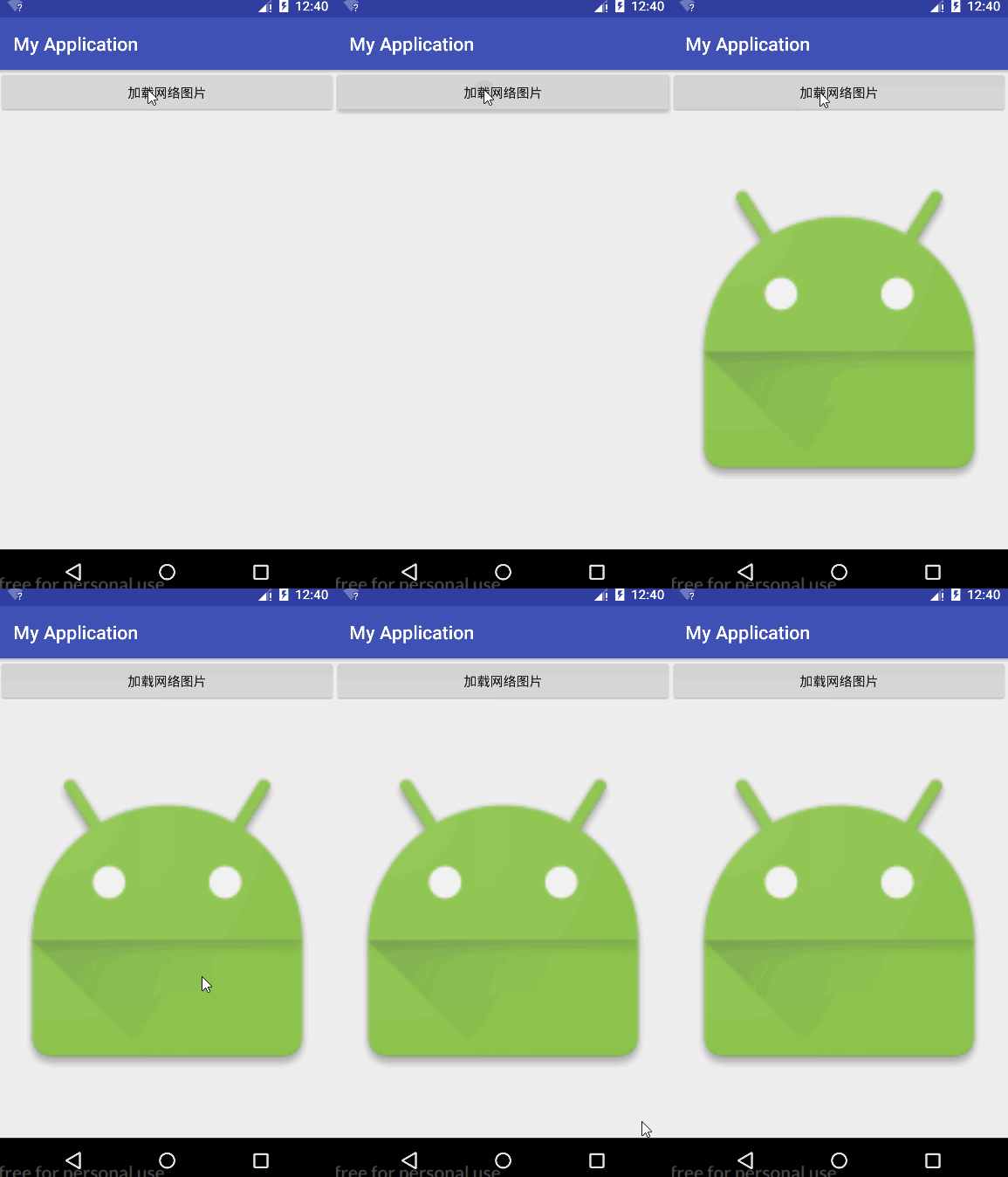
我們就試試加載應用的圖片
Glide.with(MainActivity.this).load(R.mipmap.ic_launcher).into(myImageView);
效果圖
最後是into()方法,就是把我們要顯示的ImageView加載進去,那就大功告成了。
重複使用過程Glide–>with()–>load()–>into()