Foreword
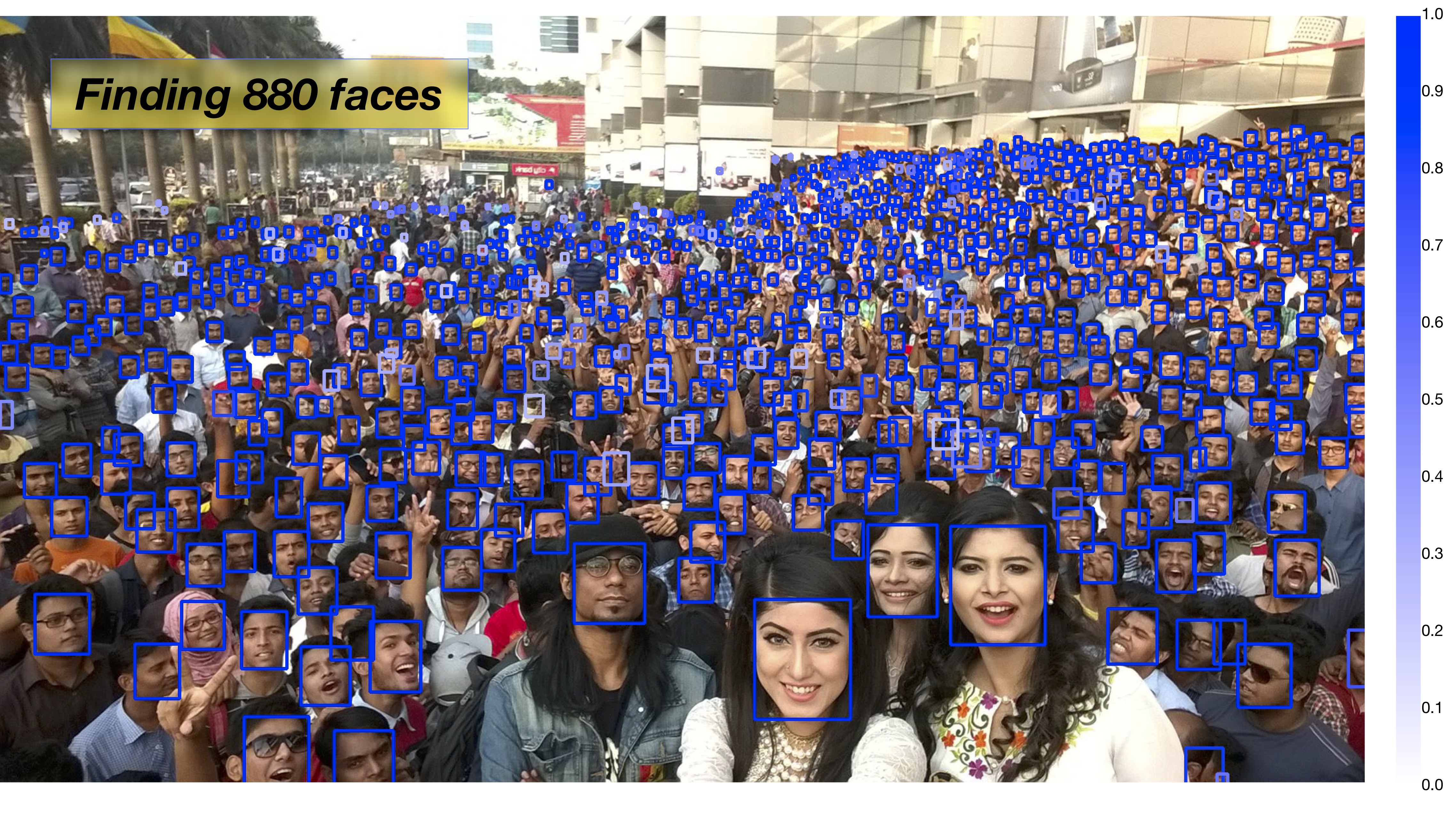
Today, I’ll share a tutorial on using PaddlePaddle to train and predict with the PyramidBox model for large-scale face detection. Based on the open-source PyramidBox, this tutorial has been modified for easier training and prediction. Despite its large size, this model accurately detects faces even in crowded scenes with significant occlusion.
Tutorial Source Code: https://download.csdn.net/download/qq_33200967/14029049
PyramidBox is a single-stage face detector based on SSD, leveraging contextual information to tackle challenging face detection tasks. As shown in the figure below, it performs predictions across six scales of feature maps. Key modules include: LFPN, Pyramid Anchors, CPM, and Data-anchor-sampling.
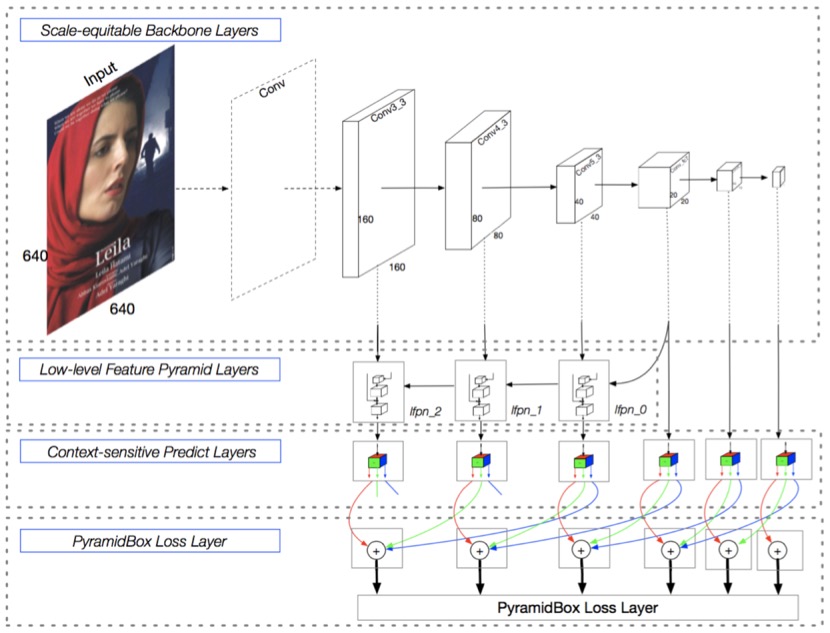
LFPN (Low-level Feature Pyramid Networks): Integrates high-level features (with rich context) and low-level features (with fine texture details). High-level features detect large faces, while low-level features detect small faces. A top-down fusion from intermediate layers constructs this low-level FPN for high-resolution integration.
Pyramid Anchors: Uses semi-supervised labeling to generate semantic anchor boxes. It introduces context-aware anchor sampling, expanding labeled faces by 1/2 in all directions (head labels) and customizing expansion for body labels to enhance training data diversity.
CPM (Context-sensitive Predict Module): Enhances the prediction network’s expressiveness with a context-aware structure.
Data-anchor-sampling: A novel sampling method that increases training diversity across scales, focusing on smaller faces by reweighting sample distribution.
The following image demonstrates PyramidBox’s performance in detecting faces in crowded scenes. Whether you believe it or not, I do!
Training
- Download Dataset
Download and extract the following files into thedatadirectory:
   https://share.weiyun.com/5WjCBWV
   https://share.weiyun.com/5ot9Qv1
   https://share.weiyun.com/5vSUomP
   http://mmlab.ie.cuhk.edu.hk/projects/WIDERFace/support/bbx_annotation/wider_face_split.zip
Expected directory structure after extraction:
   data
   |-- download.sh
   |-- wider_face_split
   |   |-- readme.txt
   |   |-- wider_face_train_bbx_gt.txt
   |   |-- wider_face_val_bbx_gt.txt
   |   `-- ...
   |-- WIDER_train
   |   `-- images
   |       |-- 0--Parade
   |       ...
   |       `-- 9--Press_Conference
   `-- WIDER_val
       `-- images
           |-- 0--Parade
           ...
           `-- 9--Press_Conference
- Download Pretrained Model
Download the VGG pretrained model:
http://paddlemodels.bj.bcebos.com/vgg_ilsvrc_16_fc_reduced.tar.gz
Extract and place it in the project root directory.
- Start Training
Executetrain.pydirectly. For large models with insufficient GPU memory, reducebatch_size.
- Multi-GPU Support: Setexport CUDA_VISIBLE_DEVICES=0,1,2,3andnum_devicesto specify GPUs.
- Windows Users: Disable multiprocessing by settinguse_multiprocess=False(PaddlePaddle lacks multi-thread support on Windows).
Trained models are saved in the output directory.
Prediction
- Convert Pretrained Model to Inference Model
Official PyramidBox model download: http://paddlemodels.bj.bcebos.com/PyramidBox_WiderFace.tar.gz
Use the following code to convert parameters to inference format:
   import paddle.fluid as fluid
   from pyramidbox import PyramidBox

   use_gpu = True
   model_dir = 'PyramidBox_WiderFace'
   save_infer_model_path = 'pyramidbox_model'

   place = fluid.CUDAPlace(0) if use_gpu else fluid.CPUPlace()
   exe = fluid.Executor(place)
   main_program = fluid.Program()
   startup_program = fluid.Program()
   image_shape = [3, 1024, 1024]

   with fluid.program_guard(main_program, startup_program):
       network = PyramidBox(
           data_shape=image_shape,
           sub_network=True,
           is_infer=True)
       infer_program, nmsed_out = network.infer(main_program)
       fetches = [nmsed_out]
       fluid.io.load_persistables(exe, model_dir, main_program=infer_program)
       fluid.io.save_inference_model(
           save_infer_model_path,
           ['image'], [nmsed_out],
           exe, main_program=infer_program,
           model_filename='model', params_filename='params')
- Inference Code
Use the following code to load the inference model and detect faces:
   import time
   import cv2
   import numpy as np
   import paddle.fluid as fluid
   from PIL import Image, ImageDraw

   use_gpu = True
   save_path = 'pyramidbox_model/'
   [infer_program, feeded_var_names, target_var] = fluid.io.load_inference_model(
       dirname=save_path,
       executor=fluid.CUDAPlace(0) if use_gpu else fluid.CPUPlace(),
       model_filename='model',
       params_filename='params')

   def get_shrink(height, width):
       max_shrink_v1 = (0x7fffffff / 577.0 / (height * width)) ** 0.5
       max_shrink_v2 = ((678 * 1024 * 2.0 * 2.0) / (height * width)) ** 0.5
       max_shrink = min(max_shrink_v1, max_shrink_v2) - 0.3
       max_shrink = max_shrink - (0.1 if 1.5 <= max_shrink < 2 else
                                 0.2 if 2 <= max_shrink < 3 else
                                 0.3 if 3 <= max_shrink < 4 else
                                 0.4 if 4 <= max_shrink < 5 else 0.5)
       return max(max_shrink, 1) if max_shrink < 1 else 1, max_shrink

   def draw_image(img_path, bboxes):
       image = Image.open(img_path)
       draw = ImageDraw.Draw(image)
       for xmin, ymin, xmax, ymax in bboxes:
           draw.rectangle([xmin, ymin, xmax, ymax], outline='red', width=4)
       cv2.imshow('result', cv2.cvtColor(np.array(image), cv2.COLOR_RGB2BGR))
       cv2.waitKey(0)

   def detect_face(image, shrink):
       h, w = image.size
       if shrink != 1:
           image = image.resize((int(w * shrink), int(h * shrink)), Image.ANTIALIAS)
       img = np.array(image)
       img = np.swapaxes(img, 0, 2)
       img = np.swapaxes(img, 0, 1)
       img = img[[2, 1, 0], :, :]  # RGB->BGR
       img -= np.array([104., 117., 123.])[:, None, None]
       img = img * 0.007843
       result, = exe.run(infer_program,
                         feed={feeded_var_names[0]: img[None, ...]},
                         fetch_list=target_var)
       result = np.array(result)
       det_conf = result[:, 1]
       det_xmin = (w * result[:, 2]) / shrink
       det_ymin = (h * result[:, 3]) / shrink
       det_xmax = (w * result[:, 4]) / shrink
       det_ymax = (h * result[:, 5]) / shrink
       return np.column_stack((det_xmin, det_ymin, det_xmax, det_ymax, det_conf))

   def infer(image_path, confs_threshold=0.15):
       image = Image.open(image_path).convert('RGB')
       shrink, _ = get_shrink(image.size[1], image.size[0])
       dets = detect_face(image, shrink)
       dets = dets[dets[:, 4] >= confs_threshold]
       draw_image(image_path, dets[:, :4])

   if __name__ == '__main__':
       infer('test.jpg')
       cv2.destroyAllWindows()
- Output
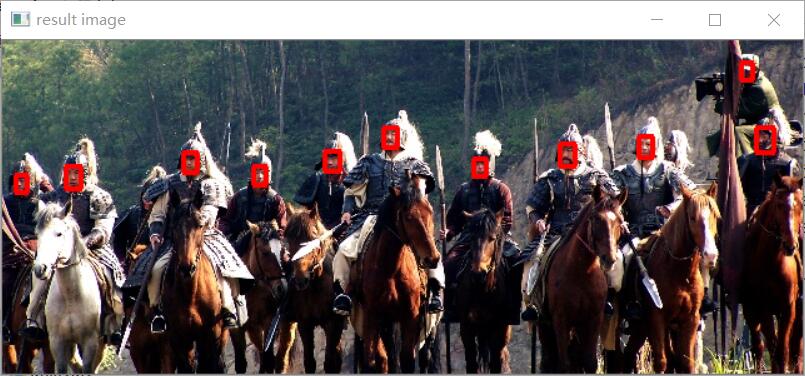
Detected faces are drawn in red boxes. The prediction result image is displayed in a window.
Result
Example output image after detection: