Foreword
This article will introduce a program that can control the Tank Battle game through voice commands. Users only need to add a few disease areas and then control the tank to perform operations such as up, down, left, right, fire, stop, etc. It also supports instruction fine-tuning to improve the accuracy of instructions.
Install Project Environment
This project was developed with:
- Anaconda 3
- Windows 11
- Python 3.11
- PyTorch 2.1.0
- CUDA 12.1
- Install PyTorch by executing the following command. If you already have another version installed and it runs normally, you can skip this step.
conda install pytorch torchvision torchaudio pytorch-cuda=12.1 -c pytorch -c nvidia
- Install other dependency packages by executing the following command. If any libraries are still missing after installation, install them accordingly.
pip install -r requirements.txt -i https://pypi.tuna.tsinghua.edu.cn/simple
Start the Game
-
Run the
main.pyprogram to start the game. The adjustable parameters include:sec_timefor recording duration in seconds;last_lenfor the length of the previous part of data in seconds. -
To add a new instruction, add it to
instruct.txtand then add the corresponding processing function inmain.py.
Log Output:
Supported commands: ['up', 'down', 'left', 'right', 'stop', 'fire']
Please issue a command...
Triggered command: [up]
Triggered command: [fire]
Triggered command: [fire]
Game Interface:
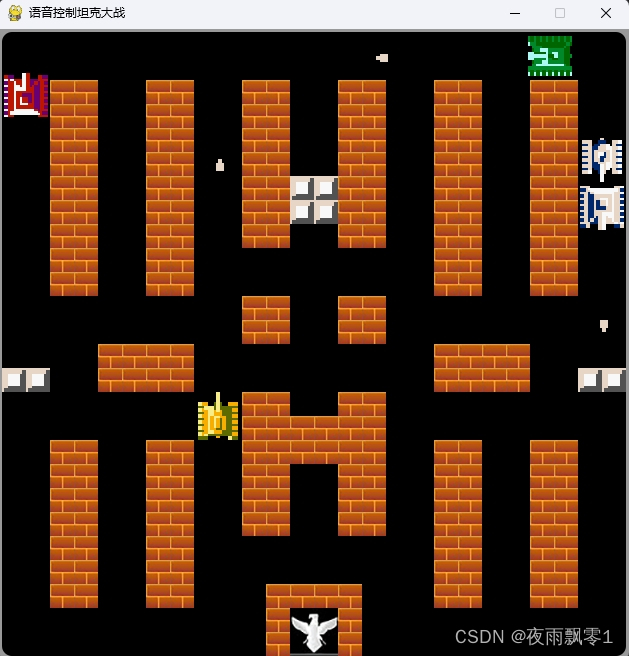
Fine-tune the Instruction Model
The code for fine-tuning the instruction model is in the finetune directory. Switch to the finetune directory before starting the fine-tuning. The specific training process is as follows:
Data Preparation
Run the record_data.py code to start the recording program. By default, it records for 2 seconds. It is recommended to record an additional 1 second of audio after recording. Note that the 1-second recording is very short—press Enter immediately after the prompt to start speaking. For reference, the generated dataset directory can be used as a template for custom data.
Log Output:
Please enter the command content: up
Please enter the number of recordings: 10
Recording 1: Press Enter to start speaking:
Recording started......
Recording ended!
Recording 2: Press Enter to start speaking:
Generate Training Data List
Run the generate_data_list.py code to generate the training data list.
Train the Model
Execute the following command to train the model. For Windows, combine the parameters into a single line and remove the \.
funasr-train \
++model=../models/paraformer-zh \
++train_data_set_list=dataset/train.jsonl \
++valid_data_set_list=dataset/validation.jsonl \
++dataset_conf.batch_type="token" \
++dataset_conf.batch_size=10000 \
++train_conf.max_epoch=5 \
++train_conf.log_interval=1 \
++train_conf.keep_nbest_models=5 \
++train_conf.avg_nbest_model=3 \
++output_dir="./outputs"
Merge Models
Run the merge_model.py code to merge the trained models into a single model ../models/paraformer-zh-finetune.
Scan the QR code to join the knowledge planet and search for “Voice Command Controlled Tank Battle” to get the source code
References
The game development references TankWar.